 ROS Index
Repository Summary
| Description | Color-coded terminal output for ROS 2 — group nodes by color, highlight crashes and tracebacks, zero changes to your launch files or workflow. |
| Checkout URI | https://github.com/mlisi1/DendROS.git |
| VCS Type | git |
| VCS Version | main |
| Last Updated | 2026-10-12 |
| Dev Status | DEVELOPED |
| Released | UNRELEASED |
| Contributing |
Help Wanted (-)
Good First Issues (-) Pull Requests to Review (-) |
Packages
| Name | Version |
|---|---|
| dendros | 1.1.0 |
README
Color-coded ROS 2 output — because a wall of white text from 32 nodes is nobody's debugging tool.



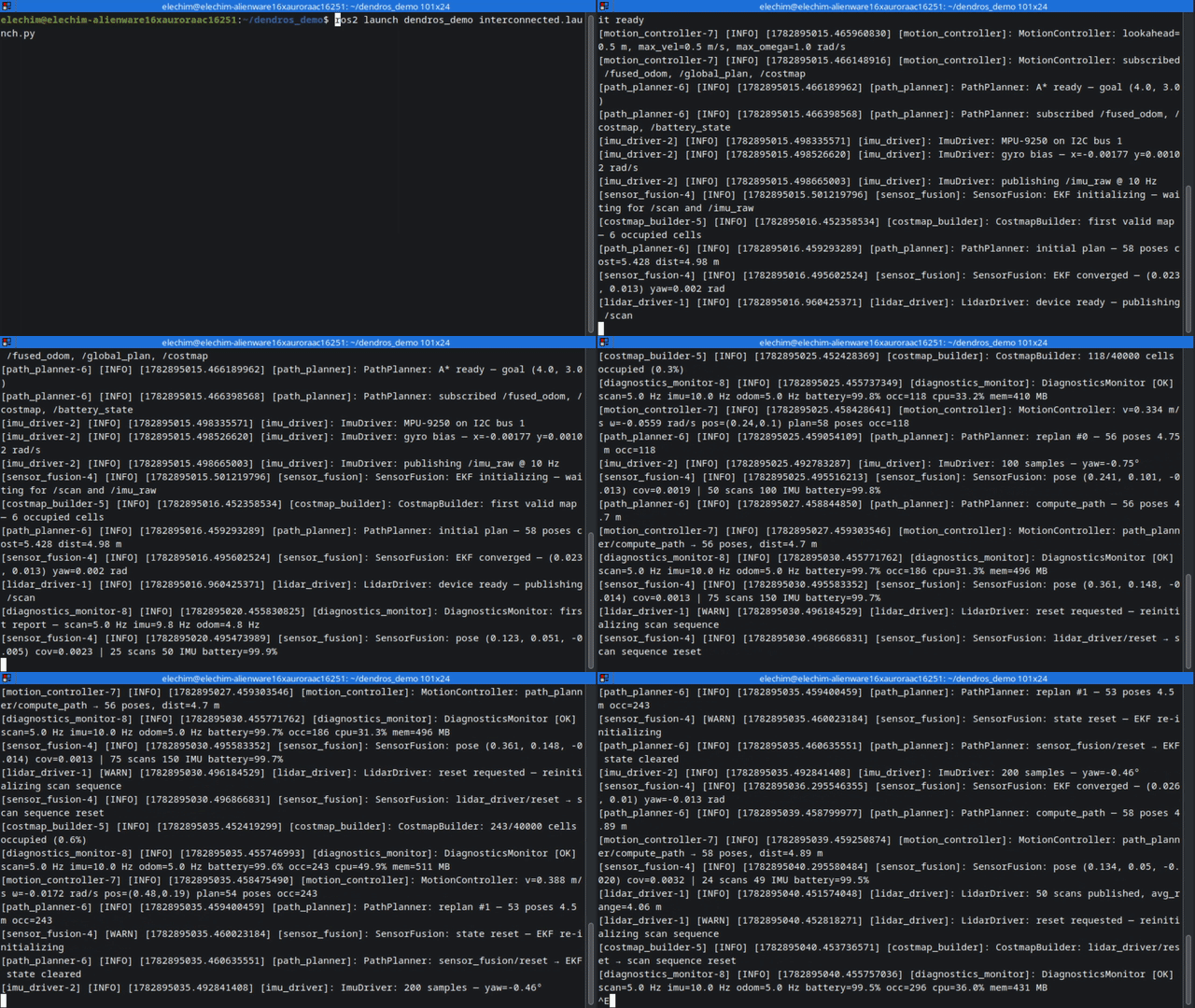
You launched your stack. Nav2, SLAM, hardware drivers, your own nodes — all printing to the same terminal, all the same color. By the time you find the line you were looking for, it has scrolled past.
Vanilla ros2 launch
|
With DendROS |
|---|---|
 |
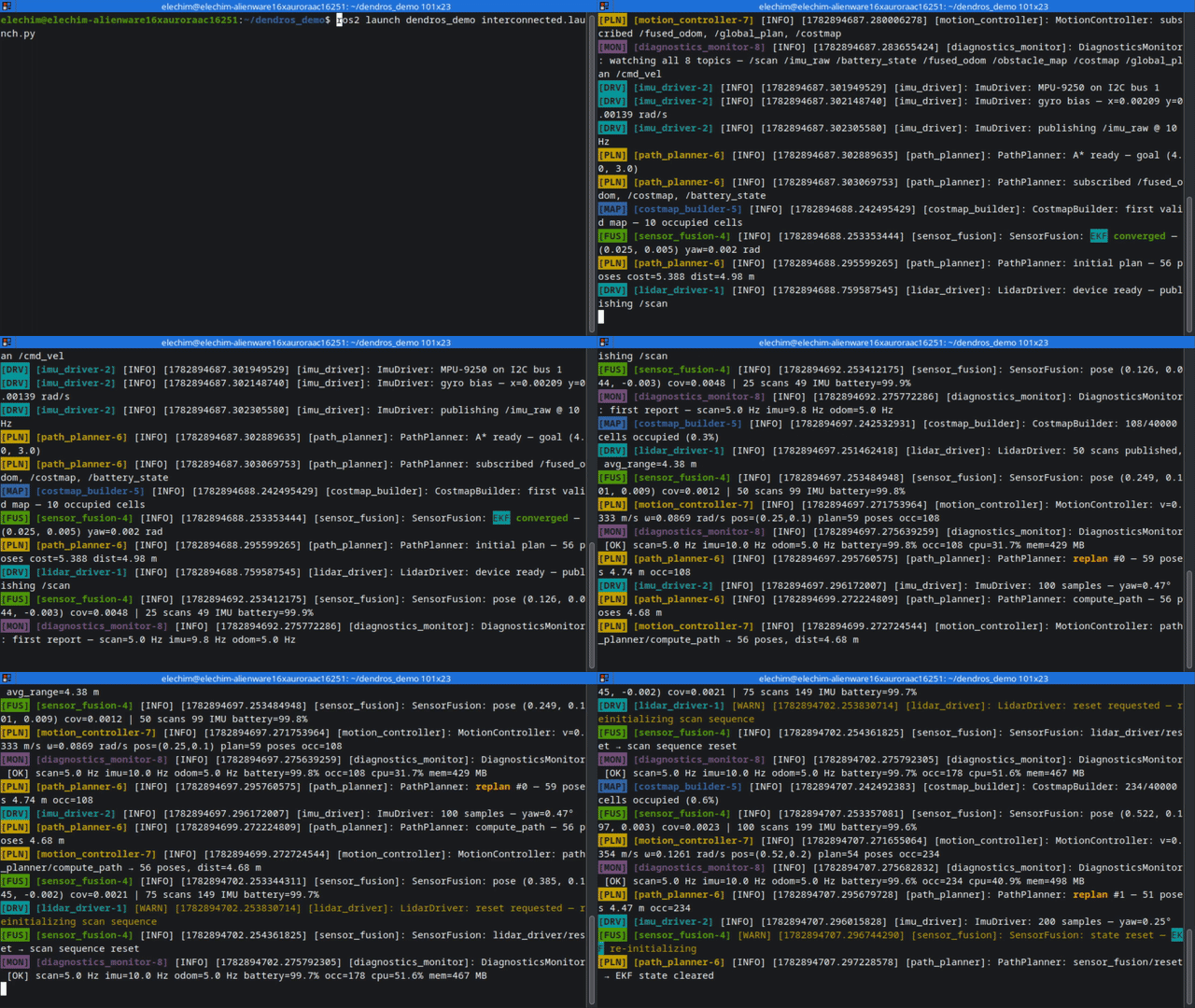 |
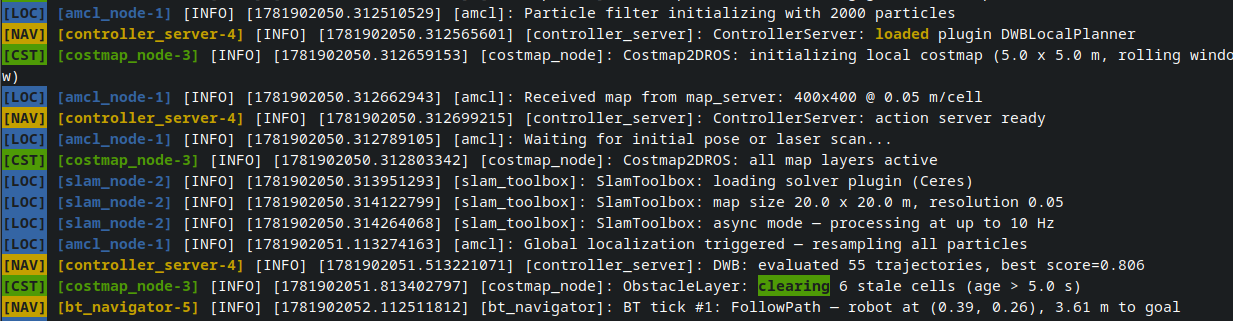
DendROS assigns each group of nodes its own color. You could have localization in blue, navigation in green, hardware in orange — defined once in a small YAML file that lives inside your package. No launch file edits. No new ROS 2 dependencies. Packages without a config pass through completely unchanged.
And since 1.1, ros2 launch opens in a full-screen viewer where you scroll, search and filter the log while the launch keeps running.
New in 1.1: TUI mode
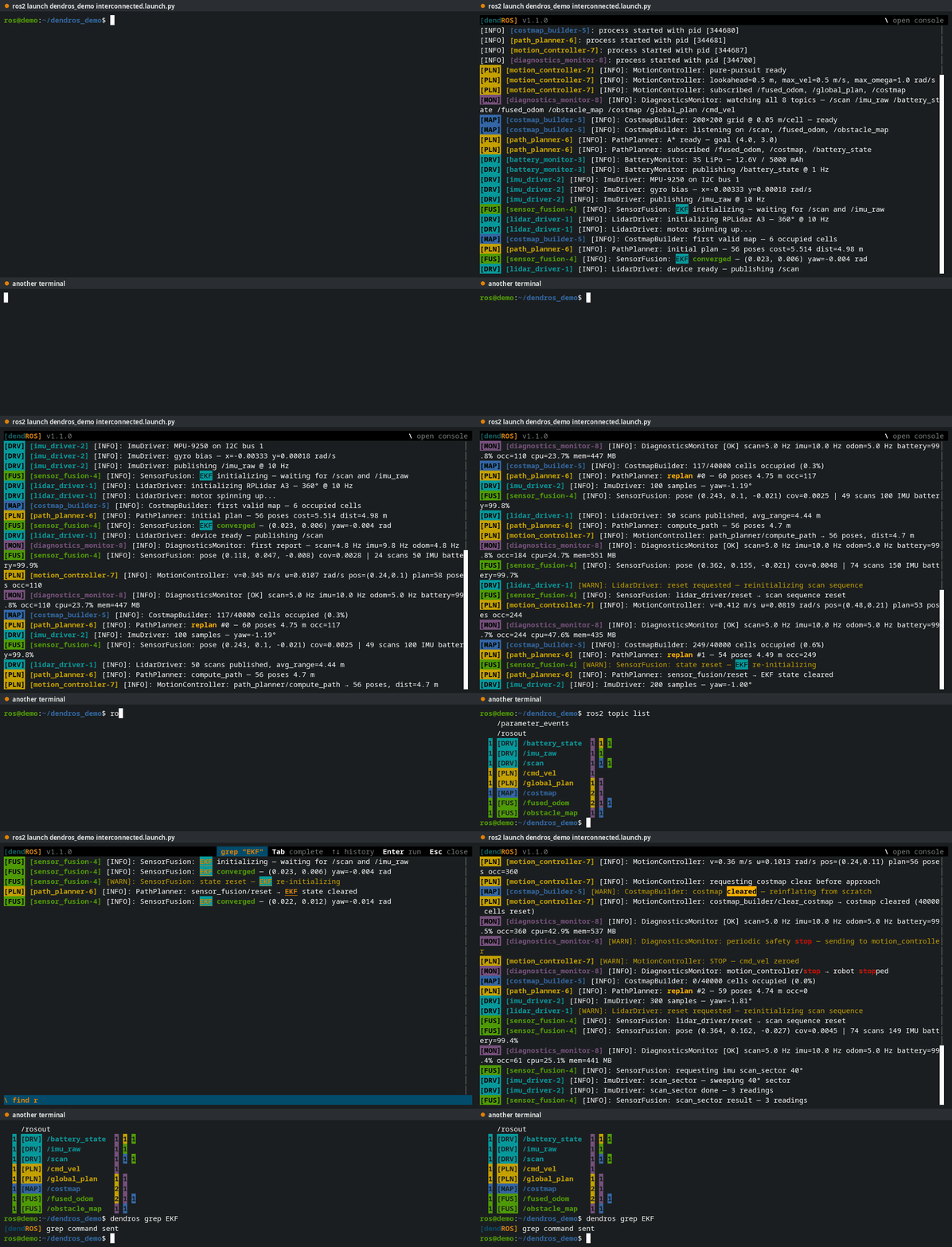
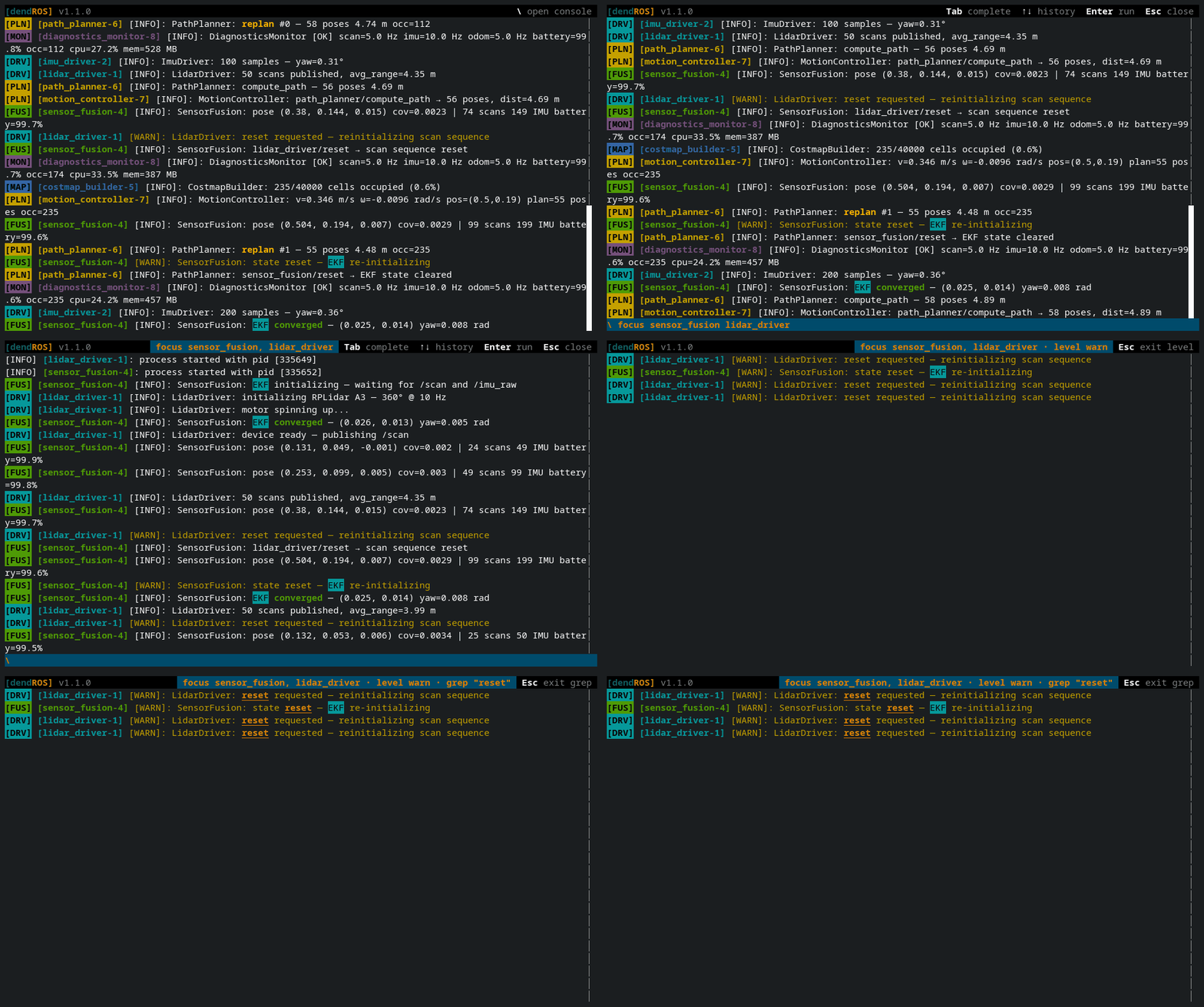
ros2 launch now opens in a full-screen log viewer:
- Scroll back and copy — the whole run stays in the scrollback; drag with the mouse to copy. Crash and parameter alerts stay pinned in the header.
-
Filter and search with
\—focuson some nodes, filter bylevelorgrep,findtext and step through the matches,mutethe noisy ones. Filters stack, andEscpeels them off one at a time. -
markandtee— drop a timestamped marker before you poke the robot, then save exactly what you see to a file for the bug report. -
Drive it from another terminal —
dendros focus planner_server,dendros grep timeout, … reach the running launch, so you don’t have to switch panes. -
dendros reopen— closed it too early? Bring back the last run, scrollback and all.
It falls back to the classic output on its own when the output is piped or redirected, so scripts and CI are not affected. Prefer the plain scrolling output? Set launch_mode: classic. → TUI Mode · → Console commands
Features
-
Color by group
One config file per package maps node groups to colors, badges, and display rules. Wildcards cover whole families of nodes (
nav2_*), and keywords can be highlighted per group or package-wide.
-
One command to get started
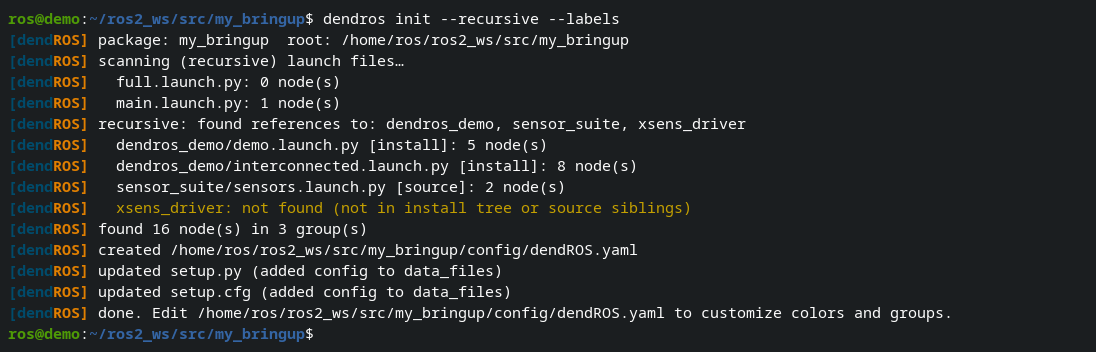
Too lazy to look up how DendROS config works? We got you covered:
dendros initscans your launch files and generates an initial config for you.
-
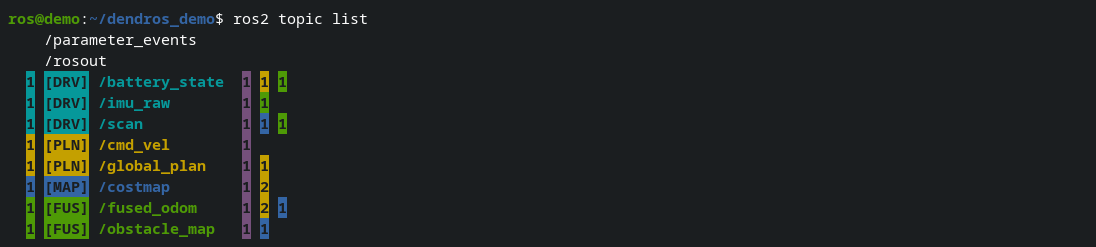
The main
ros2CLI commands, colorizedros2 node list,node info,topic list,service list,action list,param listandparam describeuse the same group colors and badges, with no extra config. → Full list
-
Crashes, tracebacks and parameter changes
A banner flags crashed nodes the moment they die and lists the exit code. Python tracebacks are colored automatically. When a parameter changes at runtime, a notice shows the node, the parameter and old → new value.


<img align=”right” src=”docs/assets/images/dendrobate.png”
File truncated at 100 lines see the full file
CONTRIBUTING
Repository Summary
| Description | Color-coded terminal output for ROS 2 — group nodes by color, highlight crashes and tracebacks, zero changes to your launch files or workflow. |
| Checkout URI | https://github.com/mlisi1/DendROS.git |
| VCS Type | git |
| VCS Version | main |
| Last Updated | 2026-10-12 |
| Dev Status | DEVELOPED |
| Released | UNRELEASED |
| Contributing |
Help Wanted (-)
Good First Issues (-) Pull Requests to Review (-) |
Packages
| Name | Version |
|---|---|
| dendros | 1.1.0 |
README
Color-coded ROS 2 output — because a wall of white text from 32 nodes is nobody's debugging tool.
You launched your stack. Nav2, SLAM, hardware drivers, your own nodes — all printing to the same terminal, all the same color. By the time you find the line you were looking for, it has scrolled past.
Vanilla ros2 launch
|
With DendROS |
|---|---|
|
|
DendROS assigns each group of nodes its own color. You could have localization in blue, navigation in green, hardware in orange — defined once in a small YAML file that lives inside your package. No launch file edits. No new ROS 2 dependencies. Packages without a config pass through completely unchanged.
And since 1.1, ros2 launch opens in a full-screen viewer where you scroll, search and filter the log while the launch keeps running.
New in 1.1: TUI mode
ros2 launch now opens in a full-screen log viewer:
- Scroll back and copy — the whole run stays in the scrollback; drag with the mouse to copy. Crash and parameter alerts stay pinned in the header.
-
Filter and search with
\—focuson some nodes, filter bylevelorgrep,findtext and step through the matches,mutethe noisy ones. Filters stack, andEscpeels them off one at a time. -
markandtee— drop a timestamped marker before you poke the robot, then save exactly what you see to a file for the bug report. -
Drive it from another terminal —
dendros focus planner_server,dendros grep timeout, … reach the running launch, so you don’t have to switch panes. -
dendros reopen— closed it too early? Bring back the last run, scrollback and all.
It falls back to the classic output on its own when the output is piped or redirected, so scripts and CI are not affected. Prefer the plain scrolling output? Set launch_mode: classic. → TUI Mode · → Console commands
Features
-
Color by group
One config file per package maps node groups to colors, badges, and display rules. Wildcards cover whole families of nodes (
nav2_*), and keywords can be highlighted per group or package-wide.
-
One command to get started
Too lazy to look up how DendROS config works? We got you covered:
dendros initscans your launch files and generates an initial config for you.
-
The main
ros2CLI commands, colorizedros2 node list,node info,topic list,service list,action list,param listandparam describeuse the same group colors and badges, with no extra config. → Full list
-
Crashes, tracebacks and parameter changes
A banner flags crashed nodes the moment they die and lists the exit code. Python tracebacks are colored automatically. When a parameter changes at runtime, a notice shows the node, the parameter and old → new value.
<img align=”right” src=”docs/assets/images/dendrobate.png”
File truncated at 100 lines see the full file
CONTRIBUTING
Repository Summary
| Description | Color-coded terminal output for ROS 2 — group nodes by color, highlight crashes and tracebacks, zero changes to your launch files or workflow. |
| Checkout URI | https://github.com/mlisi1/DendROS.git |
| VCS Type | git |
| VCS Version | main |
| Last Updated | 2026-10-12 |
| Dev Status | DEVELOPED |
| Released | UNRELEASED |
| Contributing |
Help Wanted (-)
Good First Issues (-) Pull Requests to Review (-) |
Packages
| Name | Version |
|---|---|
| dendros | 1.1.0 |
README
Color-coded ROS 2 output — because a wall of white text from 32 nodes is nobody's debugging tool.
You launched your stack. Nav2, SLAM, hardware drivers, your own nodes — all printing to the same terminal, all the same color. By the time you find the line you were looking for, it has scrolled past.
Vanilla ros2 launch
|
With DendROS |
|---|---|
|
|
DendROS assigns each group of nodes its own color. You could have localization in blue, navigation in green, hardware in orange — defined once in a small YAML file that lives inside your package. No launch file edits. No new ROS 2 dependencies. Packages without a config pass through completely unchanged.
And since 1.1, ros2 launch opens in a full-screen viewer where you scroll, search and filter the log while the launch keeps running.
New in 1.1: TUI mode
ros2 launch now opens in a full-screen log viewer:
- Scroll back and copy — the whole run stays in the scrollback; drag with the mouse to copy. Crash and parameter alerts stay pinned in the header.
-
Filter and search with
\—focuson some nodes, filter bylevelorgrep,findtext and step through the matches,mutethe noisy ones. Filters stack, andEscpeels them off one at a time. -
markandtee— drop a timestamped marker before you poke the robot, then save exactly what you see to a file for the bug report. -
Drive it from another terminal —
dendros focus planner_server,dendros grep timeout, … reach the running launch, so you don’t have to switch panes. -
dendros reopen— closed it too early? Bring back the last run, scrollback and all.
It falls back to the classic output on its own when the output is piped or redirected, so scripts and CI are not affected. Prefer the plain scrolling output? Set launch_mode: classic. → TUI Mode · → Console commands
Features
-
Color by group
One config file per package maps node groups to colors, badges, and display rules. Wildcards cover whole families of nodes (
nav2_*), and keywords can be highlighted per group or package-wide.
-
One command to get started
Too lazy to look up how DendROS config works? We got you covered:
dendros initscans your launch files and generates an initial config for you.
-
The main
ros2CLI commands, colorizedros2 node list,node info,topic list,service list,action list,param listandparam describeuse the same group colors and badges, with no extra config. → Full list
-
Crashes, tracebacks and parameter changes
A banner flags crashed nodes the moment they die and lists the exit code. Python tracebacks are colored automatically. When a parameter changes at runtime, a notice shows the node, the parameter and old → new value.
<img align=”right” src=”docs/assets/images/dendrobate.png”
File truncated at 100 lines see the full file
CONTRIBUTING
Repository Summary
| Description | Color-coded terminal output for ROS 2 — group nodes by color, highlight crashes and tracebacks, zero changes to your launch files or workflow. |
| Checkout URI | https://github.com/mlisi1/DendROS.git |
| VCS Type | git |
| VCS Version | main |
| Last Updated | 2026-10-12 |
| Dev Status | DEVELOPED |
| Released | UNRELEASED |
| Contributing |
Help Wanted (-)
Good First Issues (-) Pull Requests to Review (-) |
Packages
| Name | Version |
|---|---|
| dendros | 1.1.0 |
README
Color-coded ROS 2 output — because a wall of white text from 32 nodes is nobody's debugging tool.
You launched your stack. Nav2, SLAM, hardware drivers, your own nodes — all printing to the same terminal, all the same color. By the time you find the line you were looking for, it has scrolled past.
Vanilla ros2 launch
|
With DendROS |
|---|---|
|
|
DendROS assigns each group of nodes its own color. You could have localization in blue, navigation in green, hardware in orange — defined once in a small YAML file that lives inside your package. No launch file edits. No new ROS 2 dependencies. Packages without a config pass through completely unchanged.
And since 1.1, ros2 launch opens in a full-screen viewer where you scroll, search and filter the log while the launch keeps running.
New in 1.1: TUI mode
ros2 launch now opens in a full-screen log viewer:
- Scroll back and copy — the whole run stays in the scrollback; drag with the mouse to copy. Crash and parameter alerts stay pinned in the header.
-
Filter and search with
\—focuson some nodes, filter bylevelorgrep,findtext and step through the matches,mutethe noisy ones. Filters stack, andEscpeels them off one at a time. -
markandtee— drop a timestamped marker before you poke the robot, then save exactly what you see to a file for the bug report. -
Drive it from another terminal —
dendros focus planner_server,dendros grep timeout, … reach the running launch, so you don’t have to switch panes. -
dendros reopen— closed it too early? Bring back the last run, scrollback and all.
It falls back to the classic output on its own when the output is piped or redirected, so scripts and CI are not affected. Prefer the plain scrolling output? Set launch_mode: classic. → TUI Mode · → Console commands
Features
-
Color by group
One config file per package maps node groups to colors, badges, and display rules. Wildcards cover whole families of nodes (
nav2_*), and keywords can be highlighted per group or package-wide.
-
One command to get started
Too lazy to look up how DendROS config works? We got you covered:
dendros initscans your launch files and generates an initial config for you.
-
The main
ros2CLI commands, colorizedros2 node list,node info,topic list,service list,action list,param listandparam describeuse the same group colors and badges, with no extra config. → Full list
-
Crashes, tracebacks and parameter changes
A banner flags crashed nodes the moment they die and lists the exit code. Python tracebacks are colored automatically. When a parameter changes at runtime, a notice shows the node, the parameter and old → new value.
<img align=”right” src=”docs/assets/images/dendrobate.png”
File truncated at 100 lines see the full file
CONTRIBUTING
Repository Summary
| Description | Color-coded terminal output for ROS 2 — group nodes by color, highlight crashes and tracebacks, zero changes to your launch files or workflow. |
| Checkout URI | https://github.com/mlisi1/DendROS.git |
| VCS Type | git |
| VCS Version | main |
| Last Updated | 2026-10-12 |
| Dev Status | DEVELOPED |
| Released | UNRELEASED |
| Contributing |
Help Wanted (-)
Good First Issues (-) Pull Requests to Review (-) |
Packages
| Name | Version |
|---|---|
| dendros | 1.1.0 |
README
Color-coded ROS 2 output — because a wall of white text from 32 nodes is nobody's debugging tool.
You launched your stack. Nav2, SLAM, hardware drivers, your own nodes — all printing to the same terminal, all the same color. By the time you find the line you were looking for, it has scrolled past.
Vanilla ros2 launch
|
With DendROS |
|---|---|
|
|
DendROS assigns each group of nodes its own color. You could have localization in blue, navigation in green, hardware in orange — defined once in a small YAML file that lives inside your package. No launch file edits. No new ROS 2 dependencies. Packages without a config pass through completely unchanged.
And since 1.1, ros2 launch opens in a full-screen viewer where you scroll, search and filter the log while the launch keeps running.
New in 1.1: TUI mode
ros2 launch now opens in a full-screen log viewer:
- Scroll back and copy — the whole run stays in the scrollback; drag with the mouse to copy. Crash and parameter alerts stay pinned in the header.
-
Filter and search with
\—focuson some nodes, filter bylevelorgrep,findtext and step through the matches,mutethe noisy ones. Filters stack, andEscpeels them off one at a time. -
markandtee— drop a timestamped marker before you poke the robot, then save exactly what you see to a file for the bug report. -
Drive it from another terminal —
dendros focus planner_server,dendros grep timeout, … reach the running launch, so you don’t have to switch panes. -
dendros reopen— closed it too early? Bring back the last run, scrollback and all.
It falls back to the classic output on its own when the output is piped or redirected, so scripts and CI are not affected. Prefer the plain scrolling output? Set launch_mode: classic. → TUI Mode · → Console commands
Features
-
Color by group
One config file per package maps node groups to colors, badges, and display rules. Wildcards cover whole families of nodes (
nav2_*), and keywords can be highlighted per group or package-wide.
-
One command to get started
Too lazy to look up how DendROS config works? We got you covered:
dendros initscans your launch files and generates an initial config for you.
-
The main
ros2CLI commands, colorizedros2 node list,node info,topic list,service list,action list,param listandparam describeuse the same group colors and badges, with no extra config. → Full list
-
Crashes, tracebacks and parameter changes
A banner flags crashed nodes the moment they die and lists the exit code. Python tracebacks are colored automatically. When a parameter changes at runtime, a notice shows the node, the parameter and old → new value.
<img align=”right” src=”docs/assets/images/dendrobate.png”
File truncated at 100 lines see the full file
CONTRIBUTING
Repository Summary
| Description | Color-coded terminal output for ROS 2 — group nodes by color, highlight crashes and tracebacks, zero changes to your launch files or workflow. |
| Checkout URI | https://github.com/mlisi1/DendROS.git |
| VCS Type | git |
| VCS Version | main |
| Last Updated | 2026-10-12 |
| Dev Status | DEVELOPED |
| Released | UNRELEASED |
| Contributing |
Help Wanted (-)
Good First Issues (-) Pull Requests to Review (-) |
Packages
| Name | Version |
|---|---|
| dendros | 1.1.0 |
README
Color-coded ROS 2 output — because a wall of white text from 32 nodes is nobody's debugging tool.
You launched your stack. Nav2, SLAM, hardware drivers, your own nodes — all printing to the same terminal, all the same color. By the time you find the line you were looking for, it has scrolled past.
Vanilla ros2 launch
|
With DendROS |
|---|---|
|
|
DendROS assigns each group of nodes its own color. You could have localization in blue, navigation in green, hardware in orange — defined once in a small YAML file that lives inside your package. No launch file edits. No new ROS 2 dependencies. Packages without a config pass through completely unchanged.
And since 1.1, ros2 launch opens in a full-screen viewer where you scroll, search and filter the log while the launch keeps running.
New in 1.1: TUI mode
ros2 launch now opens in a full-screen log viewer:
- Scroll back and copy — the whole run stays in the scrollback; drag with the mouse to copy. Crash and parameter alerts stay pinned in the header.
-
Filter and search with
\—focuson some nodes, filter bylevelorgrep,findtext and step through the matches,mutethe noisy ones. Filters stack, andEscpeels them off one at a time. -
markandtee— drop a timestamped marker before you poke the robot, then save exactly what you see to a file for the bug report. -
Drive it from another terminal —
dendros focus planner_server,dendros grep timeout, … reach the running launch, so you don’t have to switch panes. -
dendros reopen— closed it too early? Bring back the last run, scrollback and all.
It falls back to the classic output on its own when the output is piped or redirected, so scripts and CI are not affected. Prefer the plain scrolling output? Set launch_mode: classic. → TUI Mode · → Console commands
Features
-
Color by group
One config file per package maps node groups to colors, badges, and display rules. Wildcards cover whole families of nodes (
nav2_*), and keywords can be highlighted per group or package-wide.
-
One command to get started
Too lazy to look up how DendROS config works? We got you covered:
dendros initscans your launch files and generates an initial config for you.
-
The main
ros2CLI commands, colorizedros2 node list,node info,topic list,service list,action list,param listandparam describeuse the same group colors and badges, with no extra config. → Full list
-
Crashes, tracebacks and parameter changes
A banner flags crashed nodes the moment they die and lists the exit code. Python tracebacks are colored automatically. When a parameter changes at runtime, a notice shows the node, the parameter and old → new value.
<img align=”right” src=”docs/assets/images/dendrobate.png”
File truncated at 100 lines see the full file
CONTRIBUTING
Repository Summary
| Description | Color-coded terminal output for ROS 2 — group nodes by color, highlight crashes and tracebacks, zero changes to your launch files or workflow. |
| Checkout URI | https://github.com/mlisi1/DendROS.git |
| VCS Type | git |
| VCS Version | main |
| Last Updated | 2026-10-12 |
| Dev Status | DEVELOPED |
| Released | UNRELEASED |
| Contributing |
Help Wanted (-)
Good First Issues (-) Pull Requests to Review (-) |
Packages
| Name | Version |
|---|---|
| dendros | 1.1.0 |
README
Color-coded ROS 2 output — because a wall of white text from 32 nodes is nobody's debugging tool.
You launched your stack. Nav2, SLAM, hardware drivers, your own nodes — all printing to the same terminal, all the same color. By the time you find the line you were looking for, it has scrolled past.
Vanilla ros2 launch
|
With DendROS |
|---|---|
|
|
DendROS assigns each group of nodes its own color. You could have localization in blue, navigation in green, hardware in orange — defined once in a small YAML file that lives inside your package. No launch file edits. No new ROS 2 dependencies. Packages without a config pass through completely unchanged.
And since 1.1, ros2 launch opens in a full-screen viewer where you scroll, search and filter the log while the launch keeps running.
New in 1.1: TUI mode
ros2 launch now opens in a full-screen log viewer:
- Scroll back and copy — the whole run stays in the scrollback; drag with the mouse to copy. Crash and parameter alerts stay pinned in the header.
-
Filter and search with
\—focuson some nodes, filter bylevelorgrep,findtext and step through the matches,mutethe noisy ones. Filters stack, andEscpeels them off one at a time. -
markandtee— drop a timestamped marker before you poke the robot, then save exactly what you see to a file for the bug report. -
Drive it from another terminal —
dendros focus planner_server,dendros grep timeout, … reach the running launch, so you don’t have to switch panes. -
dendros reopen— closed it too early? Bring back the last run, scrollback and all.
It falls back to the classic output on its own when the output is piped or redirected, so scripts and CI are not affected. Prefer the plain scrolling output? Set launch_mode: classic. → TUI Mode · → Console commands
Features
-
Color by group
One config file per package maps node groups to colors, badges, and display rules. Wildcards cover whole families of nodes (
nav2_*), and keywords can be highlighted per group or package-wide.
-
One command to get started
Too lazy to look up how DendROS config works? We got you covered:
dendros initscans your launch files and generates an initial config for you.
-
The main
ros2CLI commands, colorizedros2 node list,node info,topic list,service list,action list,param listandparam describeuse the same group colors and badges, with no extra config. → Full list
-
Crashes, tracebacks and parameter changes
A banner flags crashed nodes the moment they die and lists the exit code. Python tracebacks are colored automatically. When a parameter changes at runtime, a notice shows the node, the parameter and old → new value.
<img align=”right” src=”docs/assets/images/dendrobate.png”
File truncated at 100 lines see the full file
CONTRIBUTING
Repository Summary
| Description | Color-coded terminal output for ROS 2 — group nodes by color, highlight crashes and tracebacks, zero changes to your launch files or workflow. |
| Checkout URI | https://github.com/mlisi1/DendROS.git |
| VCS Type | git |
| VCS Version | main |
| Last Updated | 2026-10-12 |
| Dev Status | DEVELOPED |
| Released | UNRELEASED |
| Contributing |
Help Wanted (-)
Good First Issues (-) Pull Requests to Review (-) |
Packages
| Name | Version |
|---|---|
| dendros | 1.1.0 |
README
Color-coded ROS 2 output — because a wall of white text from 32 nodes is nobody's debugging tool.
You launched your stack. Nav2, SLAM, hardware drivers, your own nodes — all printing to the same terminal, all the same color. By the time you find the line you were looking for, it has scrolled past.
Vanilla ros2 launch
|
With DendROS |
|---|---|
|
|
DendROS assigns each group of nodes its own color. You could have localization in blue, navigation in green, hardware in orange — defined once in a small YAML file that lives inside your package. No launch file edits. No new ROS 2 dependencies. Packages without a config pass through completely unchanged.
And since 1.1, ros2 launch opens in a full-screen viewer where you scroll, search and filter the log while the launch keeps running.
New in 1.1: TUI mode
ros2 launch now opens in a full-screen log viewer:
- Scroll back and copy — the whole run stays in the scrollback; drag with the mouse to copy. Crash and parameter alerts stay pinned in the header.
-
Filter and search with
\—focuson some nodes, filter bylevelorgrep,findtext and step through the matches,mutethe noisy ones. Filters stack, andEscpeels them off one at a time. -
markandtee— drop a timestamped marker before you poke the robot, then save exactly what you see to a file for the bug report. -
Drive it from another terminal —
dendros focus planner_server,dendros grep timeout, … reach the running launch, so you don’t have to switch panes. -
dendros reopen— closed it too early? Bring back the last run, scrollback and all.
It falls back to the classic output on its own when the output is piped or redirected, so scripts and CI are not affected. Prefer the plain scrolling output? Set launch_mode: classic. → TUI Mode · → Console commands
Features
-
Color by group
One config file per package maps node groups to colors, badges, and display rules. Wildcards cover whole families of nodes (
nav2_*), and keywords can be highlighted per group or package-wide.
-
One command to get started
Too lazy to look up how DendROS config works? We got you covered:
dendros initscans your launch files and generates an initial config for you.
-
The main
ros2CLI commands, colorizedros2 node list,node info,topic list,service list,action list,param listandparam describeuse the same group colors and badges, with no extra config. → Full list
-
Crashes, tracebacks and parameter changes
A banner flags crashed nodes the moment they die and lists the exit code. Python tracebacks are colored automatically. When a parameter changes at runtime, a notice shows the node, the parameter and old → new value.
<img align=”right” src=”docs/assets/images/dendrobate.png”
File truncated at 100 lines see the full file
CONTRIBUTING
Repository Summary
| Description | Color-coded terminal output for ROS 2 — group nodes by color, highlight crashes and tracebacks, zero changes to your launch files or workflow. |
| Checkout URI | https://github.com/mlisi1/DendROS.git |
| VCS Type | git |
| VCS Version | main |
| Last Updated | 2026-10-12 |
| Dev Status | DEVELOPED |
| Released | UNRELEASED |
| Contributing |
Help Wanted (-)
Good First Issues (-) Pull Requests to Review (-) |
Packages
| Name | Version |
|---|---|
| dendros | 1.1.0 |
README
Color-coded ROS 2 output — because a wall of white text from 32 nodes is nobody's debugging tool.
You launched your stack. Nav2, SLAM, hardware drivers, your own nodes — all printing to the same terminal, all the same color. By the time you find the line you were looking for, it has scrolled past.
Vanilla ros2 launch
|
With DendROS |
|---|---|
|
|
DendROS assigns each group of nodes its own color. You could have localization in blue, navigation in green, hardware in orange — defined once in a small YAML file that lives inside your package. No launch file edits. No new ROS 2 dependencies. Packages without a config pass through completely unchanged.
And since 1.1, ros2 launch opens in a full-screen viewer where you scroll, search and filter the log while the launch keeps running.
New in 1.1: TUI mode
ros2 launch now opens in a full-screen log viewer:
- Scroll back and copy — the whole run stays in the scrollback; drag with the mouse to copy. Crash and parameter alerts stay pinned in the header.
-
Filter and search with
\—focuson some nodes, filter bylevelorgrep,findtext and step through the matches,mutethe noisy ones. Filters stack, andEscpeels them off one at a time. -
markandtee— drop a timestamped marker before you poke the robot, then save exactly what you see to a file for the bug report. -
Drive it from another terminal —
dendros focus planner_server,dendros grep timeout, … reach the running launch, so you don’t have to switch panes. -
dendros reopen— closed it too early? Bring back the last run, scrollback and all.
It falls back to the classic output on its own when the output is piped or redirected, so scripts and CI are not affected. Prefer the plain scrolling output? Set launch_mode: classic. → TUI Mode · → Console commands
Features
-
Color by group
One config file per package maps node groups to colors, badges, and display rules. Wildcards cover whole families of nodes (
nav2_*), and keywords can be highlighted per group or package-wide.
-
One command to get started
Too lazy to look up how DendROS config works? We got you covered:
dendros initscans your launch files and generates an initial config for you.
-
The main
ros2CLI commands, colorizedros2 node list,node info,topic list,service list,action list,param listandparam describeuse the same group colors and badges, with no extra config. → Full list
-
Crashes, tracebacks and parameter changes
A banner flags crashed nodes the moment they die and lists the exit code. Python tracebacks are colored automatically. When a parameter changes at runtime, a notice shows the node, the parameter and old → new value.
<img align=”right” src=”docs/assets/images/dendrobate.png”
File truncated at 100 lines see the full file
CONTRIBUTING
Repository Summary
| Description | Color-coded terminal output for ROS 2 — group nodes by color, highlight crashes and tracebacks, zero changes to your launch files or workflow. |
| Checkout URI | https://github.com/mlisi1/DendROS.git |
| VCS Type | git |
| VCS Version | main |
| Last Updated | 2026-10-12 |
| Dev Status | DEVELOPED |
| Released | UNRELEASED |
| Contributing |
Help Wanted (-)
Good First Issues (-) Pull Requests to Review (-) |
Packages
| Name | Version |
|---|---|
| dendros | 1.1.0 |
README
Color-coded ROS 2 output — because a wall of white text from 32 nodes is nobody's debugging tool.
You launched your stack. Nav2, SLAM, hardware drivers, your own nodes — all printing to the same terminal, all the same color. By the time you find the line you were looking for, it has scrolled past.
Vanilla ros2 launch
|
With DendROS |
|---|---|
|
|
DendROS assigns each group of nodes its own color. You could have localization in blue, navigation in green, hardware in orange — defined once in a small YAML file that lives inside your package. No launch file edits. No new ROS 2 dependencies. Packages without a config pass through completely unchanged.
And since 1.1, ros2 launch opens in a full-screen viewer where you scroll, search and filter the log while the launch keeps running.
New in 1.1: TUI mode
ros2 launch now opens in a full-screen log viewer:
- Scroll back and copy — the whole run stays in the scrollback; drag with the mouse to copy. Crash and parameter alerts stay pinned in the header.
-
Filter and search with
\—focuson some nodes, filter bylevelorgrep,findtext and step through the matches,mutethe noisy ones. Filters stack, andEscpeels them off one at a time. -
markandtee— drop a timestamped marker before you poke the robot, then save exactly what you see to a file for the bug report. -
Drive it from another terminal —
dendros focus planner_server,dendros grep timeout, … reach the running launch, so you don’t have to switch panes. -
dendros reopen— closed it too early? Bring back the last run, scrollback and all.
It falls back to the classic output on its own when the output is piped or redirected, so scripts and CI are not affected. Prefer the plain scrolling output? Set launch_mode: classic. → TUI Mode · → Console commands
Features
-
Color by group
One config file per package maps node groups to colors, badges, and display rules. Wildcards cover whole families of nodes (
nav2_*), and keywords can be highlighted per group or package-wide.
-
One command to get started
Too lazy to look up how DendROS config works? We got you covered:
dendros initscans your launch files and generates an initial config for you.
-
The main
ros2CLI commands, colorizedros2 node list,node info,topic list,service list,action list,param listandparam describeuse the same group colors and badges, with no extra config. → Full list
-
Crashes, tracebacks and parameter changes
A banner flags crashed nodes the moment they die and lists the exit code. Python tracebacks are colored automatically. When a parameter changes at runtime, a notice shows the node, the parameter and old → new value.
<img align=”right” src=”docs/assets/images/dendrobate.png”
File truncated at 100 lines see the full file
CONTRIBUTING
Repository Summary
| Description | Color-coded terminal output for ROS 2 — group nodes by color, highlight crashes and tracebacks, zero changes to your launch files or workflow. |
| Checkout URI | https://github.com/mlisi1/DendROS.git |
| VCS Type | git |
| VCS Version | main |
| Last Updated | 2026-10-12 |
| Dev Status | DEVELOPED |
| Released | UNRELEASED |
| Contributing |
Help Wanted (-)
Good First Issues (-) Pull Requests to Review (-) |
Packages
| Name | Version |
|---|---|
| dendros | 1.1.0 |
README
Color-coded ROS 2 output — because a wall of white text from 32 nodes is nobody's debugging tool.
You launched your stack. Nav2, SLAM, hardware drivers, your own nodes — all printing to the same terminal, all the same color. By the time you find the line you were looking for, it has scrolled past.
Vanilla ros2 launch
|
With DendROS |
|---|---|
|
|
DendROS assigns each group of nodes its own color. You could have localization in blue, navigation in green, hardware in orange — defined once in a small YAML file that lives inside your package. No launch file edits. No new ROS 2 dependencies. Packages without a config pass through completely unchanged.
And since 1.1, ros2 launch opens in a full-screen viewer where you scroll, search and filter the log while the launch keeps running.
New in 1.1: TUI mode
ros2 launch now opens in a full-screen log viewer:
- Scroll back and copy — the whole run stays in the scrollback; drag with the mouse to copy. Crash and parameter alerts stay pinned in the header.
-
Filter and search with
\—focuson some nodes, filter bylevelorgrep,findtext and step through the matches,mutethe noisy ones. Filters stack, andEscpeels them off one at a time. -
markandtee— drop a timestamped marker before you poke the robot, then save exactly what you see to a file for the bug report. -
Drive it from another terminal —
dendros focus planner_server,dendros grep timeout, … reach the running launch, so you don’t have to switch panes. -
dendros reopen— closed it too early? Bring back the last run, scrollback and all.
It falls back to the classic output on its own when the output is piped or redirected, so scripts and CI are not affected. Prefer the plain scrolling output? Set launch_mode: classic. → TUI Mode · → Console commands
Features
-
Color by group
One config file per package maps node groups to colors, badges, and display rules. Wildcards cover whole families of nodes (
nav2_*), and keywords can be highlighted per group or package-wide.
-
One command to get started
Too lazy to look up how DendROS config works? We got you covered:
dendros initscans your launch files and generates an initial config for you.
-
The main
ros2CLI commands, colorizedros2 node list,node info,topic list,service list,action list,param listandparam describeuse the same group colors and badges, with no extra config. → Full list
-
Crashes, tracebacks and parameter changes
A banner flags crashed nodes the moment they die and lists the exit code. Python tracebacks are colored automatically. When a parameter changes at runtime, a notice shows the node, the parameter and old → new value.
<img align=”right” src=”docs/assets/images/dendrobate.png”
File truncated at 100 lines see the full file
CONTRIBUTING
Repository Summary
| Description | Color-coded terminal output for ROS 2 — group nodes by color, highlight crashes and tracebacks, zero changes to your launch files or workflow. |
| Checkout URI | https://github.com/mlisi1/DendROS.git |
| VCS Type | git |
| VCS Version | main |
| Last Updated | 2026-10-12 |
| Dev Status | DEVELOPED |
| Released | UNRELEASED |
| Contributing |
Help Wanted (-)
Good First Issues (-) Pull Requests to Review (-) |
Packages
| Name | Version |
|---|---|
| dendros | 1.1.0 |
README
Color-coded ROS 2 output — because a wall of white text from 32 nodes is nobody's debugging tool.
You launched your stack. Nav2, SLAM, hardware drivers, your own nodes — all printing to the same terminal, all the same color. By the time you find the line you were looking for, it has scrolled past.
Vanilla ros2 launch
|
With DendROS |
|---|---|
|
|
DendROS assigns each group of nodes its own color. You could have localization in blue, navigation in green, hardware in orange — defined once in a small YAML file that lives inside your package. No launch file edits. No new ROS 2 dependencies. Packages without a config pass through completely unchanged.
And since 1.1, ros2 launch opens in a full-screen viewer where you scroll, search and filter the log while the launch keeps running.
New in 1.1: TUI mode
ros2 launch now opens in a full-screen log viewer:
- Scroll back and copy — the whole run stays in the scrollback; drag with the mouse to copy. Crash and parameter alerts stay pinned in the header.
-
Filter and search with
\—focuson some nodes, filter bylevelorgrep,findtext and step through the matches,mutethe noisy ones. Filters stack, andEscpeels them off one at a time. -
markandtee— drop a timestamped marker before you poke the robot, then save exactly what you see to a file for the bug report. -
Drive it from another terminal —
dendros focus planner_server,dendros grep timeout, … reach the running launch, so you don’t have to switch panes. -
dendros reopen— closed it too early? Bring back the last run, scrollback and all.
It falls back to the classic output on its own when the output is piped or redirected, so scripts and CI are not affected. Prefer the plain scrolling output? Set launch_mode: classic. → TUI Mode · → Console commands
Features
-
Color by group
One config file per package maps node groups to colors, badges, and display rules. Wildcards cover whole families of nodes (
nav2_*), and keywords can be highlighted per group or package-wide.
-
One command to get started
Too lazy to look up how DendROS config works? We got you covered:
dendros initscans your launch files and generates an initial config for you.
-
The main
ros2CLI commands, colorizedros2 node list,node info,topic list,service list,action list,param listandparam describeuse the same group colors and badges, with no extra config. → Full list
-
Crashes, tracebacks and parameter changes
A banner flags crashed nodes the moment they die and lists the exit code. Python tracebacks are colored automatically. When a parameter changes at runtime, a notice shows the node, the parameter and old → new value.
<img align=”right” src=”docs/assets/images/dendrobate.png”
File truncated at 100 lines see the full file
CONTRIBUTING
Repository Summary
| Description | Color-coded terminal output for ROS 2 — group nodes by color, highlight crashes and tracebacks, zero changes to your launch files or workflow. |
| Checkout URI | https://github.com/mlisi1/DendROS.git |
| VCS Type | git |
| VCS Version | main |
| Last Updated | 2026-10-12 |
| Dev Status | DEVELOPED |
| Released | UNRELEASED |
| Contributing |
Help Wanted (-)
Good First Issues (-) Pull Requests to Review (-) |
Packages
| Name | Version |
|---|---|
| dendros | 1.1.0 |
README
Color-coded ROS 2 output — because a wall of white text from 32 nodes is nobody's debugging tool.
You launched your stack. Nav2, SLAM, hardware drivers, your own nodes — all printing to the same terminal, all the same color. By the time you find the line you were looking for, it has scrolled past.
Vanilla ros2 launch
|
With DendROS |
|---|---|
|
|
DendROS assigns each group of nodes its own color. You could have localization in blue, navigation in green, hardware in orange — defined once in a small YAML file that lives inside your package. No launch file edits. No new ROS 2 dependencies. Packages without a config pass through completely unchanged.
And since 1.1, ros2 launch opens in a full-screen viewer where you scroll, search and filter the log while the launch keeps running.
New in 1.1: TUI mode
ros2 launch now opens in a full-screen log viewer:
- Scroll back and copy — the whole run stays in the scrollback; drag with the mouse to copy. Crash and parameter alerts stay pinned in the header.
-
Filter and search with
\—focuson some nodes, filter bylevelorgrep,findtext and step through the matches,mutethe noisy ones. Filters stack, andEscpeels them off one at a time. -
markandtee— drop a timestamped marker before you poke the robot, then save exactly what you see to a file for the bug report. -
Drive it from another terminal —
dendros focus planner_server,dendros grep timeout, … reach the running launch, so you don’t have to switch panes. -
dendros reopen— closed it too early? Bring back the last run, scrollback and all.
It falls back to the classic output on its own when the output is piped or redirected, so scripts and CI are not affected. Prefer the plain scrolling output? Set launch_mode: classic. → TUI Mode · → Console commands
Features
-
Color by group
One config file per package maps node groups to colors, badges, and display rules. Wildcards cover whole families of nodes (
nav2_*), and keywords can be highlighted per group or package-wide.
-
One command to get started
Too lazy to look up how DendROS config works? We got you covered:
dendros initscans your launch files and generates an initial config for you.
-
The main
ros2CLI commands, colorizedros2 node list,node info,topic list,service list,action list,param listandparam describeuse the same group colors and badges, with no extra config. → Full list
-
Crashes, tracebacks and parameter changes
A banner flags crashed nodes the moment they die and lists the exit code. Python tracebacks are colored automatically. When a parameter changes at runtime, a notice shows the node, the parameter and old → new value.
<img align=”right” src=”docs/assets/images/dendrobate.png”
File truncated at 100 lines see the full file
CONTRIBUTING
Repository Summary
| Description | Color-coded terminal output for ROS 2 — group nodes by color, highlight crashes and tracebacks, zero changes to your launch files or workflow. |
| Checkout URI | https://github.com/mlisi1/DendROS.git |
| VCS Type | git |
| VCS Version | main |
| Last Updated | 2026-10-12 |
| Dev Status | DEVELOPED |
| Released | UNRELEASED |
| Contributing |
Help Wanted (-)
Good First Issues (-) Pull Requests to Review (-) |
Packages
| Name | Version |
|---|---|
| dendros | 1.1.0 |
README
Color-coded ROS 2 output — because a wall of white text from 32 nodes is nobody's debugging tool.
You launched your stack. Nav2, SLAM, hardware drivers, your own nodes — all printing to the same terminal, all the same color. By the time you find the line you were looking for, it has scrolled past.
Vanilla ros2 launch
|
With DendROS |
|---|---|
|
|
DendROS assigns each group of nodes its own color. You could have localization in blue, navigation in green, hardware in orange — defined once in a small YAML file that lives inside your package. No launch file edits. No new ROS 2 dependencies. Packages without a config pass through completely unchanged.
And since 1.1, ros2 launch opens in a full-screen viewer where you scroll, search and filter the log while the launch keeps running.
New in 1.1: TUI mode
ros2 launch now opens in a full-screen log viewer:
- Scroll back and copy — the whole run stays in the scrollback; drag with the mouse to copy. Crash and parameter alerts stay pinned in the header.
-
Filter and search with
\—focuson some nodes, filter bylevelorgrep,findtext and step through the matches,mutethe noisy ones. Filters stack, andEscpeels them off one at a time. -
markandtee— drop a timestamped marker before you poke the robot, then save exactly what you see to a file for the bug report. -
Drive it from another terminal —
dendros focus planner_server,dendros grep timeout, … reach the running launch, so you don’t have to switch panes. -
dendros reopen— closed it too early? Bring back the last run, scrollback and all.
It falls back to the classic output on its own when the output is piped or redirected, so scripts and CI are not affected. Prefer the plain scrolling output? Set launch_mode: classic. → TUI Mode · → Console commands
Features
-
Color by group
One config file per package maps node groups to colors, badges, and display rules. Wildcards cover whole families of nodes (
nav2_*), and keywords can be highlighted per group or package-wide.
-
One command to get started
Too lazy to look up how DendROS config works? We got you covered:
dendros initscans your launch files and generates an initial config for you.
-
The main
ros2CLI commands, colorizedros2 node list,node info,topic list,service list,action list,param listandparam describeuse the same group colors and badges, with no extra config. → Full list
-
Crashes, tracebacks and parameter changes
A banner flags crashed nodes the moment they die and lists the exit code. Python tracebacks are colored automatically. When a parameter changes at runtime, a notice shows the node, the parameter and old → new value.
<img align=”right” src=”docs/assets/images/dendrobate.png”
File truncated at 100 lines see the full file
CONTRIBUTING
Repository Summary
| Description | Color-coded terminal output for ROS 2 — group nodes by color, highlight crashes and tracebacks, zero changes to your launch files or workflow. |
| Checkout URI | https://github.com/mlisi1/DendROS.git |
| VCS Type | git |
| VCS Version | main |
| Last Updated | 2026-10-12 |
| Dev Status | DEVELOPED |
| Released | UNRELEASED |
| Contributing |
Help Wanted (-)
Good First Issues (-) Pull Requests to Review (-) |
Packages
| Name | Version |
|---|---|
| dendros | 1.1.0 |
README
Color-coded ROS 2 output — because a wall of white text from 32 nodes is nobody's debugging tool.
You launched your stack. Nav2, SLAM, hardware drivers, your own nodes — all printing to the same terminal, all the same color. By the time you find the line you were looking for, it has scrolled past.
Vanilla ros2 launch
|
With DendROS |
|---|---|
|
|
DendROS assigns each group of nodes its own color. You could have localization in blue, navigation in green, hardware in orange — defined once in a small YAML file that lives inside your package. No launch file edits. No new ROS 2 dependencies. Packages without a config pass through completely unchanged.
And since 1.1, ros2 launch opens in a full-screen viewer where you scroll, search and filter the log while the launch keeps running.
New in 1.1: TUI mode
ros2 launch now opens in a full-screen log viewer:
- Scroll back and copy — the whole run stays in the scrollback; drag with the mouse to copy. Crash and parameter alerts stay pinned in the header.
-
Filter and search with
\—focuson some nodes, filter bylevelorgrep,findtext and step through the matches,mutethe noisy ones. Filters stack, andEscpeels them off one at a time. -
markandtee— drop a timestamped marker before you poke the robot, then save exactly what you see to a file for the bug report. -
Drive it from another terminal —
dendros focus planner_server,dendros grep timeout, … reach the running launch, so you don’t have to switch panes. -
dendros reopen— closed it too early? Bring back the last run, scrollback and all.
It falls back to the classic output on its own when the output is piped or redirected, so scripts and CI are not affected. Prefer the plain scrolling output? Set launch_mode: classic. → TUI Mode · → Console commands
Features
-
Color by group
One config file per package maps node groups to colors, badges, and display rules. Wildcards cover whole families of nodes (
nav2_*), and keywords can be highlighted per group or package-wide.
-
One command to get started
Too lazy to look up how DendROS config works? We got you covered:
dendros initscans your launch files and generates an initial config for you.
-
The main
ros2CLI commands, colorizedros2 node list,node info,topic list,service list,action list,param listandparam describeuse the same group colors and badges, with no extra config. → Full list
-
Crashes, tracebacks and parameter changes
A banner flags crashed nodes the moment they die and lists the exit code. Python tracebacks are colored automatically. When a parameter changes at runtime, a notice shows the node, the parameter and old → new value.
<img align=”right” src=”docs/assets/images/dendrobate.png”
File truncated at 100 lines see the full file
CONTRIBUTING
Repository Summary
| Description | Color-coded terminal output for ROS 2 — group nodes by color, highlight crashes and tracebacks, zero changes to your launch files or workflow. |
| Checkout URI | https://github.com/mlisi1/DendROS.git |
| VCS Type | git |
| VCS Version | main |
| Last Updated | 2026-10-12 |
| Dev Status | DEVELOPED |
| Released | UNRELEASED |
| Contributing |
Help Wanted (-)
Good First Issues (-) Pull Requests to Review (-) |
Packages
| Name | Version |
|---|---|
| dendros | 1.1.0 |
README
Color-coded ROS 2 output — because a wall of white text from 32 nodes is nobody's debugging tool.
You launched your stack. Nav2, SLAM, hardware drivers, your own nodes — all printing to the same terminal, all the same color. By the time you find the line you were looking for, it has scrolled past.
Vanilla ros2 launch
|
With DendROS |
|---|---|
|
|
DendROS assigns each group of nodes its own color. You could have localization in blue, navigation in green, hardware in orange — defined once in a small YAML file that lives inside your package. No launch file edits. No new ROS 2 dependencies. Packages without a config pass through completely unchanged.
And since 1.1, ros2 launch opens in a full-screen viewer where you scroll, search and filter the log while the launch keeps running.
New in 1.1: TUI mode
ros2 launch now opens in a full-screen log viewer:
- Scroll back and copy — the whole run stays in the scrollback; drag with the mouse to copy. Crash and parameter alerts stay pinned in the header.
-
Filter and search with
\—focuson some nodes, filter bylevelorgrep,findtext and step through the matches,mutethe noisy ones. Filters stack, andEscpeels them off one at a time. -
markandtee— drop a timestamped marker before you poke the robot, then save exactly what you see to a file for the bug report. -
Drive it from another terminal —
dendros focus planner_server,dendros grep timeout, … reach the running launch, so you don’t have to switch panes. -
dendros reopen— closed it too early? Bring back the last run, scrollback and all.
It falls back to the classic output on its own when the output is piped or redirected, so scripts and CI are not affected. Prefer the plain scrolling output? Set launch_mode: classic. → TUI Mode · → Console commands
Features
-
Color by group
One config file per package maps node groups to colors, badges, and display rules. Wildcards cover whole families of nodes (
nav2_*), and keywords can be highlighted per group or package-wide.
-
One command to get started
Too lazy to look up how DendROS config works? We got you covered:
dendros initscans your launch files and generates an initial config for you.
-
The main
ros2CLI commands, colorizedros2 node list,node info,topic list,service list,action list,param listandparam describeuse the same group colors and badges, with no extra config. → Full list
-
Crashes, tracebacks and parameter changes
A banner flags crashed nodes the moment they die and lists the exit code. Python tracebacks are colored automatically. When a parameter changes at runtime, a notice shows the node, the parameter and old → new value.
<img align=”right” src=”docs/assets/images/dendrobate.png”
File truncated at 100 lines see the full file
CONTRIBUTING
Repository Summary
| Description | Color-coded terminal output for ROS 2 — group nodes by color, highlight crashes and tracebacks, zero changes to your launch files or workflow. |
| Checkout URI | https://github.com/mlisi1/DendROS.git |
| VCS Type | git |
| VCS Version | main |
| Last Updated | 2026-10-12 |
| Dev Status | DEVELOPED |
| Released | UNRELEASED |
| Contributing |
Help Wanted (-)
Good First Issues (-) Pull Requests to Review (-) |
Packages
| Name | Version |
|---|---|
| dendros | 1.1.0 |
README
Color-coded ROS 2 output — because a wall of white text from 32 nodes is nobody's debugging tool.
You launched your stack. Nav2, SLAM, hardware drivers, your own nodes — all printing to the same terminal, all the same color. By the time you find the line you were looking for, it has scrolled past.
Vanilla ros2 launch
|
With DendROS |
|---|---|
|
|
DendROS assigns each group of nodes its own color. You could have localization in blue, navigation in green, hardware in orange — defined once in a small YAML file that lives inside your package. No launch file edits. No new ROS 2 dependencies. Packages without a config pass through completely unchanged.
And since 1.1, ros2 launch opens in a full-screen viewer where you scroll, search and filter the log while the launch keeps running.
New in 1.1: TUI mode
ros2 launch now opens in a full-screen log viewer:
- Scroll back and copy — the whole run stays in the scrollback; drag with the mouse to copy. Crash and parameter alerts stay pinned in the header.
-
Filter and search with
\—focuson some nodes, filter bylevelorgrep,findtext and step through the matches,mutethe noisy ones. Filters stack, andEscpeels them off one at a time. -
markandtee— drop a timestamped marker before you poke the robot, then save exactly what you see to a file for the bug report. -
Drive it from another terminal —
dendros focus planner_server,dendros grep timeout, … reach the running launch, so you don’t have to switch panes. -
dendros reopen— closed it too early? Bring back the last run, scrollback and all.
It falls back to the classic output on its own when the output is piped or redirected, so scripts and CI are not affected. Prefer the plain scrolling output? Set launch_mode: classic. → TUI Mode · → Console commands
Features
-
Color by group
One config file per package maps node groups to colors, badges, and display rules. Wildcards cover whole families of nodes (
nav2_*), and keywords can be highlighted per group or package-wide.
-
One command to get started
Too lazy to look up how DendROS config works? We got you covered:
dendros initscans your launch files and generates an initial config for you.
-
The main
ros2CLI commands, colorizedros2 node list,node info,topic list,service list,action list,param listandparam describeuse the same group colors and badges, with no extra config. → Full list
-
Crashes, tracebacks and parameter changes
A banner flags crashed nodes the moment they die and lists the exit code. Python tracebacks are colored automatically. When a parameter changes at runtime, a notice shows the node, the parameter and old → new value.
<img align=”right” src=”docs/assets/images/dendrobate.png”
File truncated at 100 lines see the full file
CONTRIBUTING
Repository Summary
| Description | Color-coded terminal output for ROS 2 — group nodes by color, highlight crashes and tracebacks, zero changes to your launch files or workflow. |
| Checkout URI | https://github.com/mlisi1/DendROS.git |
| VCS Type | git |
| VCS Version | main |
| Last Updated | 2026-10-12 |
| Dev Status | DEVELOPED |
| Released | UNRELEASED |
| Contributing |
Help Wanted (-)
Good First Issues (-) Pull Requests to Review (-) |
Packages
| Name | Version |
|---|---|
| dendros | 1.1.0 |
README
Color-coded ROS 2 output — because a wall of white text from 32 nodes is nobody's debugging tool.
You launched your stack. Nav2, SLAM, hardware drivers, your own nodes — all printing to the same terminal, all the same color. By the time you find the line you were looking for, it has scrolled past.
Vanilla ros2 launch
|
With DendROS |
|---|---|
|
|
DendROS assigns each group of nodes its own color. You could have localization in blue, navigation in green, hardware in orange — defined once in a small YAML file that lives inside your package. No launch file edits. No new ROS 2 dependencies. Packages without a config pass through completely unchanged.
And since 1.1, ros2 launch opens in a full-screen viewer where you scroll, search and filter the log while the launch keeps running.
New in 1.1: TUI mode
ros2 launch now opens in a full-screen log viewer:
- Scroll back and copy — the whole run stays in the scrollback; drag with the mouse to copy. Crash and parameter alerts stay pinned in the header.
-
Filter and search with
\—focuson some nodes, filter bylevelorgrep,findtext and step through the matches,mutethe noisy ones. Filters stack, andEscpeels them off one at a time. -
markandtee— drop a timestamped marker before you poke the robot, then save exactly what you see to a file for the bug report. -
Drive it from another terminal —
dendros focus planner_server,dendros grep timeout, … reach the running launch, so you don’t have to switch panes. -
dendros reopen— closed it too early? Bring back the last run, scrollback and all.
It falls back to the classic output on its own when the output is piped or redirected, so scripts and CI are not affected. Prefer the plain scrolling output? Set launch_mode: classic. → TUI Mode · → Console commands
Features
-
Color by group
One config file per package maps node groups to colors, badges, and display rules. Wildcards cover whole families of nodes (
nav2_*), and keywords can be highlighted per group or package-wide.
-
One command to get started
Too lazy to look up how DendROS config works? We got you covered:
dendros initscans your launch files and generates an initial config for you.
-
The main
ros2CLI commands, colorizedros2 node list,node info,topic list,service list,action list,param listandparam describeuse the same group colors and badges, with no extra config. → Full list
-
Crashes, tracebacks and parameter changes
A banner flags crashed nodes the moment they die and lists the exit code. Python tracebacks are colored automatically. When a parameter changes at runtime, a notice shows the node, the parameter and old → new value.
<img align=”right” src=”docs/assets/images/dendrobate.png”
File truncated at 100 lines see the full file
CONTRIBUTING
Repository Summary
| Description | Color-coded terminal output for ROS 2 — group nodes by color, highlight crashes and tracebacks, zero changes to your launch files or workflow. |
| Checkout URI | https://github.com/mlisi1/DendROS.git |
| VCS Type | git |
| VCS Version | main |
| Last Updated | 2026-10-12 |
| Dev Status | DEVELOPED |
| Released | UNRELEASED |
| Contributing |
Help Wanted (-)
Good First Issues (-) Pull Requests to Review (-) |
Packages
| Name | Version |
|---|---|
| dendros | 1.1.0 |
README
Color-coded ROS 2 output — because a wall of white text from 32 nodes is nobody's debugging tool.
You launched your stack. Nav2, SLAM, hardware drivers, your own nodes — all printing to the same terminal, all the same color. By the time you find the line you were looking for, it has scrolled past.
Vanilla ros2 launch
|
With DendROS |
|---|---|
|
|
DendROS assigns each group of nodes its own color. You could have localization in blue, navigation in green, hardware in orange — defined once in a small YAML file that lives inside your package. No launch file edits. No new ROS 2 dependencies. Packages without a config pass through completely unchanged.
And since 1.1, ros2 launch opens in a full-screen viewer where you scroll, search and filter the log while the launch keeps running.
New in 1.1: TUI mode
ros2 launch now opens in a full-screen log viewer:
- Scroll back and copy — the whole run stays in the scrollback; drag with the mouse to copy. Crash and parameter alerts stay pinned in the header.
-
Filter and search with
\—focuson some nodes, filter bylevelorgrep,findtext and step through the matches,mutethe noisy ones. Filters stack, andEscpeels them off one at a time. -
markandtee— drop a timestamped marker before you poke the robot, then save exactly what you see to a file for the bug report. -
Drive it from another terminal —
dendros focus planner_server,dendros grep timeout, … reach the running launch, so you don’t have to switch panes. -
dendros reopen— closed it too early? Bring back the last run, scrollback and all.
It falls back to the classic output on its own when the output is piped or redirected, so scripts and CI are not affected. Prefer the plain scrolling output? Set launch_mode: classic. → TUI Mode · → Console commands
Features
-
Color by group
One config file per package maps node groups to colors, badges, and display rules. Wildcards cover whole families of nodes (
nav2_*), and keywords can be highlighted per group or package-wide.
-
One command to get started
Too lazy to look up how DendROS config works? We got you covered:
dendros initscans your launch files and generates an initial config for you.
-
The main
ros2CLI commands, colorizedros2 node list,node info,topic list,service list,action list,param listandparam describeuse the same group colors and badges, with no extra config. → Full list
-
Crashes, tracebacks and parameter changes
A banner flags crashed nodes the moment they die and lists the exit code. Python tracebacks are colored automatically. When a parameter changes at runtime, a notice shows the node, the parameter and old → new value.
<img align=”right” src=”docs/assets/images/dendrobate.png”
File truncated at 100 lines see the full file
CONTRIBUTING
Repository Summary
| Description | Color-coded terminal output for ROS 2 — group nodes by color, highlight crashes and tracebacks, zero changes to your launch files or workflow. |
| Checkout URI | https://github.com/mlisi1/DendROS.git |
| VCS Type | git |
| VCS Version | main |
| Last Updated | 2026-10-12 |
| Dev Status | DEVELOPED |
| Released | UNRELEASED |
| Contributing |
Help Wanted (-)
Good First Issues (-) Pull Requests to Review (-) |
Packages
| Name | Version |
|---|---|
| dendros | 1.1.0 |
README
Color-coded ROS 2 output — because a wall of white text from 32 nodes is nobody's debugging tool.
You launched your stack. Nav2, SLAM, hardware drivers, your own nodes — all printing to the same terminal, all the same color. By the time you find the line you were looking for, it has scrolled past.
Vanilla ros2 launch
|
With DendROS |
|---|---|
|
|
DendROS assigns each group of nodes its own color. You could have localization in blue, navigation in green, hardware in orange — defined once in a small YAML file that lives inside your package. No launch file edits. No new ROS 2 dependencies. Packages without a config pass through completely unchanged.
And since 1.1, ros2 launch opens in a full-screen viewer where you scroll, search and filter the log while the launch keeps running.
New in 1.1: TUI mode
ros2 launch now opens in a full-screen log viewer:
- Scroll back and copy — the whole run stays in the scrollback; drag with the mouse to copy. Crash and parameter alerts stay pinned in the header.
-
Filter and search with
\—focuson some nodes, filter bylevelorgrep,findtext and step through the matches,mutethe noisy ones. Filters stack, andEscpeels them off one at a time. -
markandtee— drop a timestamped marker before you poke the robot, then save exactly what you see to a file for the bug report. -
Drive it from another terminal —
dendros focus planner_server,dendros grep timeout, … reach the running launch, so you don’t have to switch panes. -
dendros reopen— closed it too early? Bring back the last run, scrollback and all.
It falls back to the classic output on its own when the output is piped or redirected, so scripts and CI are not affected. Prefer the plain scrolling output? Set launch_mode: classic. → TUI Mode · → Console commands
Features
-
Color by group
One config file per package maps node groups to colors, badges, and display rules. Wildcards cover whole families of nodes (
nav2_*), and keywords can be highlighted per group or package-wide.
-
One command to get started
Too lazy to look up how DendROS config works? We got you covered:
dendros initscans your launch files and generates an initial config for you.
-
The main
ros2CLI commands, colorizedros2 node list,node info,topic list,service list,action list,param listandparam describeuse the same group colors and badges, with no extra config. → Full list
-
Crashes, tracebacks and parameter changes
A banner flags crashed nodes the moment they die and lists the exit code. Python tracebacks are colored automatically. When a parameter changes at runtime, a notice shows the node, the parameter and old → new value.
<img align=”right” src=”docs/assets/images/dendrobate.png”
File truncated at 100 lines see the full file