 ROS Index

|
diffbot repositorydiffbot_base diffbot_bringup diffbot_control diffbot_description diffbot_gazebo diffbot_mbf diffbot_msgs diffbot_navigation diffbot_robot diffbot_slam |
ROS Distro
|
Repository Summary
| Description | DiffBot is an autonomous 2wd differential drive robot using ROS Noetic on a Raspberry Pi 4 B. With its SLAMTEC Lidar and the ROS Control hardware interface it's capable of navigating in an environment using the ROS Navigation stack and making use of SLAM algorithms to create maps of unknown environments. |
| Checkout URI | https://github.com/ros-mobile-robots/diffbot.git |
| VCS Type | git |
| VCS Version | noetic-devel |
| Last Updated | 2026-10-11 |
| Dev Status | DEVELOPED |
| Released | RELEASED |
| Contributing |
Help Wanted (-)
Good First Issues (-) Pull Requests to Review (-) |
Packages
| Name | Version |
|---|---|
| diffbot_base | 1.1.0 |
| diffbot_bringup | 1.1.0 |
| diffbot_control | 1.1.0 |
| diffbot_description | 1.1.0 |
| diffbot_gazebo | 1.1.0 |
| diffbot_mbf | 1.1.0 |
| diffbot_msgs | 1.1.0 |
| diffbot_navigation | 1.1.0 |
| diffbot_robot | 1.1.0 |
| diffbot_slam | 1.1.0 |
README
DiffBot


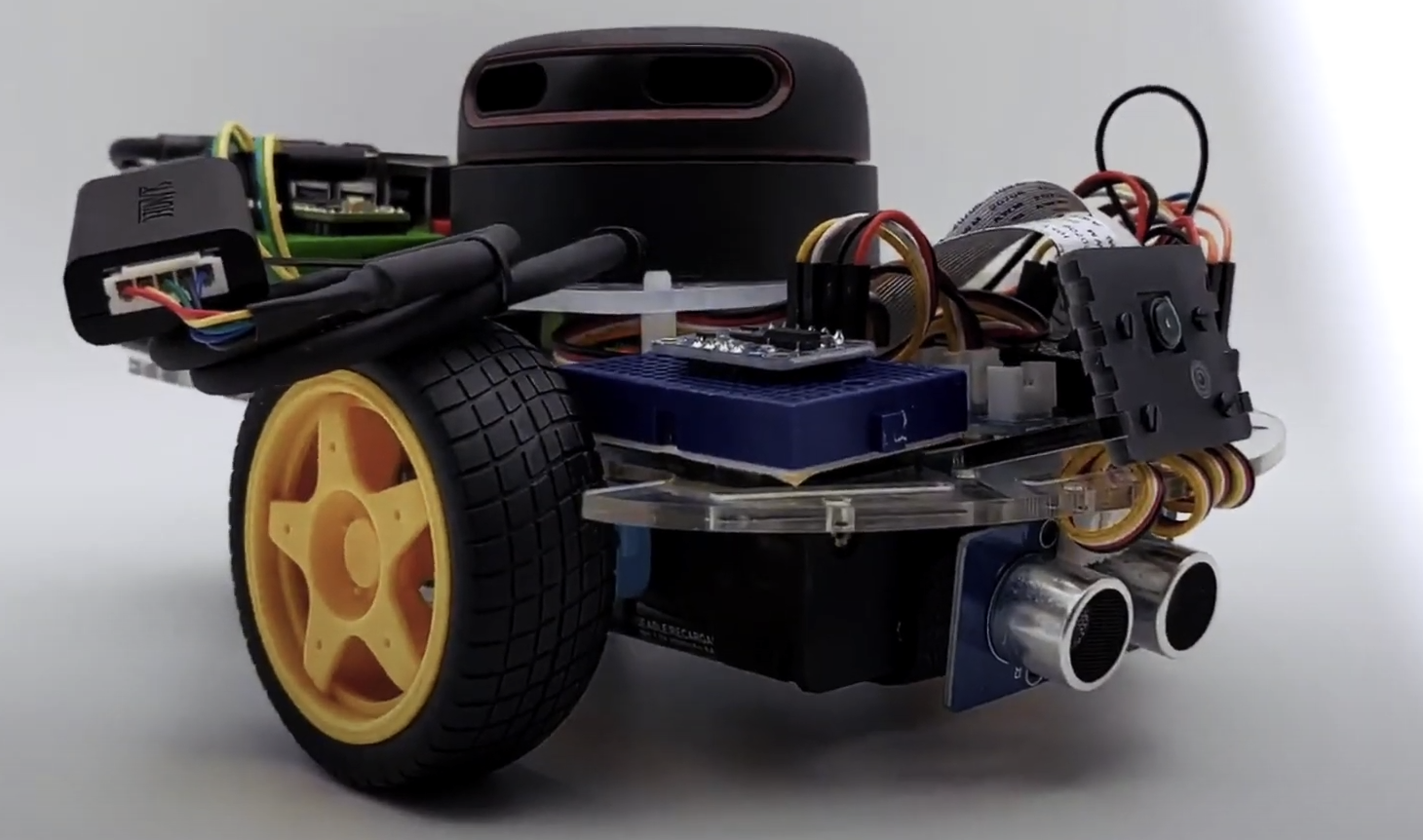
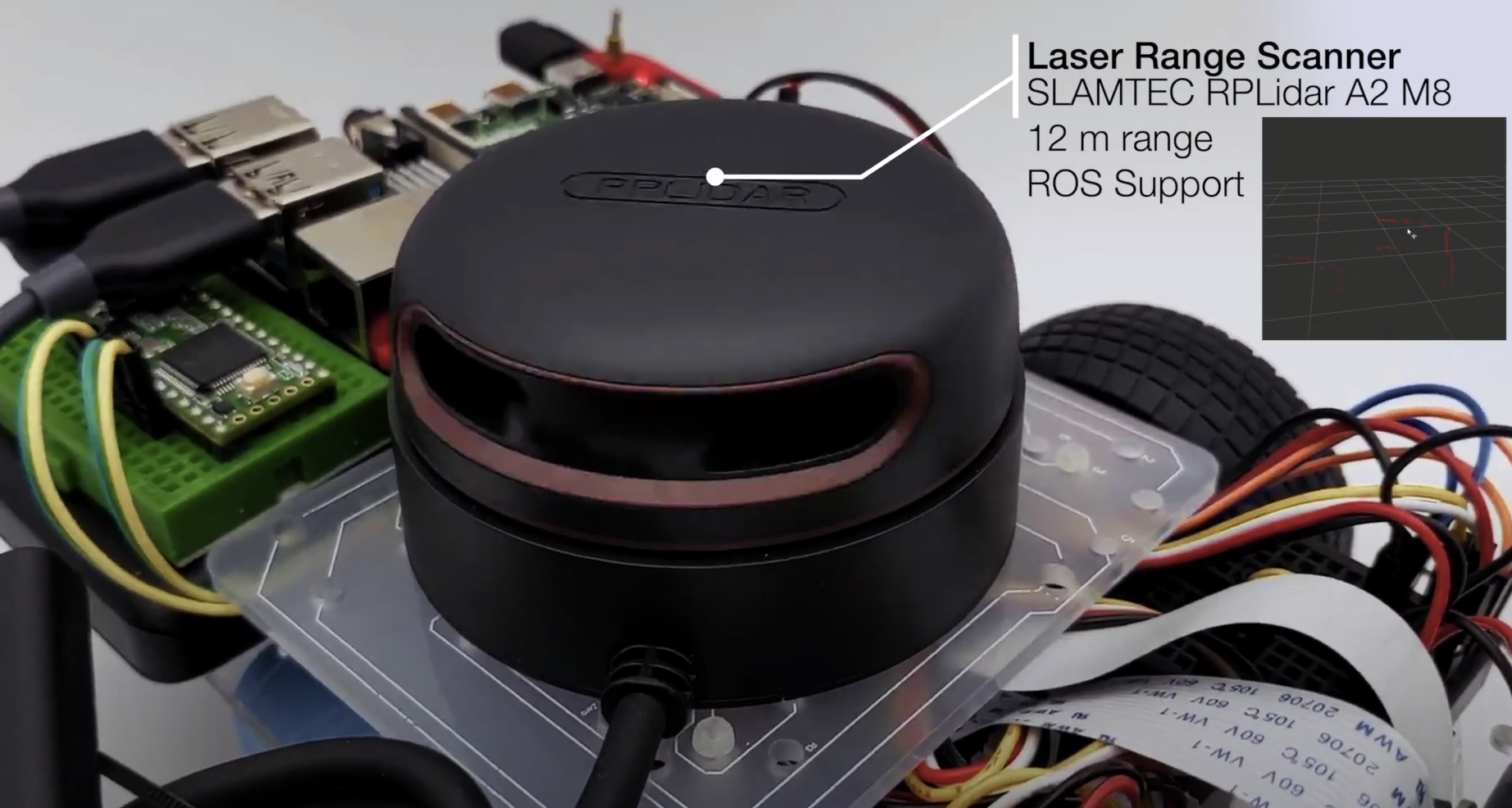
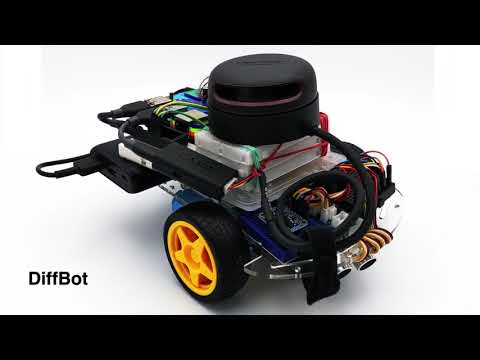
DiffBot is an autonomous differential drive robot with two wheels. Its main processing unit is a Raspberry Pi 4 B running Ubuntu Mate 20.04 and the ROS 1 (ROS Noetic) middleware. This respository contains ROS driver packages, ROS Control Hardware Interface for the real robot and configurations for simulating DiffBot. The formatted documentation can be found at: https://ros-mobile-robots.com.
| DiffBot | Lidar SLAMTEC RPLidar A2 |
|---|---|
 |
 |
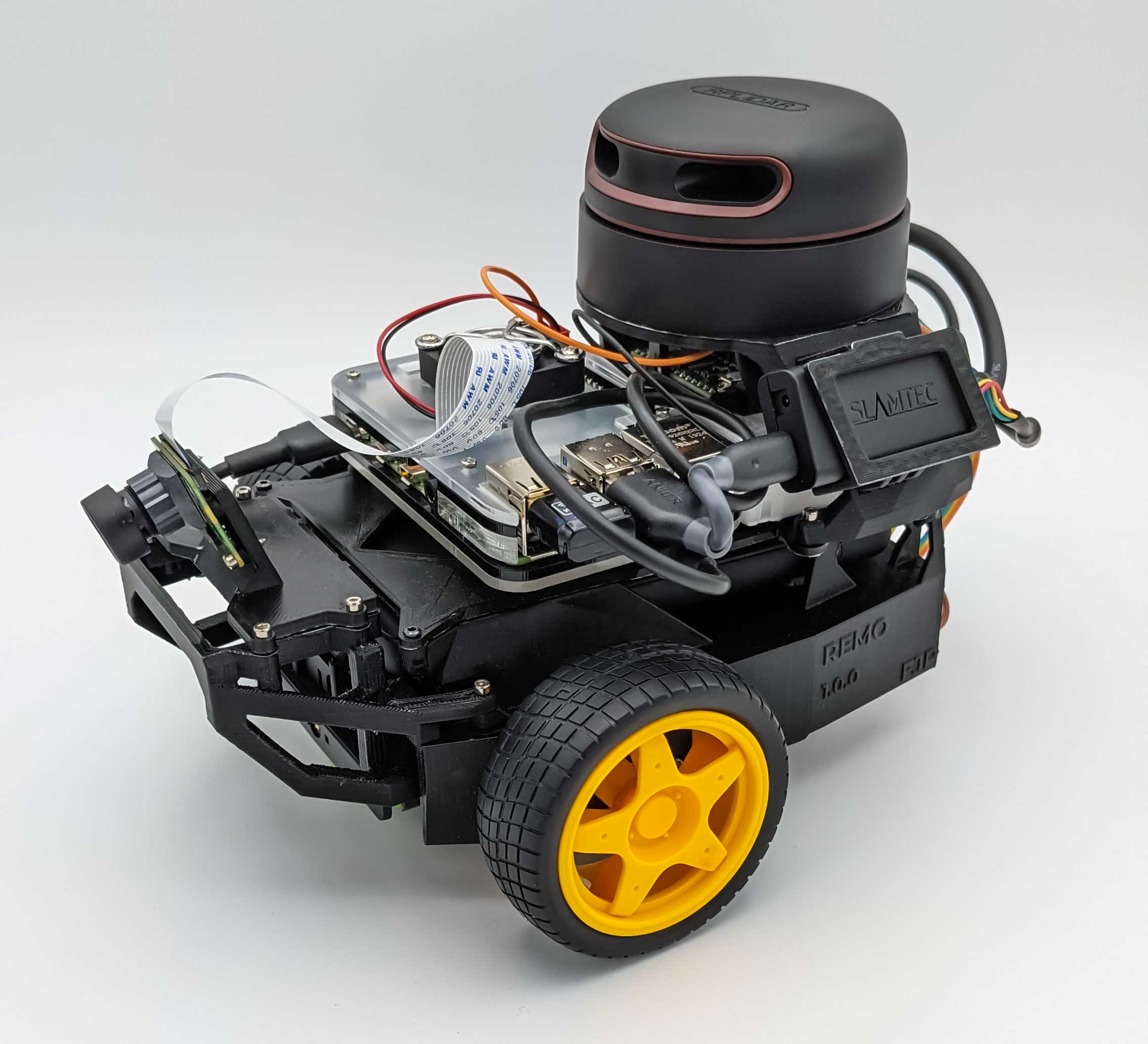
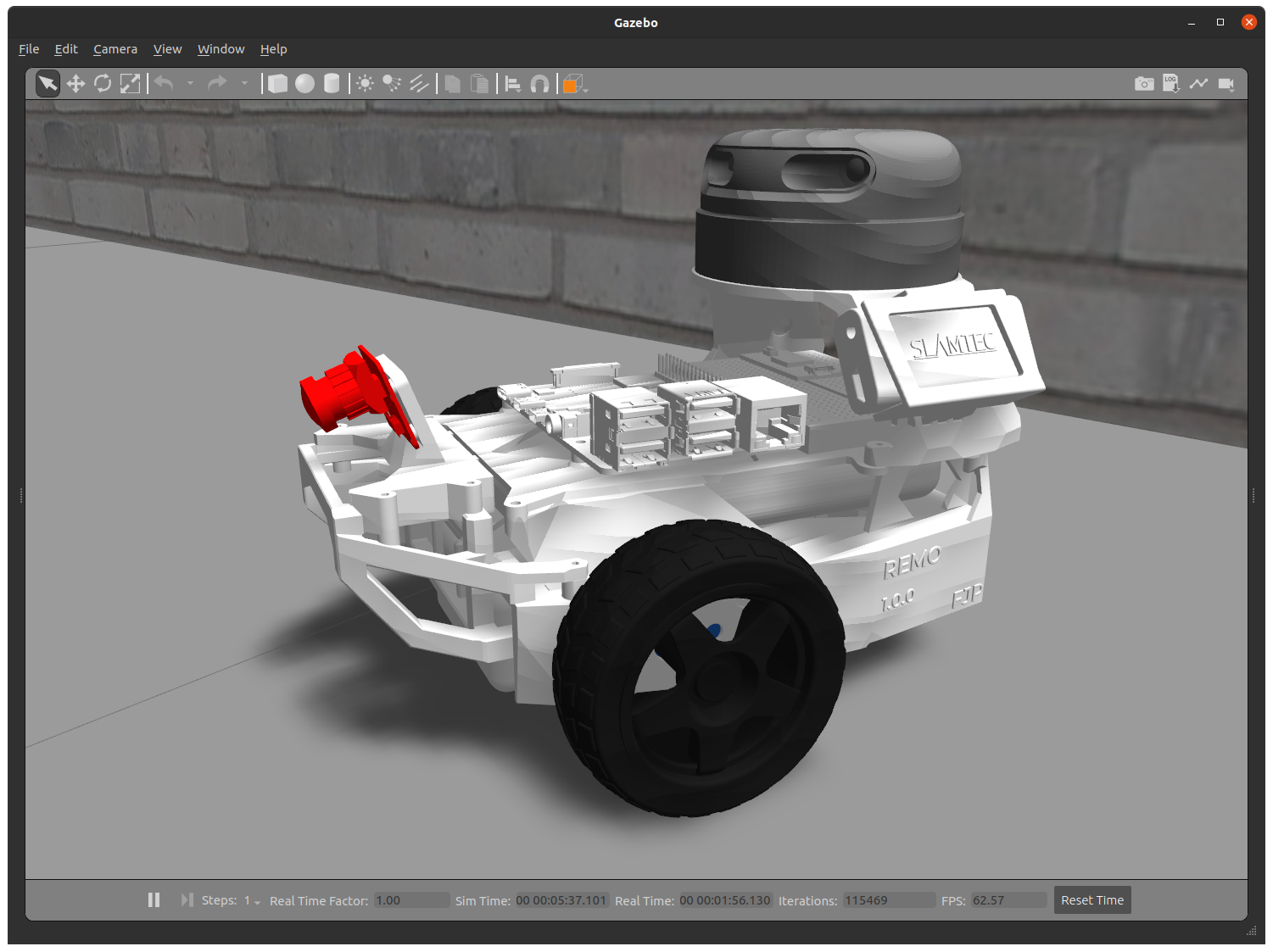
If you are looking for a 3D printable modular base, see the remo_description repository. You can use it directly with the software of this diffbot repository.
| Remo | Gazebo Simulation | RViz |
|---|---|---|
 |
 |
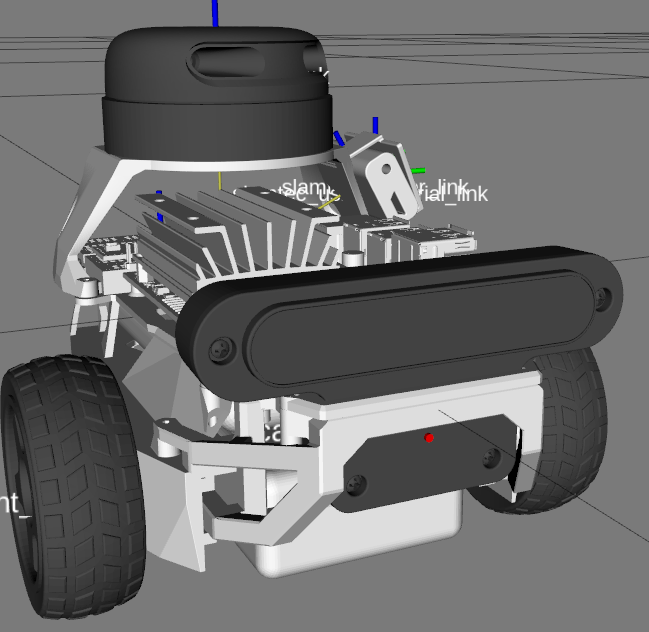 |
It provides mounts for different camera modules, such as Raspi Cam v2, OAK-1, OAK-D and you can even design your own if you like. There is also support for different single board computers (Raspberry Pi and Nvidia Jetson Nano) through two changable decks. You are agin free to create your own.
Demonstration
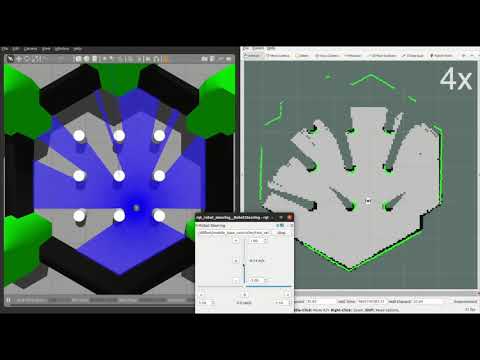
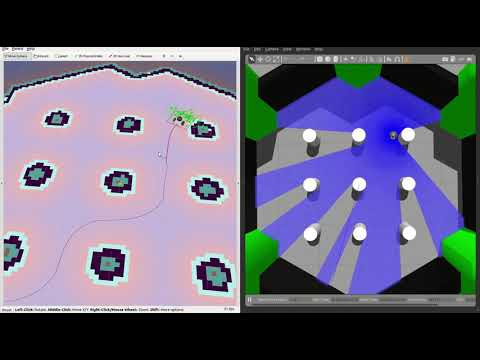
SLAM and Navigation
| Real robot | Gazebo Simulation |
|---|---|
 |
|
:package: Package Overview
-
diffbot_base: ROS Control hardware interface includingcontroller_managercontrol loop for the real robot. Thescriptsfolder of this package contains the low-levelbase_controllerthat is running on the Teensy microcontroller. -
diffbot_bringup: Launch files to bring up the hardware drivers (camera, lidar, imu, ultrasonic, …) for the real DiffBot robot. -
diffbot_control: Configurations for thediff_drive_controllerof ROS Control used in Gazebo simulation and the real robot. -
diffbot_description: URDF description of DiffBot including its sensors. -
diffbot_gazebo: Simulation specific launch and configuration files for DiffBot. -
diffbot_msgs: Message definitions specific to DiffBot, for example the message for encoder data. -
diffbot_navigation: Navigation based onmove_basepackage; launch and configuration files. -
diffbot_slam: Simultaneous localization and mapping using different implementations (e.g., gmapping) to create a map of the environment
Installation
The packages are written for and tested with ROS 1 Noetic on Ubuntu 20.04 Focal Fossa. For the real robot Ubuntu Mate 20.04 for arm64 is installed on the Raspberry Pi 4 B with 4GB. The communication between the mobile robot and the work pc is done by configuring the ROS Network, see also the documentation.
Development Container
The quickest way to a working setup on a development PC is the dev container in .devcontainer/noetic: a Docker image with ROS Noetic, Gazebo 11 and everything the DiffBot packages need. It works on Linux and on Windows with WSL 2, and CI builds the same image.
The full guide is on the documentation site: Use the Dev Container (setup on Linux and Windows, usage, updating, troubleshooting) and How the Dev Container Works.
- VS Code: install the Dev Containers extension, open your clone of this repository and choose Reopen in Container.
- Command line: with the Dev Container CLI:
  devcontainer up --workspace-folder . --config .devcontainer/noetic/devcontainer.json
  devcontainer exec --workspace-folder . --config .devcontainer/noetic/devcontainer.json bash
Creating the container clones rplidar_ros and remo_description, installs missing dependencies with rosdep and builds the workspace in ~/catkin_ws. Your clone of this repository is mounted at ~/catkin_ws/src/diffbot, so edits on the host show up in the container. The container uses the host network to reach the robot.
RViz and Gazebo open on the host’s display. On Windows, WSLg needs no setup. On a native Linux desktop (X11 or Wayland with Xwayland), install xauth on the host (sudo apt install xauth): before the container starts, host-x11.sh copies your display’s X11 cookie to .devcontainer/noetic/.x11/ (ignored by Git), where the container reads it. So xhost + isn’t needed.
Plain Docker works too. The image’s user has UID 1000; with another UID, use the dev container, which adapts it.
docker build -f .devcontainer/noetic/Dockerfile -t diffbot:noetic .
bash .devcontainer/noetic/host-x11.sh
docker run -it --rm --net=host -v /tmp/.X11-unix:/tmp/.X11-unix -e DISPLAY \
  -e XAUTHORITY=/home/ros/catkin_ws/src/diffbot/.devcontainer/noetic/.x11/xauth \
  -v "$PWD":/home/ros/catkin_ws/src/diffbot diffbot:noetic \
  bash -c "bash src/diffbot/.devcontainer/noetic/setup.sh && bash"
To set up a workspace without Docker, for example on the robot’s Raspberry Pi, follow the steps below.
Dependencies
The required Ubuntu packages are listed in software package sections found in the documentation. Other ROS catkin packages such as rplidar_ros need to be cloned into the catkin workspace.
For an automated and simplified dependency installation process install the vcstool, which is used in the next steps.
sudo apt install python3-vcstool
:hammer: How to Build
To build the packages in this repository including the Remo robot follow these steps:
-
cdinto an existing ROS Noetic catkin workspace or create a new one:
mkdir -p catkin_ws/src
- Clone this repository in the
srcfolder of your ROS Noetic catkin workspace:
cd catkin_ws/src
```console
File truncated at 100 lines see the full file
CONTRIBUTING
|
|
diffbot repositorydiffbot_base diffbot_bringup diffbot_control diffbot_description diffbot_gazebo diffbot_mbf diffbot_msgs diffbot_navigation diffbot_robot diffbot_slam |
ROS Distro
|
Repository Summary
| Description | DiffBot is an autonomous 2wd differential drive robot using ROS Noetic on a Raspberry Pi 4 B. With its SLAMTEC Lidar and the ROS Control hardware interface it's capable of navigating in an environment using the ROS Navigation stack and making use of SLAM algorithms to create maps of unknown environments. |
| Checkout URI | https://github.com/ros-mobile-robots/diffbot.git |
| VCS Type | git |
| VCS Version | noetic-devel |
| Last Updated | 2026-10-11 |
| Dev Status | DEVELOPED |
| Released | RELEASED |
| Contributing |
Help Wanted (-)
Good First Issues (-) Pull Requests to Review (-) |
Packages
| Name | Version |
|---|---|
| diffbot_base | 1.1.0 |
| diffbot_bringup | 1.1.0 |
| diffbot_control | 1.1.0 |
| diffbot_description | 1.1.0 |
| diffbot_gazebo | 1.1.0 |
| diffbot_mbf | 1.1.0 |
| diffbot_msgs | 1.1.0 |
| diffbot_navigation | 1.1.0 |
| diffbot_robot | 1.1.0 |
| diffbot_slam | 1.1.0 |
README
DiffBot
DiffBot is an autonomous differential drive robot with two wheels. Its main processing unit is a Raspberry Pi 4 B running Ubuntu Mate 20.04 and the ROS 1 (ROS Noetic) middleware. This respository contains ROS driver packages, ROS Control Hardware Interface for the real robot and configurations for simulating DiffBot. The formatted documentation can be found at: https://ros-mobile-robots.com.
| DiffBot | Lidar SLAMTEC RPLidar A2 |
|---|---|
|
|
If you are looking for a 3D printable modular base, see the remo_description repository. You can use it directly with the software of this diffbot repository.
| Remo | Gazebo Simulation | RViz |
|---|---|---|
|
|
|
It provides mounts for different camera modules, such as Raspi Cam v2, OAK-1, OAK-D and you can even design your own if you like. There is also support for different single board computers (Raspberry Pi and Nvidia Jetson Nano) through two changable decks. You are agin free to create your own.
Demonstration
SLAM and Navigation
| Real robot | Gazebo Simulation |
|---|---|
|
|
:package: Package Overview
-
diffbot_base: ROS Control hardware interface includingcontroller_managercontrol loop for the real robot. Thescriptsfolder of this package contains the low-levelbase_controllerthat is running on the Teensy microcontroller. -
diffbot_bringup: Launch files to bring up the hardware drivers (camera, lidar, imu, ultrasonic, …) for the real DiffBot robot. -
diffbot_control: Configurations for thediff_drive_controllerof ROS Control used in Gazebo simulation and the real robot. -
diffbot_description: URDF description of DiffBot including its sensors. -
diffbot_gazebo: Simulation specific launch and configuration files for DiffBot. -
diffbot_msgs: Message definitions specific to DiffBot, for example the message for encoder data. -
diffbot_navigation: Navigation based onmove_basepackage; launch and configuration files. -
diffbot_slam: Simultaneous localization and mapping using different implementations (e.g., gmapping) to create a map of the environment
Installation
The packages are written for and tested with ROS 1 Noetic on Ubuntu 20.04 Focal Fossa. For the real robot Ubuntu Mate 20.04 for arm64 is installed on the Raspberry Pi 4 B with 4GB. The communication between the mobile robot and the work pc is done by configuring the ROS Network, see also the documentation.
Development Container
The quickest way to a working setup on a development PC is the dev container in .devcontainer/noetic: a Docker image with ROS Noetic, Gazebo 11 and everything the DiffBot packages need. It works on Linux and on Windows with WSL 2, and CI builds the same image.
The full guide is on the documentation site: Use the Dev Container (setup on Linux and Windows, usage, updating, troubleshooting) and How the Dev Container Works.
- VS Code: install the Dev Containers extension, open your clone of this repository and choose Reopen in Container.
- Command line: with the Dev Container CLI:
  devcontainer up --workspace-folder . --config .devcontainer/noetic/devcontainer.json
  devcontainer exec --workspace-folder . --config .devcontainer/noetic/devcontainer.json bash
Creating the container clones rplidar_ros and remo_description, installs missing dependencies with rosdep and builds the workspace in ~/catkin_ws. Your clone of this repository is mounted at ~/catkin_ws/src/diffbot, so edits on the host show up in the container. The container uses the host network to reach the robot.
RViz and Gazebo open on the host’s display. On Windows, WSLg needs no setup. On a native Linux desktop (X11 or Wayland with Xwayland), install xauth on the host (sudo apt install xauth): before the container starts, host-x11.sh copies your display’s X11 cookie to .devcontainer/noetic/.x11/ (ignored by Git), where the container reads it. So xhost + isn’t needed.
Plain Docker works too. The image’s user has UID 1000; with another UID, use the dev container, which adapts it.
docker build -f .devcontainer/noetic/Dockerfile -t diffbot:noetic .
bash .devcontainer/noetic/host-x11.sh
docker run -it --rm --net=host -v /tmp/.X11-unix:/tmp/.X11-unix -e DISPLAY \
  -e XAUTHORITY=/home/ros/catkin_ws/src/diffbot/.devcontainer/noetic/.x11/xauth \
  -v "$PWD":/home/ros/catkin_ws/src/diffbot diffbot:noetic \
  bash -c "bash src/diffbot/.devcontainer/noetic/setup.sh && bash"
To set up a workspace without Docker, for example on the robot’s Raspberry Pi, follow the steps below.
Dependencies
The required Ubuntu packages are listed in software package sections found in the documentation. Other ROS catkin packages such as rplidar_ros need to be cloned into the catkin workspace.
For an automated and simplified dependency installation process install the vcstool, which is used in the next steps.
sudo apt install python3-vcstool
:hammer: How to Build
To build the packages in this repository including the Remo robot follow these steps:
-
cdinto an existing ROS Noetic catkin workspace or create a new one:
mkdir -p catkin_ws/src
- Clone this repository in the
srcfolder of your ROS Noetic catkin workspace:
cd catkin_ws/src
```console
File truncated at 100 lines see the full file
CONTRIBUTING
|
|
diffbot repositorydiffbot_base diffbot_bringup diffbot_control diffbot_description diffbot_gazebo diffbot_mbf diffbot_msgs diffbot_navigation diffbot_robot diffbot_slam |
ROS Distro
|
Repository Summary
| Description | DiffBot is an autonomous 2wd differential drive robot using ROS Noetic on a Raspberry Pi 4 B. With its SLAMTEC Lidar and the ROS Control hardware interface it's capable of navigating in an environment using the ROS Navigation stack and making use of SLAM algorithms to create maps of unknown environments. |
| Checkout URI | https://github.com/ros-mobile-robots/diffbot.git |
| VCS Type | git |
| VCS Version | noetic-devel |
| Last Updated | 2026-10-11 |
| Dev Status | DEVELOPED |
| Released | RELEASED |
| Contributing |
Help Wanted (-)
Good First Issues (-) Pull Requests to Review (-) |
Packages
| Name | Version |
|---|---|
| diffbot_base | 1.1.0 |
| diffbot_bringup | 1.1.0 |
| diffbot_control | 1.1.0 |
| diffbot_description | 1.1.0 |
| diffbot_gazebo | 1.1.0 |
| diffbot_mbf | 1.1.0 |
| diffbot_msgs | 1.1.0 |
| diffbot_navigation | 1.1.0 |
| diffbot_robot | 1.1.0 |
| diffbot_slam | 1.1.0 |
README
DiffBot
DiffBot is an autonomous differential drive robot with two wheels. Its main processing unit is a Raspberry Pi 4 B running Ubuntu Mate 20.04 and the ROS 1 (ROS Noetic) middleware. This respository contains ROS driver packages, ROS Control Hardware Interface for the real robot and configurations for simulating DiffBot. The formatted documentation can be found at: https://ros-mobile-robots.com.
| DiffBot | Lidar SLAMTEC RPLidar A2 |
|---|---|
|
|
If you are looking for a 3D printable modular base, see the remo_description repository. You can use it directly with the software of this diffbot repository.
| Remo | Gazebo Simulation | RViz |
|---|---|---|
|
|
|
It provides mounts for different camera modules, such as Raspi Cam v2, OAK-1, OAK-D and you can even design your own if you like. There is also support for different single board computers (Raspberry Pi and Nvidia Jetson Nano) through two changable decks. You are agin free to create your own.
Demonstration
SLAM and Navigation
| Real robot | Gazebo Simulation |
|---|---|
|
|
:package: Package Overview
-
diffbot_base: ROS Control hardware interface includingcontroller_managercontrol loop for the real robot. Thescriptsfolder of this package contains the low-levelbase_controllerthat is running on the Teensy microcontroller. -
diffbot_bringup: Launch files to bring up the hardware drivers (camera, lidar, imu, ultrasonic, …) for the real DiffBot robot. -
diffbot_control: Configurations for thediff_drive_controllerof ROS Control used in Gazebo simulation and the real robot. -
diffbot_description: URDF description of DiffBot including its sensors. -
diffbot_gazebo: Simulation specific launch and configuration files for DiffBot. -
diffbot_msgs: Message definitions specific to DiffBot, for example the message for encoder data. -
diffbot_navigation: Navigation based onmove_basepackage; launch and configuration files. -
diffbot_slam: Simultaneous localization and mapping using different implementations (e.g., gmapping) to create a map of the environment
Installation
The packages are written for and tested with ROS 1 Noetic on Ubuntu 20.04 Focal Fossa. For the real robot Ubuntu Mate 20.04 for arm64 is installed on the Raspberry Pi 4 B with 4GB. The communication between the mobile robot and the work pc is done by configuring the ROS Network, see also the documentation.
Development Container
The quickest way to a working setup on a development PC is the dev container in .devcontainer/noetic: a Docker image with ROS Noetic, Gazebo 11 and everything the DiffBot packages need. It works on Linux and on Windows with WSL 2, and CI builds the same image.
The full guide is on the documentation site: Use the Dev Container (setup on Linux and Windows, usage, updating, troubleshooting) and How the Dev Container Works.
- VS Code: install the Dev Containers extension, open your clone of this repository and choose Reopen in Container.
- Command line: with the Dev Container CLI:
  devcontainer up --workspace-folder . --config .devcontainer/noetic/devcontainer.json
  devcontainer exec --workspace-folder . --config .devcontainer/noetic/devcontainer.json bash
Creating the container clones rplidar_ros and remo_description, installs missing dependencies with rosdep and builds the workspace in ~/catkin_ws. Your clone of this repository is mounted at ~/catkin_ws/src/diffbot, so edits on the host show up in the container. The container uses the host network to reach the robot.
RViz and Gazebo open on the host’s display. On Windows, WSLg needs no setup. On a native Linux desktop (X11 or Wayland with Xwayland), install xauth on the host (sudo apt install xauth): before the container starts, host-x11.sh copies your display’s X11 cookie to .devcontainer/noetic/.x11/ (ignored by Git), where the container reads it. So xhost + isn’t needed.
Plain Docker works too. The image’s user has UID 1000; with another UID, use the dev container, which adapts it.
docker build -f .devcontainer/noetic/Dockerfile -t diffbot:noetic .
bash .devcontainer/noetic/host-x11.sh
docker run -it --rm --net=host -v /tmp/.X11-unix:/tmp/.X11-unix -e DISPLAY \
  -e XAUTHORITY=/home/ros/catkin_ws/src/diffbot/.devcontainer/noetic/.x11/xauth \
  -v "$PWD":/home/ros/catkin_ws/src/diffbot diffbot:noetic \
  bash -c "bash src/diffbot/.devcontainer/noetic/setup.sh && bash"
To set up a workspace without Docker, for example on the robot’s Raspberry Pi, follow the steps below.
Dependencies
The required Ubuntu packages are listed in software package sections found in the documentation. Other ROS catkin packages such as rplidar_ros need to be cloned into the catkin workspace.
For an automated and simplified dependency installation process install the vcstool, which is used in the next steps.
sudo apt install python3-vcstool
:hammer: How to Build
To build the packages in this repository including the Remo robot follow these steps:
-
cdinto an existing ROS Noetic catkin workspace or create a new one:
mkdir -p catkin_ws/src
- Clone this repository in the
srcfolder of your ROS Noetic catkin workspace:
cd catkin_ws/src
```console
File truncated at 100 lines see the full file
CONTRIBUTING
|
|
diffbot repositorydiffbot_base diffbot_bringup diffbot_control diffbot_description diffbot_gazebo diffbot_mbf diffbot_msgs diffbot_navigation diffbot_robot diffbot_slam |
ROS Distro
|
Repository Summary
| Description | DiffBot is an autonomous 2wd differential drive robot using ROS Noetic on a Raspberry Pi 4 B. With its SLAMTEC Lidar and the ROS Control hardware interface it's capable of navigating in an environment using the ROS Navigation stack and making use of SLAM algorithms to create maps of unknown environments. |
| Checkout URI | https://github.com/ros-mobile-robots/diffbot.git |
| VCS Type | git |
| VCS Version | noetic-devel |
| Last Updated | 2026-10-11 |
| Dev Status | DEVELOPED |
| Released | RELEASED |
| Contributing |
Help Wanted (-)
Good First Issues (-) Pull Requests to Review (-) |
Packages
| Name | Version |
|---|---|
| diffbot_base | 1.1.0 |
| diffbot_bringup | 1.1.0 |
| diffbot_control | 1.1.0 |
| diffbot_description | 1.1.0 |
| diffbot_gazebo | 1.1.0 |
| diffbot_mbf | 1.1.0 |
| diffbot_msgs | 1.1.0 |
| diffbot_navigation | 1.1.0 |
| diffbot_robot | 1.1.0 |
| diffbot_slam | 1.1.0 |
README
DiffBot
DiffBot is an autonomous differential drive robot with two wheels. Its main processing unit is a Raspberry Pi 4 B running Ubuntu Mate 20.04 and the ROS 1 (ROS Noetic) middleware. This respository contains ROS driver packages, ROS Control Hardware Interface for the real robot and configurations for simulating DiffBot. The formatted documentation can be found at: https://ros-mobile-robots.com.
| DiffBot | Lidar SLAMTEC RPLidar A2 |
|---|---|
|
|
If you are looking for a 3D printable modular base, see the remo_description repository. You can use it directly with the software of this diffbot repository.
| Remo | Gazebo Simulation | RViz |
|---|---|---|
|
|
|
It provides mounts for different camera modules, such as Raspi Cam v2, OAK-1, OAK-D and you can even design your own if you like. There is also support for different single board computers (Raspberry Pi and Nvidia Jetson Nano) through two changable decks. You are agin free to create your own.
Demonstration
SLAM and Navigation
| Real robot | Gazebo Simulation |
|---|---|
|
|
:package: Package Overview
-
diffbot_base: ROS Control hardware interface includingcontroller_managercontrol loop for the real robot. Thescriptsfolder of this package contains the low-levelbase_controllerthat is running on the Teensy microcontroller. -
diffbot_bringup: Launch files to bring up the hardware drivers (camera, lidar, imu, ultrasonic, …) for the real DiffBot robot. -
diffbot_control: Configurations for thediff_drive_controllerof ROS Control used in Gazebo simulation and the real robot. -
diffbot_description: URDF description of DiffBot including its sensors. -
diffbot_gazebo: Simulation specific launch and configuration files for DiffBot. -
diffbot_msgs: Message definitions specific to DiffBot, for example the message for encoder data. -
diffbot_navigation: Navigation based onmove_basepackage; launch and configuration files. -
diffbot_slam: Simultaneous localization and mapping using different implementations (e.g., gmapping) to create a map of the environment
Installation
The packages are written for and tested with ROS 1 Noetic on Ubuntu 20.04 Focal Fossa. For the real robot Ubuntu Mate 20.04 for arm64 is installed on the Raspberry Pi 4 B with 4GB. The communication between the mobile robot and the work pc is done by configuring the ROS Network, see also the documentation.
Development Container
The quickest way to a working setup on a development PC is the dev container in .devcontainer/noetic: a Docker image with ROS Noetic, Gazebo 11 and everything the DiffBot packages need. It works on Linux and on Windows with WSL 2, and CI builds the same image.
The full guide is on the documentation site: Use the Dev Container (setup on Linux and Windows, usage, updating, troubleshooting) and How the Dev Container Works.
- VS Code: install the Dev Containers extension, open your clone of this repository and choose Reopen in Container.
- Command line: with the Dev Container CLI:
  devcontainer up --workspace-folder . --config .devcontainer/noetic/devcontainer.json
  devcontainer exec --workspace-folder . --config .devcontainer/noetic/devcontainer.json bash
Creating the container clones rplidar_ros and remo_description, installs missing dependencies with rosdep and builds the workspace in ~/catkin_ws. Your clone of this repository is mounted at ~/catkin_ws/src/diffbot, so edits on the host show up in the container. The container uses the host network to reach the robot.
RViz and Gazebo open on the host’s display. On Windows, WSLg needs no setup. On a native Linux desktop (X11 or Wayland with Xwayland), install xauth on the host (sudo apt install xauth): before the container starts, host-x11.sh copies your display’s X11 cookie to .devcontainer/noetic/.x11/ (ignored by Git), where the container reads it. So xhost + isn’t needed.
Plain Docker works too. The image’s user has UID 1000; with another UID, use the dev container, which adapts it.
docker build -f .devcontainer/noetic/Dockerfile -t diffbot:noetic .
bash .devcontainer/noetic/host-x11.sh
docker run -it --rm --net=host -v /tmp/.X11-unix:/tmp/.X11-unix -e DISPLAY \
  -e XAUTHORITY=/home/ros/catkin_ws/src/diffbot/.devcontainer/noetic/.x11/xauth \
  -v "$PWD":/home/ros/catkin_ws/src/diffbot diffbot:noetic \
  bash -c "bash src/diffbot/.devcontainer/noetic/setup.sh && bash"
To set up a workspace without Docker, for example on the robot’s Raspberry Pi, follow the steps below.
Dependencies
The required Ubuntu packages are listed in software package sections found in the documentation. Other ROS catkin packages such as rplidar_ros need to be cloned into the catkin workspace.
For an automated and simplified dependency installation process install the vcstool, which is used in the next steps.
sudo apt install python3-vcstool
:hammer: How to Build
To build the packages in this repository including the Remo robot follow these steps:
-
cdinto an existing ROS Noetic catkin workspace or create a new one:
mkdir -p catkin_ws/src
- Clone this repository in the
srcfolder of your ROS Noetic catkin workspace:
cd catkin_ws/src
```console
File truncated at 100 lines see the full file
CONTRIBUTING
|
|
diffbot repositorydiffbot_base diffbot_bringup diffbot_control diffbot_description diffbot_gazebo diffbot_mbf diffbot_msgs diffbot_navigation diffbot_robot diffbot_slam |
ROS Distro
|
Repository Summary
| Description | DiffBot is an autonomous 2wd differential drive robot using ROS Noetic on a Raspberry Pi 4 B. With its SLAMTEC Lidar and the ROS Control hardware interface it's capable of navigating in an environment using the ROS Navigation stack and making use of SLAM algorithms to create maps of unknown environments. |
| Checkout URI | https://github.com/ros-mobile-robots/diffbot.git |
| VCS Type | git |
| VCS Version | noetic-devel |
| Last Updated | 2026-10-11 |
| Dev Status | DEVELOPED |
| Released | RELEASED |
| Contributing |
Help Wanted (-)
Good First Issues (-) Pull Requests to Review (-) |
Packages
| Name | Version |
|---|---|
| diffbot_base | 1.1.0 |
| diffbot_bringup | 1.1.0 |
| diffbot_control | 1.1.0 |
| diffbot_description | 1.1.0 |
| diffbot_gazebo | 1.1.0 |
| diffbot_mbf | 1.1.0 |
| diffbot_msgs | 1.1.0 |
| diffbot_navigation | 1.1.0 |
| diffbot_robot | 1.1.0 |
| diffbot_slam | 1.1.0 |
README
DiffBot
DiffBot is an autonomous differential drive robot with two wheels. Its main processing unit is a Raspberry Pi 4 B running Ubuntu Mate 20.04 and the ROS 1 (ROS Noetic) middleware. This respository contains ROS driver packages, ROS Control Hardware Interface for the real robot and configurations for simulating DiffBot. The formatted documentation can be found at: https://ros-mobile-robots.com.
| DiffBot | Lidar SLAMTEC RPLidar A2 |
|---|---|
|
|
If you are looking for a 3D printable modular base, see the remo_description repository. You can use it directly with the software of this diffbot repository.
| Remo | Gazebo Simulation | RViz |
|---|---|---|
|
|
|
It provides mounts for different camera modules, such as Raspi Cam v2, OAK-1, OAK-D and you can even design your own if you like. There is also support for different single board computers (Raspberry Pi and Nvidia Jetson Nano) through two changable decks. You are agin free to create your own.
Demonstration
SLAM and Navigation
| Real robot | Gazebo Simulation |
|---|---|
|
|
:package: Package Overview
-
diffbot_base: ROS Control hardware interface includingcontroller_managercontrol loop for the real robot. Thescriptsfolder of this package contains the low-levelbase_controllerthat is running on the Teensy microcontroller. -
diffbot_bringup: Launch files to bring up the hardware drivers (camera, lidar, imu, ultrasonic, …) for the real DiffBot robot. -
diffbot_control: Configurations for thediff_drive_controllerof ROS Control used in Gazebo simulation and the real robot. -
diffbot_description: URDF description of DiffBot including its sensors. -
diffbot_gazebo: Simulation specific launch and configuration files for DiffBot. -
diffbot_msgs: Message definitions specific to DiffBot, for example the message for encoder data. -
diffbot_navigation: Navigation based onmove_basepackage; launch and configuration files. -
diffbot_slam: Simultaneous localization and mapping using different implementations (e.g., gmapping) to create a map of the environment
Installation
The packages are written for and tested with ROS 1 Noetic on Ubuntu 20.04 Focal Fossa. For the real robot Ubuntu Mate 20.04 for arm64 is installed on the Raspberry Pi 4 B with 4GB. The communication between the mobile robot and the work pc is done by configuring the ROS Network, see also the documentation.
Development Container
The quickest way to a working setup on a development PC is the dev container in .devcontainer/noetic: a Docker image with ROS Noetic, Gazebo 11 and everything the DiffBot packages need. It works on Linux and on Windows with WSL 2, and CI builds the same image.
The full guide is on the documentation site: Use the Dev Container (setup on Linux and Windows, usage, updating, troubleshooting) and How the Dev Container Works.
- VS Code: install the Dev Containers extension, open your clone of this repository and choose Reopen in Container.
- Command line: with the Dev Container CLI:
  devcontainer up --workspace-folder . --config .devcontainer/noetic/devcontainer.json
  devcontainer exec --workspace-folder . --config .devcontainer/noetic/devcontainer.json bash
Creating the container clones rplidar_ros and remo_description, installs missing dependencies with rosdep and builds the workspace in ~/catkin_ws. Your clone of this repository is mounted at ~/catkin_ws/src/diffbot, so edits on the host show up in the container. The container uses the host network to reach the robot.
RViz and Gazebo open on the host’s display. On Windows, WSLg needs no setup. On a native Linux desktop (X11 or Wayland with Xwayland), install xauth on the host (sudo apt install xauth): before the container starts, host-x11.sh copies your display’s X11 cookie to .devcontainer/noetic/.x11/ (ignored by Git), where the container reads it. So xhost + isn’t needed.
Plain Docker works too. The image’s user has UID 1000; with another UID, use the dev container, which adapts it.
docker build -f .devcontainer/noetic/Dockerfile -t diffbot:noetic .
bash .devcontainer/noetic/host-x11.sh
docker run -it --rm --net=host -v /tmp/.X11-unix:/tmp/.X11-unix -e DISPLAY \
  -e XAUTHORITY=/home/ros/catkin_ws/src/diffbot/.devcontainer/noetic/.x11/xauth \
  -v "$PWD":/home/ros/catkin_ws/src/diffbot diffbot:noetic \
  bash -c "bash src/diffbot/.devcontainer/noetic/setup.sh && bash"
To set up a workspace without Docker, for example on the robot’s Raspberry Pi, follow the steps below.
Dependencies
The required Ubuntu packages are listed in software package sections found in the documentation. Other ROS catkin packages such as rplidar_ros need to be cloned into the catkin workspace.
For an automated and simplified dependency installation process install the vcstool, which is used in the next steps.
sudo apt install python3-vcstool
:hammer: How to Build
To build the packages in this repository including the Remo robot follow these steps:
-
cdinto an existing ROS Noetic catkin workspace or create a new one:
mkdir -p catkin_ws/src
- Clone this repository in the
srcfolder of your ROS Noetic catkin workspace:
cd catkin_ws/src
```console
File truncated at 100 lines see the full file
CONTRIBUTING
|
|
diffbot repositorydiffbot_base diffbot_bringup diffbot_control diffbot_description diffbot_gazebo diffbot_mbf diffbot_msgs diffbot_navigation diffbot_robot diffbot_slam |
ROS Distro
|
Repository Summary
| Description | DiffBot is an autonomous 2wd differential drive robot using ROS Noetic on a Raspberry Pi 4 B. With its SLAMTEC Lidar and the ROS Control hardware interface it's capable of navigating in an environment using the ROS Navigation stack and making use of SLAM algorithms to create maps of unknown environments. |
| Checkout URI | https://github.com/ros-mobile-robots/diffbot.git |
| VCS Type | git |
| VCS Version | noetic-devel |
| Last Updated | 2026-10-11 |
| Dev Status | DEVELOPED |
| Released | RELEASED |
| Contributing |
Help Wanted (-)
Good First Issues (-) Pull Requests to Review (-) |
Packages
| Name | Version |
|---|---|
| diffbot_base | 1.1.0 |
| diffbot_bringup | 1.1.0 |
| diffbot_control | 1.1.0 |
| diffbot_description | 1.1.0 |
| diffbot_gazebo | 1.1.0 |
| diffbot_mbf | 1.1.0 |
| diffbot_msgs | 1.1.0 |
| diffbot_navigation | 1.1.0 |
| diffbot_robot | 1.1.0 |
| diffbot_slam | 1.1.0 |
README
DiffBot
DiffBot is an autonomous differential drive robot with two wheels. Its main processing unit is a Raspberry Pi 4 B running Ubuntu Mate 20.04 and the ROS 1 (ROS Noetic) middleware. This respository contains ROS driver packages, ROS Control Hardware Interface for the real robot and configurations for simulating DiffBot. The formatted documentation can be found at: https://ros-mobile-robots.com.
| DiffBot | Lidar SLAMTEC RPLidar A2 |
|---|---|
|
|
If you are looking for a 3D printable modular base, see the remo_description repository. You can use it directly with the software of this diffbot repository.
| Remo | Gazebo Simulation | RViz |
|---|---|---|
|
|
|
It provides mounts for different camera modules, such as Raspi Cam v2, OAK-1, OAK-D and you can even design your own if you like. There is also support for different single board computers (Raspberry Pi and Nvidia Jetson Nano) through two changable decks. You are agin free to create your own.
Demonstration
SLAM and Navigation
| Real robot | Gazebo Simulation |
|---|---|
|
|
:package: Package Overview
-
diffbot_base: ROS Control hardware interface includingcontroller_managercontrol loop for the real robot. Thescriptsfolder of this package contains the low-levelbase_controllerthat is running on the Teensy microcontroller. -
diffbot_bringup: Launch files to bring up the hardware drivers (camera, lidar, imu, ultrasonic, …) for the real DiffBot robot. -
diffbot_control: Configurations for thediff_drive_controllerof ROS Control used in Gazebo simulation and the real robot. -
diffbot_description: URDF description of DiffBot including its sensors. -
diffbot_gazebo: Simulation specific launch and configuration files for DiffBot. -
diffbot_msgs: Message definitions specific to DiffBot, for example the message for encoder data. -
diffbot_navigation: Navigation based onmove_basepackage; launch and configuration files. -
diffbot_slam: Simultaneous localization and mapping using different implementations (e.g., gmapping) to create a map of the environment
Installation
The packages are written for and tested with ROS 1 Noetic on Ubuntu 20.04 Focal Fossa. For the real robot Ubuntu Mate 20.04 for arm64 is installed on the Raspberry Pi 4 B with 4GB. The communication between the mobile robot and the work pc is done by configuring the ROS Network, see also the documentation.
Development Container
The quickest way to a working setup on a development PC is the dev container in .devcontainer/noetic: a Docker image with ROS Noetic, Gazebo 11 and everything the DiffBot packages need. It works on Linux and on Windows with WSL 2, and CI builds the same image.
The full guide is on the documentation site: Use the Dev Container (setup on Linux and Windows, usage, updating, troubleshooting) and How the Dev Container Works.
- VS Code: install the Dev Containers extension, open your clone of this repository and choose Reopen in Container.
- Command line: with the Dev Container CLI:
  devcontainer up --workspace-folder . --config .devcontainer/noetic/devcontainer.json
  devcontainer exec --workspace-folder . --config .devcontainer/noetic/devcontainer.json bash
Creating the container clones rplidar_ros and remo_description, installs missing dependencies with rosdep and builds the workspace in ~/catkin_ws. Your clone of this repository is mounted at ~/catkin_ws/src/diffbot, so edits on the host show up in the container. The container uses the host network to reach the robot.
RViz and Gazebo open on the host’s display. On Windows, WSLg needs no setup. On a native Linux desktop (X11 or Wayland with Xwayland), install xauth on the host (sudo apt install xauth): before the container starts, host-x11.sh copies your display’s X11 cookie to .devcontainer/noetic/.x11/ (ignored by Git), where the container reads it. So xhost + isn’t needed.
Plain Docker works too. The image’s user has UID 1000; with another UID, use the dev container, which adapts it.
docker build -f .devcontainer/noetic/Dockerfile -t diffbot:noetic .
bash .devcontainer/noetic/host-x11.sh
docker run -it --rm --net=host -v /tmp/.X11-unix:/tmp/.X11-unix -e DISPLAY \
  -e XAUTHORITY=/home/ros/catkin_ws/src/diffbot/.devcontainer/noetic/.x11/xauth \
  -v "$PWD":/home/ros/catkin_ws/src/diffbot diffbot:noetic \
  bash -c "bash src/diffbot/.devcontainer/noetic/setup.sh && bash"
To set up a workspace without Docker, for example on the robot’s Raspberry Pi, follow the steps below.
Dependencies
The required Ubuntu packages are listed in software package sections found in the documentation. Other ROS catkin packages such as rplidar_ros need to be cloned into the catkin workspace.
For an automated and simplified dependency installation process install the vcstool, which is used in the next steps.
sudo apt install python3-vcstool
:hammer: How to Build
To build the packages in this repository including the Remo robot follow these steps:
-
cdinto an existing ROS Noetic catkin workspace or create a new one:
mkdir -p catkin_ws/src
- Clone this repository in the
srcfolder of your ROS Noetic catkin workspace:
cd catkin_ws/src
```console
File truncated at 100 lines see the full file
CONTRIBUTING
|
|
diffbot repositorydiffbot_base diffbot_bringup diffbot_control diffbot_description diffbot_gazebo diffbot_mbf diffbot_msgs diffbot_navigation diffbot_robot diffbot_slam |
ROS Distro
|
Repository Summary
| Description | DiffBot is an autonomous 2wd differential drive robot using ROS Noetic on a Raspberry Pi 4 B. With its SLAMTEC Lidar and the ROS Control hardware interface it's capable of navigating in an environment using the ROS Navigation stack and making use of SLAM algorithms to create maps of unknown environments. |
| Checkout URI | https://github.com/ros-mobile-robots/diffbot.git |
| VCS Type | git |
| VCS Version | noetic-devel |
| Last Updated | 2026-10-11 |
| Dev Status | DEVELOPED |
| Released | RELEASED |
| Contributing |
Help Wanted (-)
Good First Issues (-) Pull Requests to Review (-) |
Packages
| Name | Version |
|---|---|
| diffbot_base | 1.1.0 |
| diffbot_bringup | 1.1.0 |
| diffbot_control | 1.1.0 |
| diffbot_description | 1.1.0 |
| diffbot_gazebo | 1.1.0 |
| diffbot_mbf | 1.1.0 |
| diffbot_msgs | 1.1.0 |
| diffbot_navigation | 1.1.0 |
| diffbot_robot | 1.1.0 |
| diffbot_slam | 1.1.0 |
README
DiffBot
DiffBot is an autonomous differential drive robot with two wheels. Its main processing unit is a Raspberry Pi 4 B running Ubuntu Mate 20.04 and the ROS 1 (ROS Noetic) middleware. This respository contains ROS driver packages, ROS Control Hardware Interface for the real robot and configurations for simulating DiffBot. The formatted documentation can be found at: https://ros-mobile-robots.com.
| DiffBot | Lidar SLAMTEC RPLidar A2 |
|---|---|
|
|
If you are looking for a 3D printable modular base, see the remo_description repository. You can use it directly with the software of this diffbot repository.
| Remo | Gazebo Simulation | RViz |
|---|---|---|
|
|
|
It provides mounts for different camera modules, such as Raspi Cam v2, OAK-1, OAK-D and you can even design your own if you like. There is also support for different single board computers (Raspberry Pi and Nvidia Jetson Nano) through two changable decks. You are agin free to create your own.
Demonstration
SLAM and Navigation
| Real robot | Gazebo Simulation |
|---|---|
|
|
:package: Package Overview
-
diffbot_base: ROS Control hardware interface includingcontroller_managercontrol loop for the real robot. Thescriptsfolder of this package contains the low-levelbase_controllerthat is running on the Teensy microcontroller. -
diffbot_bringup: Launch files to bring up the hardware drivers (camera, lidar, imu, ultrasonic, …) for the real DiffBot robot. -
diffbot_control: Configurations for thediff_drive_controllerof ROS Control used in Gazebo simulation and the real robot. -
diffbot_description: URDF description of DiffBot including its sensors. -
diffbot_gazebo: Simulation specific launch and configuration files for DiffBot. -
diffbot_msgs: Message definitions specific to DiffBot, for example the message for encoder data. -
diffbot_navigation: Navigation based onmove_basepackage; launch and configuration files. -
diffbot_slam: Simultaneous localization and mapping using different implementations (e.g., gmapping) to create a map of the environment
Installation
The packages are written for and tested with ROS 1 Noetic on Ubuntu 20.04 Focal Fossa. For the real robot Ubuntu Mate 20.04 for arm64 is installed on the Raspberry Pi 4 B with 4GB. The communication between the mobile robot and the work pc is done by configuring the ROS Network, see also the documentation.
Development Container
The quickest way to a working setup on a development PC is the dev container in .devcontainer/noetic: a Docker image with ROS Noetic, Gazebo 11 and everything the DiffBot packages need. It works on Linux and on Windows with WSL 2, and CI builds the same image.
The full guide is on the documentation site: Use the Dev Container (setup on Linux and Windows, usage, updating, troubleshooting) and How the Dev Container Works.
- VS Code: install the Dev Containers extension, open your clone of this repository and choose Reopen in Container.
- Command line: with the Dev Container CLI:
  devcontainer up --workspace-folder . --config .devcontainer/noetic/devcontainer.json
  devcontainer exec --workspace-folder . --config .devcontainer/noetic/devcontainer.json bash
Creating the container clones rplidar_ros and remo_description, installs missing dependencies with rosdep and builds the workspace in ~/catkin_ws. Your clone of this repository is mounted at ~/catkin_ws/src/diffbot, so edits on the host show up in the container. The container uses the host network to reach the robot.
RViz and Gazebo open on the host’s display. On Windows, WSLg needs no setup. On a native Linux desktop (X11 or Wayland with Xwayland), install xauth on the host (sudo apt install xauth): before the container starts, host-x11.sh copies your display’s X11 cookie to .devcontainer/noetic/.x11/ (ignored by Git), where the container reads it. So xhost + isn’t needed.
Plain Docker works too. The image’s user has UID 1000; with another UID, use the dev container, which adapts it.
docker build -f .devcontainer/noetic/Dockerfile -t diffbot:noetic .
bash .devcontainer/noetic/host-x11.sh
docker run -it --rm --net=host -v /tmp/.X11-unix:/tmp/.X11-unix -e DISPLAY \
  -e XAUTHORITY=/home/ros/catkin_ws/src/diffbot/.devcontainer/noetic/.x11/xauth \
  -v "$PWD":/home/ros/catkin_ws/src/diffbot diffbot:noetic \
  bash -c "bash src/diffbot/.devcontainer/noetic/setup.sh && bash"
To set up a workspace without Docker, for example on the robot’s Raspberry Pi, follow the steps below.
Dependencies
The required Ubuntu packages are listed in software package sections found in the documentation. Other ROS catkin packages such as rplidar_ros need to be cloned into the catkin workspace.
For an automated and simplified dependency installation process install the vcstool, which is used in the next steps.
sudo apt install python3-vcstool
:hammer: How to Build
To build the packages in this repository including the Remo robot follow these steps:
-
cdinto an existing ROS Noetic catkin workspace or create a new one:
mkdir -p catkin_ws/src
- Clone this repository in the
srcfolder of your ROS Noetic catkin workspace:
cd catkin_ws/src
```console
File truncated at 100 lines see the full file
CONTRIBUTING
|
|
diffbot repositorydiffbot_base diffbot_bringup diffbot_control diffbot_description diffbot_gazebo diffbot_mbf diffbot_msgs diffbot_navigation diffbot_robot diffbot_slam |
ROS Distro
|
Repository Summary
| Description | DiffBot is an autonomous 2wd differential drive robot using ROS Noetic on a Raspberry Pi 4 B. With its SLAMTEC Lidar and the ROS Control hardware interface it's capable of navigating in an environment using the ROS Navigation stack and making use of SLAM algorithms to create maps of unknown environments. |
| Checkout URI | https://github.com/ros-mobile-robots/diffbot.git |
| VCS Type | git |
| VCS Version | noetic-devel |
| Last Updated | 2026-10-11 |
| Dev Status | DEVELOPED |
| Released | RELEASED |
| Contributing |
Help Wanted (-)
Good First Issues (-) Pull Requests to Review (-) |
Packages
| Name | Version |
|---|---|
| diffbot_base | 1.1.0 |
| diffbot_bringup | 1.1.0 |
| diffbot_control | 1.1.0 |
| diffbot_description | 1.1.0 |
| diffbot_gazebo | 1.1.0 |
| diffbot_mbf | 1.1.0 |
| diffbot_msgs | 1.1.0 |
| diffbot_navigation | 1.1.0 |
| diffbot_robot | 1.1.0 |
| diffbot_slam | 1.1.0 |
README
DiffBot
DiffBot is an autonomous differential drive robot with two wheels. Its main processing unit is a Raspberry Pi 4 B running Ubuntu Mate 20.04 and the ROS 1 (ROS Noetic) middleware. This respository contains ROS driver packages, ROS Control Hardware Interface for the real robot and configurations for simulating DiffBot. The formatted documentation can be found at: https://ros-mobile-robots.com.
| DiffBot | Lidar SLAMTEC RPLidar A2 |
|---|---|
|
|
If you are looking for a 3D printable modular base, see the remo_description repository. You can use it directly with the software of this diffbot repository.
| Remo | Gazebo Simulation | RViz |
|---|---|---|
|
|
|
It provides mounts for different camera modules, such as Raspi Cam v2, OAK-1, OAK-D and you can even design your own if you like. There is also support for different single board computers (Raspberry Pi and Nvidia Jetson Nano) through two changable decks. You are agin free to create your own.
Demonstration
SLAM and Navigation
| Real robot | Gazebo Simulation |
|---|---|
|
|
:package: Package Overview
-
diffbot_base: ROS Control hardware interface includingcontroller_managercontrol loop for the real robot. Thescriptsfolder of this package contains the low-levelbase_controllerthat is running on the Teensy microcontroller. -
diffbot_bringup: Launch files to bring up the hardware drivers (camera, lidar, imu, ultrasonic, …) for the real DiffBot robot. -
diffbot_control: Configurations for thediff_drive_controllerof ROS Control used in Gazebo simulation and the real robot. -
diffbot_description: URDF description of DiffBot including its sensors. -
diffbot_gazebo: Simulation specific launch and configuration files for DiffBot. -
diffbot_msgs: Message definitions specific to DiffBot, for example the message for encoder data. -
diffbot_navigation: Navigation based onmove_basepackage; launch and configuration files. -
diffbot_slam: Simultaneous localization and mapping using different implementations (e.g., gmapping) to create a map of the environment
Installation
The packages are written for and tested with ROS 1 Noetic on Ubuntu 20.04 Focal Fossa. For the real robot Ubuntu Mate 20.04 for arm64 is installed on the Raspberry Pi 4 B with 4GB. The communication between the mobile robot and the work pc is done by configuring the ROS Network, see also the documentation.
Development Container
The quickest way to a working setup on a development PC is the dev container in .devcontainer/noetic: a Docker image with ROS Noetic, Gazebo 11 and everything the DiffBot packages need. It works on Linux and on Windows with WSL 2, and CI builds the same image.
The full guide is on the documentation site: Use the Dev Container (setup on Linux and Windows, usage, updating, troubleshooting) and How the Dev Container Works.
- VS Code: install the Dev Containers extension, open your clone of this repository and choose Reopen in Container.
- Command line: with the Dev Container CLI:
  devcontainer up --workspace-folder . --config .devcontainer/noetic/devcontainer.json
  devcontainer exec --workspace-folder . --config .devcontainer/noetic/devcontainer.json bash
Creating the container clones rplidar_ros and remo_description, installs missing dependencies with rosdep and builds the workspace in ~/catkin_ws. Your clone of this repository is mounted at ~/catkin_ws/src/diffbot, so edits on the host show up in the container. The container uses the host network to reach the robot.
RViz and Gazebo open on the host’s display. On Windows, WSLg needs no setup. On a native Linux desktop (X11 or Wayland with Xwayland), install xauth on the host (sudo apt install xauth): before the container starts, host-x11.sh copies your display’s X11 cookie to .devcontainer/noetic/.x11/ (ignored by Git), where the container reads it. So xhost + isn’t needed.
Plain Docker works too. The image’s user has UID 1000; with another UID, use the dev container, which adapts it.
docker build -f .devcontainer/noetic/Dockerfile -t diffbot:noetic .
bash .devcontainer/noetic/host-x11.sh
docker run -it --rm --net=host -v /tmp/.X11-unix:/tmp/.X11-unix -e DISPLAY \
  -e XAUTHORITY=/home/ros/catkin_ws/src/diffbot/.devcontainer/noetic/.x11/xauth \
  -v "$PWD":/home/ros/catkin_ws/src/diffbot diffbot:noetic \
  bash -c "bash src/diffbot/.devcontainer/noetic/setup.sh && bash"
To set up a workspace without Docker, for example on the robot’s Raspberry Pi, follow the steps below.
Dependencies
The required Ubuntu packages are listed in software package sections found in the documentation. Other ROS catkin packages such as rplidar_ros need to be cloned into the catkin workspace.
For an automated and simplified dependency installation process install the vcstool, which is used in the next steps.
sudo apt install python3-vcstool
:hammer: How to Build
To build the packages in this repository including the Remo robot follow these steps:
-
cdinto an existing ROS Noetic catkin workspace or create a new one:
mkdir -p catkin_ws/src
- Clone this repository in the
srcfolder of your ROS Noetic catkin workspace:
cd catkin_ws/src
```console
File truncated at 100 lines see the full file
CONTRIBUTING
|
|
diffbot repositorydiffbot_base diffbot_bringup diffbot_control diffbot_description diffbot_gazebo diffbot_mbf diffbot_msgs diffbot_navigation diffbot_robot diffbot_slam |
ROS Distro
|
Repository Summary
| Description | DiffBot is an autonomous 2wd differential drive robot using ROS Noetic on a Raspberry Pi 4 B. With its SLAMTEC Lidar and the ROS Control hardware interface it's capable of navigating in an environment using the ROS Navigation stack and making use of SLAM algorithms to create maps of unknown environments. |
| Checkout URI | https://github.com/ros-mobile-robots/diffbot.git |
| VCS Type | git |
| VCS Version | noetic-devel |
| Last Updated | 2026-10-11 |
| Dev Status | DEVELOPED |
| Released | RELEASED |
| Contributing |
Help Wanted (-)
Good First Issues (-) Pull Requests to Review (-) |
Packages
| Name | Version |
|---|---|
| diffbot_base | 1.1.0 |
| diffbot_bringup | 1.1.0 |
| diffbot_control | 1.1.0 |
| diffbot_description | 1.1.0 |
| diffbot_gazebo | 1.1.0 |
| diffbot_mbf | 1.1.0 |
| diffbot_msgs | 1.1.0 |
| diffbot_navigation | 1.1.0 |
| diffbot_robot | 1.1.0 |
| diffbot_slam | 1.1.0 |
README
DiffBot
DiffBot is an autonomous differential drive robot with two wheels. Its main processing unit is a Raspberry Pi 4 B running Ubuntu Mate 20.04 and the ROS 1 (ROS Noetic) middleware. This respository contains ROS driver packages, ROS Control Hardware Interface for the real robot and configurations for simulating DiffBot. The formatted documentation can be found at: https://ros-mobile-robots.com.
| DiffBot | Lidar SLAMTEC RPLidar A2 |
|---|---|
|
|
If you are looking for a 3D printable modular base, see the remo_description repository. You can use it directly with the software of this diffbot repository.
| Remo | Gazebo Simulation | RViz |
|---|---|---|
|
|
|
It provides mounts for different camera modules, such as Raspi Cam v2, OAK-1, OAK-D and you can even design your own if you like. There is also support for different single board computers (Raspberry Pi and Nvidia Jetson Nano) through two changable decks. You are agin free to create your own.
Demonstration
SLAM and Navigation
| Real robot | Gazebo Simulation |
|---|---|
|
|
:package: Package Overview
-
diffbot_base: ROS Control hardware interface includingcontroller_managercontrol loop for the real robot. Thescriptsfolder of this package contains the low-levelbase_controllerthat is running on the Teensy microcontroller. -
diffbot_bringup: Launch files to bring up the hardware drivers (camera, lidar, imu, ultrasonic, …) for the real DiffBot robot. -
diffbot_control: Configurations for thediff_drive_controllerof ROS Control used in Gazebo simulation and the real robot. -
diffbot_description: URDF description of DiffBot including its sensors. -
diffbot_gazebo: Simulation specific launch and configuration files for DiffBot. -
diffbot_msgs: Message definitions specific to DiffBot, for example the message for encoder data. -
diffbot_navigation: Navigation based onmove_basepackage; launch and configuration files. -
diffbot_slam: Simultaneous localization and mapping using different implementations (e.g., gmapping) to create a map of the environment
Installation
The packages are written for and tested with ROS 1 Noetic on Ubuntu 20.04 Focal Fossa. For the real robot Ubuntu Mate 20.04 for arm64 is installed on the Raspberry Pi 4 B with 4GB. The communication between the mobile robot and the work pc is done by configuring the ROS Network, see also the documentation.
Development Container
The quickest way to a working setup on a development PC is the dev container in .devcontainer/noetic: a Docker image with ROS Noetic, Gazebo 11 and everything the DiffBot packages need. It works on Linux and on Windows with WSL 2, and CI builds the same image.
The full guide is on the documentation site: Use the Dev Container (setup on Linux and Windows, usage, updating, troubleshooting) and How the Dev Container Works.
- VS Code: install the Dev Containers extension, open your clone of this repository and choose Reopen in Container.
- Command line: with the Dev Container CLI:
  devcontainer up --workspace-folder . --config .devcontainer/noetic/devcontainer.json
  devcontainer exec --workspace-folder . --config .devcontainer/noetic/devcontainer.json bash
Creating the container clones rplidar_ros and remo_description, installs missing dependencies with rosdep and builds the workspace in ~/catkin_ws. Your clone of this repository is mounted at ~/catkin_ws/src/diffbot, so edits on the host show up in the container. The container uses the host network to reach the robot.
RViz and Gazebo open on the host’s display. On Windows, WSLg needs no setup. On a native Linux desktop (X11 or Wayland with Xwayland), install xauth on the host (sudo apt install xauth): before the container starts, host-x11.sh copies your display’s X11 cookie to .devcontainer/noetic/.x11/ (ignored by Git), where the container reads it. So xhost + isn’t needed.
Plain Docker works too. The image’s user has UID 1000; with another UID, use the dev container, which adapts it.
docker build -f .devcontainer/noetic/Dockerfile -t diffbot:noetic .
bash .devcontainer/noetic/host-x11.sh
docker run -it --rm --net=host -v /tmp/.X11-unix:/tmp/.X11-unix -e DISPLAY \
  -e XAUTHORITY=/home/ros/catkin_ws/src/diffbot/.devcontainer/noetic/.x11/xauth \
  -v "$PWD":/home/ros/catkin_ws/src/diffbot diffbot:noetic \
  bash -c "bash src/diffbot/.devcontainer/noetic/setup.sh && bash"
To set up a workspace without Docker, for example on the robot’s Raspberry Pi, follow the steps below.
Dependencies
The required Ubuntu packages are listed in software package sections found in the documentation. Other ROS catkin packages such as rplidar_ros need to be cloned into the catkin workspace.
For an automated and simplified dependency installation process install the vcstool, which is used in the next steps.
sudo apt install python3-vcstool
:hammer: How to Build
To build the packages in this repository including the Remo robot follow these steps:
-
cdinto an existing ROS Noetic catkin workspace or create a new one:
mkdir -p catkin_ws/src
- Clone this repository in the
srcfolder of your ROS Noetic catkin workspace:
cd catkin_ws/src
```console
File truncated at 100 lines see the full file
CONTRIBUTING
|
|
diffbot repositorydiffbot_base diffbot_bringup diffbot_control diffbot_description diffbot_gazebo diffbot_mbf diffbot_msgs diffbot_navigation diffbot_robot diffbot_slam |
ROS Distro
|
Repository Summary
| Description | DiffBot is an autonomous 2wd differential drive robot using ROS Noetic on a Raspberry Pi 4 B. With its SLAMTEC Lidar and the ROS Control hardware interface it's capable of navigating in an environment using the ROS Navigation stack and making use of SLAM algorithms to create maps of unknown environments. |
| Checkout URI | https://github.com/ros-mobile-robots/diffbot.git |
| VCS Type | git |
| VCS Version | noetic-devel |
| Last Updated | 2026-10-11 |
| Dev Status | DEVELOPED |
| Released | RELEASED |
| Contributing |
Help Wanted (-)
Good First Issues (-) Pull Requests to Review (-) |
Packages
| Name | Version |
|---|---|
| diffbot_base | 1.1.0 |
| diffbot_bringup | 1.1.0 |
| diffbot_control | 1.1.0 |
| diffbot_description | 1.1.0 |
| diffbot_gazebo | 1.1.0 |
| diffbot_mbf | 1.1.0 |
| diffbot_msgs | 1.1.0 |
| diffbot_navigation | 1.1.0 |
| diffbot_robot | 1.1.0 |
| diffbot_slam | 1.1.0 |
README
DiffBot
DiffBot is an autonomous differential drive robot with two wheels. Its main processing unit is a Raspberry Pi 4 B running Ubuntu Mate 20.04 and the ROS 1 (ROS Noetic) middleware. This respository contains ROS driver packages, ROS Control Hardware Interface for the real robot and configurations for simulating DiffBot. The formatted documentation can be found at: https://ros-mobile-robots.com.
| DiffBot | Lidar SLAMTEC RPLidar A2 |
|---|---|
|
|
If you are looking for a 3D printable modular base, see the remo_description repository. You can use it directly with the software of this diffbot repository.
| Remo | Gazebo Simulation | RViz |
|---|---|---|
|
|
|
It provides mounts for different camera modules, such as Raspi Cam v2, OAK-1, OAK-D and you can even design your own if you like. There is also support for different single board computers (Raspberry Pi and Nvidia Jetson Nano) through two changable decks. You are agin free to create your own.
Demonstration
SLAM and Navigation
| Real robot | Gazebo Simulation |
|---|---|
|
|
:package: Package Overview
-
diffbot_base: ROS Control hardware interface includingcontroller_managercontrol loop for the real robot. Thescriptsfolder of this package contains the low-levelbase_controllerthat is running on the Teensy microcontroller. -
diffbot_bringup: Launch files to bring up the hardware drivers (camera, lidar, imu, ultrasonic, …) for the real DiffBot robot. -
diffbot_control: Configurations for thediff_drive_controllerof ROS Control used in Gazebo simulation and the real robot. -
diffbot_description: URDF description of DiffBot including its sensors. -
diffbot_gazebo: Simulation specific launch and configuration files for DiffBot. -
diffbot_msgs: Message definitions specific to DiffBot, for example the message for encoder data. -
diffbot_navigation: Navigation based onmove_basepackage; launch and configuration files. -
diffbot_slam: Simultaneous localization and mapping using different implementations (e.g., gmapping) to create a map of the environment
Installation
The packages are written for and tested with ROS 1 Noetic on Ubuntu 20.04 Focal Fossa. For the real robot Ubuntu Mate 20.04 for arm64 is installed on the Raspberry Pi 4 B with 4GB. The communication between the mobile robot and the work pc is done by configuring the ROS Network, see also the documentation.
Development Container
The quickest way to a working setup on a development PC is the dev container in .devcontainer/noetic: a Docker image with ROS Noetic, Gazebo 11 and everything the DiffBot packages need. It works on Linux and on Windows with WSL 2, and CI builds the same image.
The full guide is on the documentation site: Use the Dev Container (setup on Linux and Windows, usage, updating, troubleshooting) and How the Dev Container Works.
- VS Code: install the Dev Containers extension, open your clone of this repository and choose Reopen in Container.
- Command line: with the Dev Container CLI:
  devcontainer up --workspace-folder . --config .devcontainer/noetic/devcontainer.json
  devcontainer exec --workspace-folder . --config .devcontainer/noetic/devcontainer.json bash
Creating the container clones rplidar_ros and remo_description, installs missing dependencies with rosdep and builds the workspace in ~/catkin_ws. Your clone of this repository is mounted at ~/catkin_ws/src/diffbot, so edits on the host show up in the container. The container uses the host network to reach the robot.
RViz and Gazebo open on the host’s display. On Windows, WSLg needs no setup. On a native Linux desktop (X11 or Wayland with Xwayland), install xauth on the host (sudo apt install xauth): before the container starts, host-x11.sh copies your display’s X11 cookie to .devcontainer/noetic/.x11/ (ignored by Git), where the container reads it. So xhost + isn’t needed.
Plain Docker works too. The image’s user has UID 1000; with another UID, use the dev container, which adapts it.
docker build -f .devcontainer/noetic/Dockerfile -t diffbot:noetic .
bash .devcontainer/noetic/host-x11.sh
docker run -it --rm --net=host -v /tmp/.X11-unix:/tmp/.X11-unix -e DISPLAY \
  -e XAUTHORITY=/home/ros/catkin_ws/src/diffbot/.devcontainer/noetic/.x11/xauth \
  -v "$PWD":/home/ros/catkin_ws/src/diffbot diffbot:noetic \
  bash -c "bash src/diffbot/.devcontainer/noetic/setup.sh && bash"
To set up a workspace without Docker, for example on the robot’s Raspberry Pi, follow the steps below.
Dependencies
The required Ubuntu packages are listed in software package sections found in the documentation. Other ROS catkin packages such as rplidar_ros need to be cloned into the catkin workspace.
For an automated and simplified dependency installation process install the vcstool, which is used in the next steps.
sudo apt install python3-vcstool
:hammer: How to Build
To build the packages in this repository including the Remo robot follow these steps:
-
cdinto an existing ROS Noetic catkin workspace or create a new one:
mkdir -p catkin_ws/src
- Clone this repository in the
srcfolder of your ROS Noetic catkin workspace:
cd catkin_ws/src
```console
File truncated at 100 lines see the full file
CONTRIBUTING
|
|
diffbot repositorydiffbot_base diffbot_bringup diffbot_control diffbot_description diffbot_gazebo diffbot_mbf diffbot_msgs diffbot_navigation diffbot_robot diffbot_slam |
ROS Distro
|
Repository Summary
| Description | DiffBot is an autonomous 2wd differential drive robot using ROS Noetic on a Raspberry Pi 4 B. With its SLAMTEC Lidar and the ROS Control hardware interface it's capable of navigating in an environment using the ROS Navigation stack and making use of SLAM algorithms to create maps of unknown environments. |
| Checkout URI | https://github.com/ros-mobile-robots/diffbot.git |
| VCS Type | git |
| VCS Version | noetic-devel |
| Last Updated | 2026-10-11 |
| Dev Status | DEVELOPED |
| Released | RELEASED |
| Contributing |
Help Wanted (-)
Good First Issues (-) Pull Requests to Review (-) |
Packages
| Name | Version |
|---|---|
| diffbot_base | 1.1.0 |
| diffbot_bringup | 1.1.0 |
| diffbot_control | 1.1.0 |
| diffbot_description | 1.1.0 |
| diffbot_gazebo | 1.1.0 |
| diffbot_mbf | 1.1.0 |
| diffbot_msgs | 1.1.0 |
| diffbot_navigation | 1.1.0 |
| diffbot_robot | 1.1.0 |
| diffbot_slam | 1.1.0 |
README
DiffBot
DiffBot is an autonomous differential drive robot with two wheels. Its main processing unit is a Raspberry Pi 4 B running Ubuntu Mate 20.04 and the ROS 1 (ROS Noetic) middleware. This respository contains ROS driver packages, ROS Control Hardware Interface for the real robot and configurations for simulating DiffBot. The formatted documentation can be found at: https://ros-mobile-robots.com.
| DiffBot | Lidar SLAMTEC RPLidar A2 |
|---|---|
|
|
If you are looking for a 3D printable modular base, see the remo_description repository. You can use it directly with the software of this diffbot repository.
| Remo | Gazebo Simulation | RViz |
|---|---|---|
|
|
|
It provides mounts for different camera modules, such as Raspi Cam v2, OAK-1, OAK-D and you can even design your own if you like. There is also support for different single board computers (Raspberry Pi and Nvidia Jetson Nano) through two changable decks. You are agin free to create your own.
Demonstration
SLAM and Navigation
| Real robot | Gazebo Simulation |
|---|---|
|
|
:package: Package Overview
-
diffbot_base: ROS Control hardware interface includingcontroller_managercontrol loop for the real robot. Thescriptsfolder of this package contains the low-levelbase_controllerthat is running on the Teensy microcontroller. -
diffbot_bringup: Launch files to bring up the hardware drivers (camera, lidar, imu, ultrasonic, …) for the real DiffBot robot. -
diffbot_control: Configurations for thediff_drive_controllerof ROS Control used in Gazebo simulation and the real robot. -
diffbot_description: URDF description of DiffBot including its sensors. -
diffbot_gazebo: Simulation specific launch and configuration files for DiffBot. -
diffbot_msgs: Message definitions specific to DiffBot, for example the message for encoder data. -
diffbot_navigation: Navigation based onmove_basepackage; launch and configuration files. -
diffbot_slam: Simultaneous localization and mapping using different implementations (e.g., gmapping) to create a map of the environment
Installation
The packages are written for and tested with ROS 1 Noetic on Ubuntu 20.04 Focal Fossa. For the real robot Ubuntu Mate 20.04 for arm64 is installed on the Raspberry Pi 4 B with 4GB. The communication between the mobile robot and the work pc is done by configuring the ROS Network, see also the documentation.
Development Container
The quickest way to a working setup on a development PC is the dev container in .devcontainer/noetic: a Docker image with ROS Noetic, Gazebo 11 and everything the DiffBot packages need. It works on Linux and on Windows with WSL 2, and CI builds the same image.
The full guide is on the documentation site: Use the Dev Container (setup on Linux and Windows, usage, updating, troubleshooting) and How the Dev Container Works.
- VS Code: install the Dev Containers extension, open your clone of this repository and choose Reopen in Container.
- Command line: with the Dev Container CLI:
  devcontainer up --workspace-folder . --config .devcontainer/noetic/devcontainer.json
  devcontainer exec --workspace-folder . --config .devcontainer/noetic/devcontainer.json bash
Creating the container clones rplidar_ros and remo_description, installs missing dependencies with rosdep and builds the workspace in ~/catkin_ws. Your clone of this repository is mounted at ~/catkin_ws/src/diffbot, so edits on the host show up in the container. The container uses the host network to reach the robot.
RViz and Gazebo open on the host’s display. On Windows, WSLg needs no setup. On a native Linux desktop (X11 or Wayland with Xwayland), install xauth on the host (sudo apt install xauth): before the container starts, host-x11.sh copies your display’s X11 cookie to .devcontainer/noetic/.x11/ (ignored by Git), where the container reads it. So xhost + isn’t needed.
Plain Docker works too. The image’s user has UID 1000; with another UID, use the dev container, which adapts it.
docker build -f .devcontainer/noetic/Dockerfile -t diffbot:noetic .
bash .devcontainer/noetic/host-x11.sh
docker run -it --rm --net=host -v /tmp/.X11-unix:/tmp/.X11-unix -e DISPLAY \
  -e XAUTHORITY=/home/ros/catkin_ws/src/diffbot/.devcontainer/noetic/.x11/xauth \
  -v "$PWD":/home/ros/catkin_ws/src/diffbot diffbot:noetic \
  bash -c "bash src/diffbot/.devcontainer/noetic/setup.sh && bash"
To set up a workspace without Docker, for example on the robot’s Raspberry Pi, follow the steps below.
Dependencies
The required Ubuntu packages are listed in software package sections found in the documentation. Other ROS catkin packages such as rplidar_ros need to be cloned into the catkin workspace.
For an automated and simplified dependency installation process install the vcstool, which is used in the next steps.
sudo apt install python3-vcstool
:hammer: How to Build
To build the packages in this repository including the Remo robot follow these steps:
-
cdinto an existing ROS Noetic catkin workspace or create a new one:
mkdir -p catkin_ws/src
- Clone this repository in the
srcfolder of your ROS Noetic catkin workspace:
cd catkin_ws/src
```console
File truncated at 100 lines see the full file
CONTRIBUTING
|
|
diffbot repositorydiffbot_base diffbot_bringup diffbot_control diffbot_description diffbot_gazebo diffbot_mbf diffbot_msgs diffbot_navigation diffbot_robot diffbot_slam |
ROS Distro
|
Repository Summary
| Description | DiffBot is an autonomous 2wd differential drive robot using ROS Noetic on a Raspberry Pi 4 B. With its SLAMTEC Lidar and the ROS Control hardware interface it's capable of navigating in an environment using the ROS Navigation stack and making use of SLAM algorithms to create maps of unknown environments. |
| Checkout URI | https://github.com/ros-mobile-robots/diffbot.git |
| VCS Type | git |
| VCS Version | noetic-devel |
| Last Updated | 2026-10-11 |
| Dev Status | DEVELOPED |
| Released | RELEASED |
| Contributing |
Help Wanted (-)
Good First Issues (-) Pull Requests to Review (-) |
Packages
| Name | Version |
|---|---|
| diffbot_base | 1.1.0 |
| diffbot_bringup | 1.1.0 |
| diffbot_control | 1.1.0 |
| diffbot_description | 1.1.0 |
| diffbot_gazebo | 1.1.0 |
| diffbot_mbf | 1.1.0 |
| diffbot_msgs | 1.1.0 |
| diffbot_navigation | 1.1.0 |
| diffbot_robot | 1.1.0 |
| diffbot_slam | 1.1.0 |
README
DiffBot
DiffBot is an autonomous differential drive robot with two wheels. Its main processing unit is a Raspberry Pi 4 B running Ubuntu Mate 20.04 and the ROS 1 (ROS Noetic) middleware. This respository contains ROS driver packages, ROS Control Hardware Interface for the real robot and configurations for simulating DiffBot. The formatted documentation can be found at: https://ros-mobile-robots.com.
| DiffBot | Lidar SLAMTEC RPLidar A2 |
|---|---|
|
|
If you are looking for a 3D printable modular base, see the remo_description repository. You can use it directly with the software of this diffbot repository.
| Remo | Gazebo Simulation | RViz |
|---|---|---|
|
|
|
It provides mounts for different camera modules, such as Raspi Cam v2, OAK-1, OAK-D and you can even design your own if you like. There is also support for different single board computers (Raspberry Pi and Nvidia Jetson Nano) through two changable decks. You are agin free to create your own.
Demonstration
SLAM and Navigation
| Real robot | Gazebo Simulation |
|---|---|
|
|
:package: Package Overview
-
diffbot_base: ROS Control hardware interface includingcontroller_managercontrol loop for the real robot. Thescriptsfolder of this package contains the low-levelbase_controllerthat is running on the Teensy microcontroller. -
diffbot_bringup: Launch files to bring up the hardware drivers (camera, lidar, imu, ultrasonic, …) for the real DiffBot robot. -
diffbot_control: Configurations for thediff_drive_controllerof ROS Control used in Gazebo simulation and the real robot. -
diffbot_description: URDF description of DiffBot including its sensors. -
diffbot_gazebo: Simulation specific launch and configuration files for DiffBot. -
diffbot_msgs: Message definitions specific to DiffBot, for example the message for encoder data. -
diffbot_navigation: Navigation based onmove_basepackage; launch and configuration files. -
diffbot_slam: Simultaneous localization and mapping using different implementations (e.g., gmapping) to create a map of the environment
Installation
The packages are written for and tested with ROS 1 Noetic on Ubuntu 20.04 Focal Fossa. For the real robot Ubuntu Mate 20.04 for arm64 is installed on the Raspberry Pi 4 B with 4GB. The communication between the mobile robot and the work pc is done by configuring the ROS Network, see also the documentation.
Development Container
The quickest way to a working setup on a development PC is the dev container in .devcontainer/noetic: a Docker image with ROS Noetic, Gazebo 11 and everything the DiffBot packages need. It works on Linux and on Windows with WSL 2, and CI builds the same image.
The full guide is on the documentation site: Use the Dev Container (setup on Linux and Windows, usage, updating, troubleshooting) and How the Dev Container Works.
- VS Code: install the Dev Containers extension, open your clone of this repository and choose Reopen in Container.
- Command line: with the Dev Container CLI:
  devcontainer up --workspace-folder . --config .devcontainer/noetic/devcontainer.json
  devcontainer exec --workspace-folder . --config .devcontainer/noetic/devcontainer.json bash
Creating the container clones rplidar_ros and remo_description, installs missing dependencies with rosdep and builds the workspace in ~/catkin_ws. Your clone of this repository is mounted at ~/catkin_ws/src/diffbot, so edits on the host show up in the container. The container uses the host network to reach the robot.
RViz and Gazebo open on the host’s display. On Windows, WSLg needs no setup. On a native Linux desktop (X11 or Wayland with Xwayland), install xauth on the host (sudo apt install xauth): before the container starts, host-x11.sh copies your display’s X11 cookie to .devcontainer/noetic/.x11/ (ignored by Git), where the container reads it. So xhost + isn’t needed.
Plain Docker works too. The image’s user has UID 1000; with another UID, use the dev container, which adapts it.
docker build -f .devcontainer/noetic/Dockerfile -t diffbot:noetic .
bash .devcontainer/noetic/host-x11.sh
docker run -it --rm --net=host -v /tmp/.X11-unix:/tmp/.X11-unix -e DISPLAY \
  -e XAUTHORITY=/home/ros/catkin_ws/src/diffbot/.devcontainer/noetic/.x11/xauth \
  -v "$PWD":/home/ros/catkin_ws/src/diffbot diffbot:noetic \
  bash -c "bash src/diffbot/.devcontainer/noetic/setup.sh && bash"
To set up a workspace without Docker, for example on the robot’s Raspberry Pi, follow the steps below.
Dependencies
The required Ubuntu packages are listed in software package sections found in the documentation. Other ROS catkin packages such as rplidar_ros need to be cloned into the catkin workspace.
For an automated and simplified dependency installation process install the vcstool, which is used in the next steps.
sudo apt install python3-vcstool
:hammer: How to Build
To build the packages in this repository including the Remo robot follow these steps:
-
cdinto an existing ROS Noetic catkin workspace or create a new one:
mkdir -p catkin_ws/src
- Clone this repository in the
srcfolder of your ROS Noetic catkin workspace:
cd catkin_ws/src
```console
File truncated at 100 lines see the full file
CONTRIBUTING
|
|
diffbot repositorydiffbot_base diffbot_bringup diffbot_control diffbot_description diffbot_gazebo diffbot_mbf diffbot_msgs diffbot_navigation diffbot_robot diffbot_slam |
ROS Distro
|
Repository Summary
| Description | DiffBot is an autonomous 2wd differential drive robot using ROS Noetic on a Raspberry Pi 4 B. With its SLAMTEC Lidar and the ROS Control hardware interface it's capable of navigating in an environment using the ROS Navigation stack and making use of SLAM algorithms to create maps of unknown environments. |
| Checkout URI | https://github.com/ros-mobile-robots/diffbot.git |
| VCS Type | git |
| VCS Version | noetic-devel |
| Last Updated | 2026-10-11 |
| Dev Status | DEVELOPED |
| Released | RELEASED |
| Contributing |
Help Wanted (-)
Good First Issues (-) Pull Requests to Review (-) |
Packages
| Name | Version |
|---|---|
| diffbot_base | 1.1.0 |
| diffbot_bringup | 1.1.0 |
| diffbot_control | 1.1.0 |
| diffbot_description | 1.1.0 |
| diffbot_gazebo | 1.1.0 |
| diffbot_mbf | 1.1.0 |
| diffbot_msgs | 1.1.0 |
| diffbot_navigation | 1.1.0 |
| diffbot_robot | 1.1.0 |
| diffbot_slam | 1.1.0 |
README
DiffBot
DiffBot is an autonomous differential drive robot with two wheels. Its main processing unit is a Raspberry Pi 4 B running Ubuntu Mate 20.04 and the ROS 1 (ROS Noetic) middleware. This respository contains ROS driver packages, ROS Control Hardware Interface for the real robot and configurations for simulating DiffBot. The formatted documentation can be found at: https://ros-mobile-robots.com.
| DiffBot | Lidar SLAMTEC RPLidar A2 |
|---|---|
|
|
If you are looking for a 3D printable modular base, see the remo_description repository. You can use it directly with the software of this diffbot repository.
| Remo | Gazebo Simulation | RViz |
|---|---|---|
|
|
|
It provides mounts for different camera modules, such as Raspi Cam v2, OAK-1, OAK-D and you can even design your own if you like. There is also support for different single board computers (Raspberry Pi and Nvidia Jetson Nano) through two changable decks. You are agin free to create your own.
Demonstration
SLAM and Navigation
| Real robot | Gazebo Simulation |
|---|---|
|
|
:package: Package Overview
-
diffbot_base: ROS Control hardware interface includingcontroller_managercontrol loop for the real robot. Thescriptsfolder of this package contains the low-levelbase_controllerthat is running on the Teensy microcontroller. -
diffbot_bringup: Launch files to bring up the hardware drivers (camera, lidar, imu, ultrasonic, …) for the real DiffBot robot. -
diffbot_control: Configurations for thediff_drive_controllerof ROS Control used in Gazebo simulation and the real robot. -
diffbot_description: URDF description of DiffBot including its sensors. -
diffbot_gazebo: Simulation specific launch and configuration files for DiffBot. -
diffbot_msgs: Message definitions specific to DiffBot, for example the message for encoder data. -
diffbot_navigation: Navigation based onmove_basepackage; launch and configuration files. -
diffbot_slam: Simultaneous localization and mapping using different implementations (e.g., gmapping) to create a map of the environment
Installation
The packages are written for and tested with ROS 1 Noetic on Ubuntu 20.04 Focal Fossa. For the real robot Ubuntu Mate 20.04 for arm64 is installed on the Raspberry Pi 4 B with 4GB. The communication between the mobile robot and the work pc is done by configuring the ROS Network, see also the documentation.
Development Container
The quickest way to a working setup on a development PC is the dev container in .devcontainer/noetic: a Docker image with ROS Noetic, Gazebo 11 and everything the DiffBot packages need. It works on Linux and on Windows with WSL 2, and CI builds the same image.
The full guide is on the documentation site: Use the Dev Container (setup on Linux and Windows, usage, updating, troubleshooting) and How the Dev Container Works.
- VS Code: install the Dev Containers extension, open your clone of this repository and choose Reopen in Container.
- Command line: with the Dev Container CLI:
  devcontainer up --workspace-folder . --config .devcontainer/noetic/devcontainer.json
  devcontainer exec --workspace-folder . --config .devcontainer/noetic/devcontainer.json bash
Creating the container clones rplidar_ros and remo_description, installs missing dependencies with rosdep and builds the workspace in ~/catkin_ws. Your clone of this repository is mounted at ~/catkin_ws/src/diffbot, so edits on the host show up in the container. The container uses the host network to reach the robot.
RViz and Gazebo open on the host’s display. On Windows, WSLg needs no setup. On a native Linux desktop (X11 or Wayland with Xwayland), install xauth on the host (sudo apt install xauth): before the container starts, host-x11.sh copies your display’s X11 cookie to .devcontainer/noetic/.x11/ (ignored by Git), where the container reads it. So xhost + isn’t needed.
Plain Docker works too. The image’s user has UID 1000; with another UID, use the dev container, which adapts it.
docker build -f .devcontainer/noetic/Dockerfile -t diffbot:noetic .
bash .devcontainer/noetic/host-x11.sh
docker run -it --rm --net=host -v /tmp/.X11-unix:/tmp/.X11-unix -e DISPLAY \
  -e XAUTHORITY=/home/ros/catkin_ws/src/diffbot/.devcontainer/noetic/.x11/xauth \
  -v "$PWD":/home/ros/catkin_ws/src/diffbot diffbot:noetic \
  bash -c "bash src/diffbot/.devcontainer/noetic/setup.sh && bash"
To set up a workspace without Docker, for example on the robot’s Raspberry Pi, follow the steps below.
Dependencies
The required Ubuntu packages are listed in software package sections found in the documentation. Other ROS catkin packages such as rplidar_ros need to be cloned into the catkin workspace.
For an automated and simplified dependency installation process install the vcstool, which is used in the next steps.
sudo apt install python3-vcstool
:hammer: How to Build
To build the packages in this repository including the Remo robot follow these steps:
-
cdinto an existing ROS Noetic catkin workspace or create a new one:
mkdir -p catkin_ws/src
- Clone this repository in the
srcfolder of your ROS Noetic catkin workspace:
cd catkin_ws/src
```console
File truncated at 100 lines see the full file
CONTRIBUTING
|
|
diffbot repositorydiffbot_base diffbot_bringup diffbot_control diffbot_description diffbot_gazebo diffbot_mbf diffbot_msgs diffbot_navigation diffbot_robot diffbot_slam |
ROS Distro
|
Repository Summary
| Description | DiffBot is an autonomous 2wd differential drive robot using ROS Noetic on a Raspberry Pi 4 B. With its SLAMTEC Lidar and the ROS Control hardware interface it's capable of navigating in an environment using the ROS Navigation stack and making use of SLAM algorithms to create maps of unknown environments. |
| Checkout URI | https://github.com/ros-mobile-robots/diffbot.git |
| VCS Type | git |
| VCS Version | noetic-devel |
| Last Updated | 2026-10-11 |
| Dev Status | DEVELOPED |
| Released | RELEASED |
| Contributing |
Help Wanted (-)
Good First Issues (-) Pull Requests to Review (-) |
Packages
| Name | Version |
|---|---|
| diffbot_base | 1.1.0 |
| diffbot_bringup | 1.1.0 |
| diffbot_control | 1.1.0 |
| diffbot_description | 1.1.0 |
| diffbot_gazebo | 1.1.0 |
| diffbot_mbf | 1.1.0 |
| diffbot_msgs | 1.1.0 |
| diffbot_navigation | 1.1.0 |
| diffbot_robot | 1.1.0 |
| diffbot_slam | 1.1.0 |
README
DiffBot
DiffBot is an autonomous differential drive robot with two wheels. Its main processing unit is a Raspberry Pi 4 B running Ubuntu Mate 20.04 and the ROS 1 (ROS Noetic) middleware. This respository contains ROS driver packages, ROS Control Hardware Interface for the real robot and configurations for simulating DiffBot. The formatted documentation can be found at: https://ros-mobile-robots.com.
| DiffBot | Lidar SLAMTEC RPLidar A2 |
|---|---|
|
|
If you are looking for a 3D printable modular base, see the remo_description repository. You can use it directly with the software of this diffbot repository.
| Remo | Gazebo Simulation | RViz |
|---|---|---|
|
|
|
It provides mounts for different camera modules, such as Raspi Cam v2, OAK-1, OAK-D and you can even design your own if you like. There is also support for different single board computers (Raspberry Pi and Nvidia Jetson Nano) through two changable decks. You are agin free to create your own.
Demonstration
SLAM and Navigation
| Real robot | Gazebo Simulation |
|---|---|
|
|
:package: Package Overview
-
diffbot_base: ROS Control hardware interface includingcontroller_managercontrol loop for the real robot. Thescriptsfolder of this package contains the low-levelbase_controllerthat is running on the Teensy microcontroller. -
diffbot_bringup: Launch files to bring up the hardware drivers (camera, lidar, imu, ultrasonic, …) for the real DiffBot robot. -
diffbot_control: Configurations for thediff_drive_controllerof ROS Control used in Gazebo simulation and the real robot. -
diffbot_description: URDF description of DiffBot including its sensors. -
diffbot_gazebo: Simulation specific launch and configuration files for DiffBot. -
diffbot_msgs: Message definitions specific to DiffBot, for example the message for encoder data. -
diffbot_navigation: Navigation based onmove_basepackage; launch and configuration files. -
diffbot_slam: Simultaneous localization and mapping using different implementations (e.g., gmapping) to create a map of the environment
Installation
The packages are written for and tested with ROS 1 Noetic on Ubuntu 20.04 Focal Fossa. For the real robot Ubuntu Mate 20.04 for arm64 is installed on the Raspberry Pi 4 B with 4GB. The communication between the mobile robot and the work pc is done by configuring the ROS Network, see also the documentation.
Development Container
The quickest way to a working setup on a development PC is the dev container in .devcontainer/noetic: a Docker image with ROS Noetic, Gazebo 11 and everything the DiffBot packages need. It works on Linux and on Windows with WSL 2, and CI builds the same image.
The full guide is on the documentation site: Use the Dev Container (setup on Linux and Windows, usage, updating, troubleshooting) and How the Dev Container Works.
- VS Code: install the Dev Containers extension, open your clone of this repository and choose Reopen in Container.
- Command line: with the Dev Container CLI:
  devcontainer up --workspace-folder . --config .devcontainer/noetic/devcontainer.json
  devcontainer exec --workspace-folder . --config .devcontainer/noetic/devcontainer.json bash
Creating the container clones rplidar_ros and remo_description, installs missing dependencies with rosdep and builds the workspace in ~/catkin_ws. Your clone of this repository is mounted at ~/catkin_ws/src/diffbot, so edits on the host show up in the container. The container uses the host network to reach the robot.
RViz and Gazebo open on the host’s display. On Windows, WSLg needs no setup. On a native Linux desktop (X11 or Wayland with Xwayland), install xauth on the host (sudo apt install xauth): before the container starts, host-x11.sh copies your display’s X11 cookie to .devcontainer/noetic/.x11/ (ignored by Git), where the container reads it. So xhost + isn’t needed.
Plain Docker works too. The image’s user has UID 1000; with another UID, use the dev container, which adapts it.
docker build -f .devcontainer/noetic/Dockerfile -t diffbot:noetic .
bash .devcontainer/noetic/host-x11.sh
docker run -it --rm --net=host -v /tmp/.X11-unix:/tmp/.X11-unix -e DISPLAY \
  -e XAUTHORITY=/home/ros/catkin_ws/src/diffbot/.devcontainer/noetic/.x11/xauth \
  -v "$PWD":/home/ros/catkin_ws/src/diffbot diffbot:noetic \
  bash -c "bash src/diffbot/.devcontainer/noetic/setup.sh && bash"
To set up a workspace without Docker, for example on the robot’s Raspberry Pi, follow the steps below.
Dependencies
The required Ubuntu packages are listed in software package sections found in the documentation. Other ROS catkin packages such as rplidar_ros need to be cloned into the catkin workspace.
For an automated and simplified dependency installation process install the vcstool, which is used in the next steps.
sudo apt install python3-vcstool
:hammer: How to Build
To build the packages in this repository including the Remo robot follow these steps:
-
cdinto an existing ROS Noetic catkin workspace or create a new one:
mkdir -p catkin_ws/src
- Clone this repository in the
srcfolder of your ROS Noetic catkin workspace:
cd catkin_ws/src
```console
File truncated at 100 lines see the full file
CONTRIBUTING
|
|
diffbot repositorydiffbot_base diffbot_bringup diffbot_control diffbot_description diffbot_gazebo diffbot_mbf diffbot_msgs diffbot_navigation diffbot_robot diffbot_slam |
ROS Distro
|
Repository Summary
| Description | DiffBot is an autonomous 2wd differential drive robot using ROS Noetic on a Raspberry Pi 4 B. With its SLAMTEC Lidar and the ROS Control hardware interface it's capable of navigating in an environment using the ROS Navigation stack and making use of SLAM algorithms to create maps of unknown environments. |
| Checkout URI | https://github.com/ros-mobile-robots/diffbot.git |
| VCS Type | git |
| VCS Version | noetic-devel |
| Last Updated | 2026-10-11 |
| Dev Status | DEVELOPED |
| Released | RELEASED |
| Contributing |
Help Wanted (-)
Good First Issues (-) Pull Requests to Review (-) |
Packages
| Name | Version |
|---|---|
| diffbot_base | 1.1.0 |
| diffbot_bringup | 1.1.0 |
| diffbot_control | 1.1.0 |
| diffbot_description | 1.1.0 |
| diffbot_gazebo | 1.1.0 |
| diffbot_mbf | 1.1.0 |
| diffbot_msgs | 1.1.0 |
| diffbot_navigation | 1.1.0 |
| diffbot_robot | 1.1.0 |
| diffbot_slam | 1.1.0 |
README
DiffBot
DiffBot is an autonomous differential drive robot with two wheels. Its main processing unit is a Raspberry Pi 4 B running Ubuntu Mate 20.04 and the ROS 1 (ROS Noetic) middleware. This respository contains ROS driver packages, ROS Control Hardware Interface for the real robot and configurations for simulating DiffBot. The formatted documentation can be found at: https://ros-mobile-robots.com.
| DiffBot | Lidar SLAMTEC RPLidar A2 |
|---|---|
|
|
If you are looking for a 3D printable modular base, see the remo_description repository. You can use it directly with the software of this diffbot repository.
| Remo | Gazebo Simulation | RViz |
|---|---|---|
|
|
|
It provides mounts for different camera modules, such as Raspi Cam v2, OAK-1, OAK-D and you can even design your own if you like. There is also support for different single board computers (Raspberry Pi and Nvidia Jetson Nano) through two changable decks. You are agin free to create your own.
Demonstration
SLAM and Navigation
| Real robot | Gazebo Simulation |
|---|---|
|
|
:package: Package Overview
-
diffbot_base: ROS Control hardware interface includingcontroller_managercontrol loop for the real robot. Thescriptsfolder of this package contains the low-levelbase_controllerthat is running on the Teensy microcontroller. -
diffbot_bringup: Launch files to bring up the hardware drivers (camera, lidar, imu, ultrasonic, …) for the real DiffBot robot. -
diffbot_control: Configurations for thediff_drive_controllerof ROS Control used in Gazebo simulation and the real robot. -
diffbot_description: URDF description of DiffBot including its sensors. -
diffbot_gazebo: Simulation specific launch and configuration files for DiffBot. -
diffbot_msgs: Message definitions specific to DiffBot, for example the message for encoder data. -
diffbot_navigation: Navigation based onmove_basepackage; launch and configuration files. -
diffbot_slam: Simultaneous localization and mapping using different implementations (e.g., gmapping) to create a map of the environment
Installation
The packages are written for and tested with ROS 1 Noetic on Ubuntu 20.04 Focal Fossa. For the real robot Ubuntu Mate 20.04 for arm64 is installed on the Raspberry Pi 4 B with 4GB. The communication between the mobile robot and the work pc is done by configuring the ROS Network, see also the documentation.
Development Container
The quickest way to a working setup on a development PC is the dev container in .devcontainer/noetic: a Docker image with ROS Noetic, Gazebo 11 and everything the DiffBot packages need. It works on Linux and on Windows with WSL 2, and CI builds the same image.
The full guide is on the documentation site: Use the Dev Container (setup on Linux and Windows, usage, updating, troubleshooting) and How the Dev Container Works.
- VS Code: install the Dev Containers extension, open your clone of this repository and choose Reopen in Container.
- Command line: with the Dev Container CLI:
  devcontainer up --workspace-folder . --config .devcontainer/noetic/devcontainer.json
  devcontainer exec --workspace-folder . --config .devcontainer/noetic/devcontainer.json bash
Creating the container clones rplidar_ros and remo_description, installs missing dependencies with rosdep and builds the workspace in ~/catkin_ws. Your clone of this repository is mounted at ~/catkin_ws/src/diffbot, so edits on the host show up in the container. The container uses the host network to reach the robot.
RViz and Gazebo open on the host’s display. On Windows, WSLg needs no setup. On a native Linux desktop (X11 or Wayland with Xwayland), install xauth on the host (sudo apt install xauth): before the container starts, host-x11.sh copies your display’s X11 cookie to .devcontainer/noetic/.x11/ (ignored by Git), where the container reads it. So xhost + isn’t needed.
Plain Docker works too. The image’s user has UID 1000; with another UID, use the dev container, which adapts it.
docker build -f .devcontainer/noetic/Dockerfile -t diffbot:noetic .
bash .devcontainer/noetic/host-x11.sh
docker run -it --rm --net=host -v /tmp/.X11-unix:/tmp/.X11-unix -e DISPLAY \
  -e XAUTHORITY=/home/ros/catkin_ws/src/diffbot/.devcontainer/noetic/.x11/xauth \
  -v "$PWD":/home/ros/catkin_ws/src/diffbot diffbot:noetic \
  bash -c "bash src/diffbot/.devcontainer/noetic/setup.sh && bash"
To set up a workspace without Docker, for example on the robot’s Raspberry Pi, follow the steps below.
Dependencies
The required Ubuntu packages are listed in software package sections found in the documentation. Other ROS catkin packages such as rplidar_ros need to be cloned into the catkin workspace.
For an automated and simplified dependency installation process install the vcstool, which is used in the next steps.
sudo apt install python3-vcstool
:hammer: How to Build
To build the packages in this repository including the Remo robot follow these steps:
-
cdinto an existing ROS Noetic catkin workspace or create a new one:
mkdir -p catkin_ws/src
- Clone this repository in the
srcfolder of your ROS Noetic catkin workspace:
cd catkin_ws/src
```console
File truncated at 100 lines see the full file
CONTRIBUTING
|
|
diffbot repositorydiffbot_base diffbot_bringup diffbot_control diffbot_description diffbot_gazebo diffbot_mbf diffbot_msgs diffbot_navigation diffbot_robot diffbot_slam |
ROS Distro
|
Repository Summary
| Description | DiffBot is an autonomous 2wd differential drive robot using ROS Noetic on a Raspberry Pi 4 B. With its SLAMTEC Lidar and the ROS Control hardware interface it's capable of navigating in an environment using the ROS Navigation stack and making use of SLAM algorithms to create maps of unknown environments. |
| Checkout URI | https://github.com/ros-mobile-robots/diffbot.git |
| VCS Type | git |
| VCS Version | noetic-devel |
| Last Updated | 2026-10-11 |
| Dev Status | DEVELOPED |
| Released | RELEASED |
| Contributing |
Help Wanted (-)
Good First Issues (-) Pull Requests to Review (-) |
Packages
| Name | Version |
|---|---|
| diffbot_base | 1.1.0 |
| diffbot_bringup | 1.1.0 |
| diffbot_control | 1.1.0 |
| diffbot_description | 1.1.0 |
| diffbot_gazebo | 1.1.0 |
| diffbot_mbf | 1.1.0 |
| diffbot_msgs | 1.1.0 |
| diffbot_navigation | 1.1.0 |
| diffbot_robot | 1.1.0 |
| diffbot_slam | 1.1.0 |
README
DiffBot
DiffBot is an autonomous differential drive robot with two wheels. Its main processing unit is a Raspberry Pi 4 B running Ubuntu Mate 20.04 and the ROS 1 (ROS Noetic) middleware. This respository contains ROS driver packages, ROS Control Hardware Interface for the real robot and configurations for simulating DiffBot. The formatted documentation can be found at: https://ros-mobile-robots.com.
| DiffBot | Lidar SLAMTEC RPLidar A2 |
|---|---|
|
|
If you are looking for a 3D printable modular base, see the remo_description repository. You can use it directly with the software of this diffbot repository.
| Remo | Gazebo Simulation | RViz |
|---|---|---|
|
|
|
It provides mounts for different camera modules, such as Raspi Cam v2, OAK-1, OAK-D and you can even design your own if you like. There is also support for different single board computers (Raspberry Pi and Nvidia Jetson Nano) through two changable decks. You are agin free to create your own.
Demonstration
SLAM and Navigation
| Real robot | Gazebo Simulation |
|---|---|
|
|
:package: Package Overview
-
diffbot_base: ROS Control hardware interface includingcontroller_managercontrol loop for the real robot. Thescriptsfolder of this package contains the low-levelbase_controllerthat is running on the Teensy microcontroller. -
diffbot_bringup: Launch files to bring up the hardware drivers (camera, lidar, imu, ultrasonic, …) for the real DiffBot robot. -
diffbot_control: Configurations for thediff_drive_controllerof ROS Control used in Gazebo simulation and the real robot. -
diffbot_description: URDF description of DiffBot including its sensors. -
diffbot_gazebo: Simulation specific launch and configuration files for DiffBot. -
diffbot_msgs: Message definitions specific to DiffBot, for example the message for encoder data. -
diffbot_navigation: Navigation based onmove_basepackage; launch and configuration files. -
diffbot_slam: Simultaneous localization and mapping using different implementations (e.g., gmapping) to create a map of the environment
Installation
The packages are written for and tested with ROS 1 Noetic on Ubuntu 20.04 Focal Fossa. For the real robot Ubuntu Mate 20.04 for arm64 is installed on the Raspberry Pi 4 B with 4GB. The communication between the mobile robot and the work pc is done by configuring the ROS Network, see also the documentation.
Development Container
The quickest way to a working setup on a development PC is the dev container in .devcontainer/noetic: a Docker image with ROS Noetic, Gazebo 11 and everything the DiffBot packages need. It works on Linux and on Windows with WSL 2, and CI builds the same image.
The full guide is on the documentation site: Use the Dev Container (setup on Linux and Windows, usage, updating, troubleshooting) and How the Dev Container Works.
- VS Code: install the Dev Containers extension, open your clone of this repository and choose Reopen in Container.
- Command line: with the Dev Container CLI:
  devcontainer up --workspace-folder . --config .devcontainer/noetic/devcontainer.json
  devcontainer exec --workspace-folder . --config .devcontainer/noetic/devcontainer.json bash
Creating the container clones rplidar_ros and remo_description, installs missing dependencies with rosdep and builds the workspace in ~/catkin_ws. Your clone of this repository is mounted at ~/catkin_ws/src/diffbot, so edits on the host show up in the container. The container uses the host network to reach the robot.
RViz and Gazebo open on the host’s display. On Windows, WSLg needs no setup. On a native Linux desktop (X11 or Wayland with Xwayland), install xauth on the host (sudo apt install xauth): before the container starts, host-x11.sh copies your display’s X11 cookie to .devcontainer/noetic/.x11/ (ignored by Git), where the container reads it. So xhost + isn’t needed.
Plain Docker works too. The image’s user has UID 1000; with another UID, use the dev container, which adapts it.
docker build -f .devcontainer/noetic/Dockerfile -t diffbot:noetic .
bash .devcontainer/noetic/host-x11.sh
docker run -it --rm --net=host -v /tmp/.X11-unix:/tmp/.X11-unix -e DISPLAY \
  -e XAUTHORITY=/home/ros/catkin_ws/src/diffbot/.devcontainer/noetic/.x11/xauth \
  -v "$PWD":/home/ros/catkin_ws/src/diffbot diffbot:noetic \
  bash -c "bash src/diffbot/.devcontainer/noetic/setup.sh && bash"
To set up a workspace without Docker, for example on the robot’s Raspberry Pi, follow the steps below.
Dependencies
The required Ubuntu packages are listed in software package sections found in the documentation. Other ROS catkin packages such as rplidar_ros need to be cloned into the catkin workspace.
For an automated and simplified dependency installation process install the vcstool, which is used in the next steps.
sudo apt install python3-vcstool
:hammer: How to Build
To build the packages in this repository including the Remo robot follow these steps:
-
cdinto an existing ROS Noetic catkin workspace or create a new one:
mkdir -p catkin_ws/src
- Clone this repository in the
srcfolder of your ROS Noetic catkin workspace:
cd catkin_ws/src
```console
File truncated at 100 lines see the full file
CONTRIBUTING
|
|
diffbot repositorydiffbot_base diffbot_bringup diffbot_control diffbot_description diffbot_gazebo diffbot_mbf diffbot_msgs diffbot_navigation diffbot_robot diffbot_slam |
ROS Distro
|
Repository Summary
| Description | DiffBot is an autonomous 2wd differential drive robot using ROS Noetic on a Raspberry Pi 4 B. With its SLAMTEC Lidar and the ROS Control hardware interface it's capable of navigating in an environment using the ROS Navigation stack and making use of SLAM algorithms to create maps of unknown environments. |
| Checkout URI | https://github.com/ros-mobile-robots/diffbot.git |
| VCS Type | git |
| VCS Version | noetic-devel |
| Last Updated | 2026-10-11 |
| Dev Status | DEVELOPED |
| Released | RELEASED |
| Contributing |
Help Wanted (-)
Good First Issues (-) Pull Requests to Review (-) |
Packages
| Name | Version |
|---|---|
| diffbot_base | 1.1.0 |
| diffbot_bringup | 1.1.0 |
| diffbot_control | 1.1.0 |
| diffbot_description | 1.1.0 |
| diffbot_gazebo | 1.1.0 |
| diffbot_mbf | 1.1.0 |
| diffbot_msgs | 1.1.0 |
| diffbot_navigation | 1.1.0 |
| diffbot_robot | 1.1.0 |
| diffbot_slam | 1.1.0 |
README
DiffBot
DiffBot is an autonomous differential drive robot with two wheels. Its main processing unit is a Raspberry Pi 4 B running Ubuntu Mate 20.04 and the ROS 1 (ROS Noetic) middleware. This respository contains ROS driver packages, ROS Control Hardware Interface for the real robot and configurations for simulating DiffBot. The formatted documentation can be found at: https://ros-mobile-robots.com.
| DiffBot | Lidar SLAMTEC RPLidar A2 |
|---|---|
|
|
If you are looking for a 3D printable modular base, see the remo_description repository. You can use it directly with the software of this diffbot repository.
| Remo | Gazebo Simulation | RViz |
|---|---|---|
|
|
|
It provides mounts for different camera modules, such as Raspi Cam v2, OAK-1, OAK-D and you can even design your own if you like. There is also support for different single board computers (Raspberry Pi and Nvidia Jetson Nano) through two changable decks. You are agin free to create your own.
Demonstration
SLAM and Navigation
| Real robot | Gazebo Simulation |
|---|---|
|
|
:package: Package Overview
-
diffbot_base: ROS Control hardware interface includingcontroller_managercontrol loop for the real robot. Thescriptsfolder of this package contains the low-levelbase_controllerthat is running on the Teensy microcontroller. -
diffbot_bringup: Launch files to bring up the hardware drivers (camera, lidar, imu, ultrasonic, …) for the real DiffBot robot. -
diffbot_control: Configurations for thediff_drive_controllerof ROS Control used in Gazebo simulation and the real robot. -
diffbot_description: URDF description of DiffBot including its sensors. -
diffbot_gazebo: Simulation specific launch and configuration files for DiffBot. -
diffbot_msgs: Message definitions specific to DiffBot, for example the message for encoder data. -
diffbot_navigation: Navigation based onmove_basepackage; launch and configuration files. -
diffbot_slam: Simultaneous localization and mapping using different implementations (e.g., gmapping) to create a map of the environment
Installation
The packages are written for and tested with ROS 1 Noetic on Ubuntu 20.04 Focal Fossa. For the real robot Ubuntu Mate 20.04 for arm64 is installed on the Raspberry Pi 4 B with 4GB. The communication between the mobile robot and the work pc is done by configuring the ROS Network, see also the documentation.
Development Container
The quickest way to a working setup on a development PC is the dev container in .devcontainer/noetic: a Docker image with ROS Noetic, Gazebo 11 and everything the DiffBot packages need. It works on Linux and on Windows with WSL 2, and CI builds the same image.
The full guide is on the documentation site: Use the Dev Container (setup on Linux and Windows, usage, updating, troubleshooting) and How the Dev Container Works.
- VS Code: install the Dev Containers extension, open your clone of this repository and choose Reopen in Container.
- Command line: with the Dev Container CLI:
  devcontainer up --workspace-folder . --config .devcontainer/noetic/devcontainer.json
  devcontainer exec --workspace-folder . --config .devcontainer/noetic/devcontainer.json bash
Creating the container clones rplidar_ros and remo_description, installs missing dependencies with rosdep and builds the workspace in ~/catkin_ws. Your clone of this repository is mounted at ~/catkin_ws/src/diffbot, so edits on the host show up in the container. The container uses the host network to reach the robot.
RViz and Gazebo open on the host’s display. On Windows, WSLg needs no setup. On a native Linux desktop (X11 or Wayland with Xwayland), install xauth on the host (sudo apt install xauth): before the container starts, host-x11.sh copies your display’s X11 cookie to .devcontainer/noetic/.x11/ (ignored by Git), where the container reads it. So xhost + isn’t needed.
Plain Docker works too. The image’s user has UID 1000; with another UID, use the dev container, which adapts it.
docker build -f .devcontainer/noetic/Dockerfile -t diffbot:noetic .
bash .devcontainer/noetic/host-x11.sh
docker run -it --rm --net=host -v /tmp/.X11-unix:/tmp/.X11-unix -e DISPLAY \
  -e XAUTHORITY=/home/ros/catkin_ws/src/diffbot/.devcontainer/noetic/.x11/xauth \
  -v "$PWD":/home/ros/catkin_ws/src/diffbot diffbot:noetic \
  bash -c "bash src/diffbot/.devcontainer/noetic/setup.sh && bash"
To set up a workspace without Docker, for example on the robot’s Raspberry Pi, follow the steps below.
Dependencies
The required Ubuntu packages are listed in software package sections found in the documentation. Other ROS catkin packages such as rplidar_ros need to be cloned into the catkin workspace.
For an automated and simplified dependency installation process install the vcstool, which is used in the next steps.
sudo apt install python3-vcstool
:hammer: How to Build
To build the packages in this repository including the Remo robot follow these steps:
-
cdinto an existing ROS Noetic catkin workspace or create a new one:
mkdir -p catkin_ws/src
- Clone this repository in the
srcfolder of your ROS Noetic catkin workspace:
cd catkin_ws/src
```console
File truncated at 100 lines see the full file
CONTRIBUTING
|
|
diffbot repositorydiffbot_base diffbot_bringup diffbot_control diffbot_description diffbot_gazebo diffbot_mbf diffbot_msgs diffbot_navigation diffbot_robot diffbot_slam |
ROS Distro
|
Repository Summary
| Description | DiffBot is an autonomous 2wd differential drive robot using ROS Noetic on a Raspberry Pi 4 B. With its SLAMTEC Lidar and the ROS Control hardware interface it's capable of navigating in an environment using the ROS Navigation stack and making use of SLAM algorithms to create maps of unknown environments. |
| Checkout URI | https://github.com/ros-mobile-robots/diffbot.git |
| VCS Type | git |
| VCS Version | noetic-devel |
| Last Updated | 2026-10-11 |
| Dev Status | DEVELOPED |
| Released | RELEASED |
| Contributing |
Help Wanted (-)
Good First Issues (-) Pull Requests to Review (-) |
Packages
| Name | Version |
|---|---|
| diffbot_base | 1.1.0 |
| diffbot_bringup | 1.1.0 |
| diffbot_control | 1.1.0 |
| diffbot_description | 1.1.0 |
| diffbot_gazebo | 1.1.0 |
| diffbot_mbf | 1.1.0 |
| diffbot_msgs | 1.1.0 |
| diffbot_navigation | 1.1.0 |
| diffbot_robot | 1.1.0 |
| diffbot_slam | 1.1.0 |
README
DiffBot
DiffBot is an autonomous differential drive robot with two wheels. Its main processing unit is a Raspberry Pi 4 B running Ubuntu Mate 20.04 and the ROS 1 (ROS Noetic) middleware. This respository contains ROS driver packages, ROS Control Hardware Interface for the real robot and configurations for simulating DiffBot. The formatted documentation can be found at: https://ros-mobile-robots.com.
| DiffBot | Lidar SLAMTEC RPLidar A2 |
|---|---|
|
|
If you are looking for a 3D printable modular base, see the remo_description repository. You can use it directly with the software of this diffbot repository.
| Remo | Gazebo Simulation | RViz |
|---|---|---|
|
|
|
It provides mounts for different camera modules, such as Raspi Cam v2, OAK-1, OAK-D and you can even design your own if you like. There is also support for different single board computers (Raspberry Pi and Nvidia Jetson Nano) through two changable decks. You are agin free to create your own.
Demonstration
SLAM and Navigation
| Real robot | Gazebo Simulation |
|---|---|
|
|
:package: Package Overview
-
diffbot_base: ROS Control hardware interface includingcontroller_managercontrol loop for the real robot. Thescriptsfolder of this package contains the low-levelbase_controllerthat is running on the Teensy microcontroller. -
diffbot_bringup: Launch files to bring up the hardware drivers (camera, lidar, imu, ultrasonic, …) for the real DiffBot robot. -
diffbot_control: Configurations for thediff_drive_controllerof ROS Control used in Gazebo simulation and the real robot. -
diffbot_description: URDF description of DiffBot including its sensors. -
diffbot_gazebo: Simulation specific launch and configuration files for DiffBot. -
diffbot_msgs: Message definitions specific to DiffBot, for example the message for encoder data. -
diffbot_navigation: Navigation based onmove_basepackage; launch and configuration files. -
diffbot_slam: Simultaneous localization and mapping using different implementations (e.g., gmapping) to create a map of the environment
Installation
The packages are written for and tested with ROS 1 Noetic on Ubuntu 20.04 Focal Fossa. For the real robot Ubuntu Mate 20.04 for arm64 is installed on the Raspberry Pi 4 B with 4GB. The communication between the mobile robot and the work pc is done by configuring the ROS Network, see also the documentation.
Development Container
The quickest way to a working setup on a development PC is the dev container in .devcontainer/noetic: a Docker image with ROS Noetic, Gazebo 11 and everything the DiffBot packages need. It works on Linux and on Windows with WSL 2, and CI builds the same image.
The full guide is on the documentation site: Use the Dev Container (setup on Linux and Windows, usage, updating, troubleshooting) and How the Dev Container Works.
- VS Code: install the Dev Containers extension, open your clone of this repository and choose Reopen in Container.
- Command line: with the Dev Container CLI:
  devcontainer up --workspace-folder . --config .devcontainer/noetic/devcontainer.json
  devcontainer exec --workspace-folder . --config .devcontainer/noetic/devcontainer.json bash
Creating the container clones rplidar_ros and remo_description, installs missing dependencies with rosdep and builds the workspace in ~/catkin_ws. Your clone of this repository is mounted at ~/catkin_ws/src/diffbot, so edits on the host show up in the container. The container uses the host network to reach the robot.
RViz and Gazebo open on the host’s display. On Windows, WSLg needs no setup. On a native Linux desktop (X11 or Wayland with Xwayland), install xauth on the host (sudo apt install xauth): before the container starts, host-x11.sh copies your display’s X11 cookie to .devcontainer/noetic/.x11/ (ignored by Git), where the container reads it. So xhost + isn’t needed.
Plain Docker works too. The image’s user has UID 1000; with another UID, use the dev container, which adapts it.
docker build -f .devcontainer/noetic/Dockerfile -t diffbot:noetic .
bash .devcontainer/noetic/host-x11.sh
docker run -it --rm --net=host -v /tmp/.X11-unix:/tmp/.X11-unix -e DISPLAY \
  -e XAUTHORITY=/home/ros/catkin_ws/src/diffbot/.devcontainer/noetic/.x11/xauth \
  -v "$PWD":/home/ros/catkin_ws/src/diffbot diffbot:noetic \
  bash -c "bash src/diffbot/.devcontainer/noetic/setup.sh && bash"
To set up a workspace without Docker, for example on the robot’s Raspberry Pi, follow the steps below.
Dependencies
The required Ubuntu packages are listed in software package sections found in the documentation. Other ROS catkin packages such as rplidar_ros need to be cloned into the catkin workspace.
For an automated and simplified dependency installation process install the vcstool, which is used in the next steps.
sudo apt install python3-vcstool
:hammer: How to Build
To build the packages in this repository including the Remo robot follow these steps:
-
cdinto an existing ROS Noetic catkin workspace or create a new one:
mkdir -p catkin_ws/src
- Clone this repository in the
srcfolder of your ROS Noetic catkin workspace:
cd catkin_ws/src
```console
File truncated at 100 lines see the full file
CONTRIBUTING
|
|
diffbot repositorydiffbot_base diffbot_bringup diffbot_control diffbot_description diffbot_gazebo diffbot_mbf diffbot_msgs diffbot_navigation diffbot_robot diffbot_slam |
ROS Distro
|
Repository Summary
| Description | DiffBot is an autonomous 2wd differential drive robot using ROS Noetic on a Raspberry Pi 4 B. With its SLAMTEC Lidar and the ROS Control hardware interface it's capable of navigating in an environment using the ROS Navigation stack and making use of SLAM algorithms to create maps of unknown environments. |
| Checkout URI | https://github.com/ros-mobile-robots/diffbot.git |
| VCS Type | git |
| VCS Version | noetic-devel |
| Last Updated | 2026-10-11 |
| Dev Status | DEVELOPED |
| Released | RELEASED |
| Contributing |
Help Wanted (-)
Good First Issues (-) Pull Requests to Review (-) |
Packages
| Name | Version |
|---|---|
| diffbot_base | 1.1.0 |
| diffbot_bringup | 1.1.0 |
| diffbot_control | 1.1.0 |
| diffbot_description | 1.1.0 |
| diffbot_gazebo | 1.1.0 |
| diffbot_mbf | 1.1.0 |
| diffbot_msgs | 1.1.0 |
| diffbot_navigation | 1.1.0 |
| diffbot_robot | 1.1.0 |
| diffbot_slam | 1.1.0 |
README
DiffBot
DiffBot is an autonomous differential drive robot with two wheels. Its main processing unit is a Raspberry Pi 4 B running Ubuntu Mate 20.04 and the ROS 1 (ROS Noetic) middleware. This respository contains ROS driver packages, ROS Control Hardware Interface for the real robot and configurations for simulating DiffBot. The formatted documentation can be found at: https://ros-mobile-robots.com.
| DiffBot | Lidar SLAMTEC RPLidar A2 |
|---|---|
|
|
If you are looking for a 3D printable modular base, see the remo_description repository. You can use it directly with the software of this diffbot repository.
| Remo | Gazebo Simulation | RViz |
|---|---|---|
|
|
|
It provides mounts for different camera modules, such as Raspi Cam v2, OAK-1, OAK-D and you can even design your own if you like. There is also support for different single board computers (Raspberry Pi and Nvidia Jetson Nano) through two changable decks. You are agin free to create your own.
Demonstration
SLAM and Navigation
| Real robot | Gazebo Simulation |
|---|---|
|
|
:package: Package Overview
-
diffbot_base: ROS Control hardware interface includingcontroller_managercontrol loop for the real robot. Thescriptsfolder of this package contains the low-levelbase_controllerthat is running on the Teensy microcontroller. -
diffbot_bringup: Launch files to bring up the hardware drivers (camera, lidar, imu, ultrasonic, …) for the real DiffBot robot. -
diffbot_control: Configurations for thediff_drive_controllerof ROS Control used in Gazebo simulation and the real robot. -
diffbot_description: URDF description of DiffBot including its sensors. -
diffbot_gazebo: Simulation specific launch and configuration files for DiffBot. -
diffbot_msgs: Message definitions specific to DiffBot, for example the message for encoder data. -
diffbot_navigation: Navigation based onmove_basepackage; launch and configuration files. -
diffbot_slam: Simultaneous localization and mapping using different implementations (e.g., gmapping) to create a map of the environment
Installation
The packages are written for and tested with ROS 1 Noetic on Ubuntu 20.04 Focal Fossa. For the real robot Ubuntu Mate 20.04 for arm64 is installed on the Raspberry Pi 4 B with 4GB. The communication between the mobile robot and the work pc is done by configuring the ROS Network, see also the documentation.
Development Container
The quickest way to a working setup on a development PC is the dev container in .devcontainer/noetic: a Docker image with ROS Noetic, Gazebo 11 and everything the DiffBot packages need. It works on Linux and on Windows with WSL 2, and CI builds the same image.
The full guide is on the documentation site: Use the Dev Container (setup on Linux and Windows, usage, updating, troubleshooting) and How the Dev Container Works.
- VS Code: install the Dev Containers extension, open your clone of this repository and choose Reopen in Container.
- Command line: with the Dev Container CLI:
  devcontainer up --workspace-folder . --config .devcontainer/noetic/devcontainer.json
  devcontainer exec --workspace-folder . --config .devcontainer/noetic/devcontainer.json bash
Creating the container clones rplidar_ros and remo_description, installs missing dependencies with rosdep and builds the workspace in ~/catkin_ws. Your clone of this repository is mounted at ~/catkin_ws/src/diffbot, so edits on the host show up in the container. The container uses the host network to reach the robot.
RViz and Gazebo open on the host’s display. On Windows, WSLg needs no setup. On a native Linux desktop (X11 or Wayland with Xwayland), install xauth on the host (sudo apt install xauth): before the container starts, host-x11.sh copies your display’s X11 cookie to .devcontainer/noetic/.x11/ (ignored by Git), where the container reads it. So xhost + isn’t needed.
Plain Docker works too. The image’s user has UID 1000; with another UID, use the dev container, which adapts it.
docker build -f .devcontainer/noetic/Dockerfile -t diffbot:noetic .
bash .devcontainer/noetic/host-x11.sh
docker run -it --rm --net=host -v /tmp/.X11-unix:/tmp/.X11-unix -e DISPLAY \
  -e XAUTHORITY=/home/ros/catkin_ws/src/diffbot/.devcontainer/noetic/.x11/xauth \
  -v "$PWD":/home/ros/catkin_ws/src/diffbot diffbot:noetic \
  bash -c "bash src/diffbot/.devcontainer/noetic/setup.sh && bash"
To set up a workspace without Docker, for example on the robot’s Raspberry Pi, follow the steps below.
Dependencies
The required Ubuntu packages are listed in software package sections found in the documentation. Other ROS catkin packages such as rplidar_ros need to be cloned into the catkin workspace.
For an automated and simplified dependency installation process install the vcstool, which is used in the next steps.
sudo apt install python3-vcstool
:hammer: How to Build
To build the packages in this repository including the Remo robot follow these steps:
-
cdinto an existing ROS Noetic catkin workspace or create a new one:
mkdir -p catkin_ws/src
- Clone this repository in the
srcfolder of your ROS Noetic catkin workspace:
cd catkin_ws/src
```console
File truncated at 100 lines see the full file
CONTRIBUTING
|
|
diffbot repositorydiffbot_base diffbot_bringup diffbot_control diffbot_description diffbot_gazebo diffbot_mbf diffbot_msgs diffbot_navigation diffbot_robot diffbot_slam |
ROS Distro
|
Repository Summary
| Description | DiffBot is an autonomous 2wd differential drive robot using ROS Noetic on a Raspberry Pi 4 B. With its SLAMTEC Lidar and the ROS Control hardware interface it's capable of navigating in an environment using the ROS Navigation stack and making use of SLAM algorithms to create maps of unknown environments. |
| Checkout URI | https://github.com/ros-mobile-robots/diffbot.git |
| VCS Type | git |
| VCS Version | noetic-devel |
| Last Updated | 2026-10-11 |
| Dev Status | DEVELOPED |
| Released | RELEASED |
| Contributing |
Help Wanted (-)
Good First Issues (-) Pull Requests to Review (-) |
Packages
| Name | Version |
|---|---|
| diffbot_base | 1.1.0 |
| diffbot_bringup | 1.1.0 |
| diffbot_control | 1.1.0 |
| diffbot_description | 1.1.0 |
| diffbot_gazebo | 1.1.0 |
| diffbot_mbf | 1.1.0 |
| diffbot_msgs | 1.1.0 |
| diffbot_navigation | 1.1.0 |
| diffbot_robot | 1.1.0 |
| diffbot_slam | 1.1.0 |
README
DiffBot
DiffBot is an autonomous differential drive robot with two wheels. Its main processing unit is a Raspberry Pi 4 B running Ubuntu Mate 20.04 and the ROS 1 (ROS Noetic) middleware. This respository contains ROS driver packages, ROS Control Hardware Interface for the real robot and configurations for simulating DiffBot. The formatted documentation can be found at: https://ros-mobile-robots.com.
| DiffBot | Lidar SLAMTEC RPLidar A2 |
|---|---|
|
|
If you are looking for a 3D printable modular base, see the remo_description repository. You can use it directly with the software of this diffbot repository.
| Remo | Gazebo Simulation | RViz |
|---|---|---|
|
|
|
It provides mounts for different camera modules, such as Raspi Cam v2, OAK-1, OAK-D and you can even design your own if you like. There is also support for different single board computers (Raspberry Pi and Nvidia Jetson Nano) through two changable decks. You are agin free to create your own.
Demonstration
SLAM and Navigation
| Real robot | Gazebo Simulation |
|---|---|
|
|
:package: Package Overview
-
diffbot_base: ROS Control hardware interface includingcontroller_managercontrol loop for the real robot. Thescriptsfolder of this package contains the low-levelbase_controllerthat is running on the Teensy microcontroller. -
diffbot_bringup: Launch files to bring up the hardware drivers (camera, lidar, imu, ultrasonic, …) for the real DiffBot robot. -
diffbot_control: Configurations for thediff_drive_controllerof ROS Control used in Gazebo simulation and the real robot. -
diffbot_description: URDF description of DiffBot including its sensors. -
diffbot_gazebo: Simulation specific launch and configuration files for DiffBot. -
diffbot_msgs: Message definitions specific to DiffBot, for example the message for encoder data. -
diffbot_navigation: Navigation based onmove_basepackage; launch and configuration files. -
diffbot_slam: Simultaneous localization and mapping using different implementations (e.g., gmapping) to create a map of the environment
Installation
The packages are written for and tested with ROS 1 Noetic on Ubuntu 20.04 Focal Fossa. For the real robot Ubuntu Mate 20.04 for arm64 is installed on the Raspberry Pi 4 B with 4GB. The communication between the mobile robot and the work pc is done by configuring the ROS Network, see also the documentation.
Development Container
The quickest way to a working setup on a development PC is the dev container in .devcontainer/noetic: a Docker image with ROS Noetic, Gazebo 11 and everything the DiffBot packages need. It works on Linux and on Windows with WSL 2, and CI builds the same image.
The full guide is on the documentation site: Use the Dev Container (setup on Linux and Windows, usage, updating, troubleshooting) and How the Dev Container Works.
- VS Code: install the Dev Containers extension, open your clone of this repository and choose Reopen in Container.
- Command line: with the Dev Container CLI:
  devcontainer up --workspace-folder . --config .devcontainer/noetic/devcontainer.json
  devcontainer exec --workspace-folder . --config .devcontainer/noetic/devcontainer.json bash
Creating the container clones rplidar_ros and remo_description, installs missing dependencies with rosdep and builds the workspace in ~/catkin_ws. Your clone of this repository is mounted at ~/catkin_ws/src/diffbot, so edits on the host show up in the container. The container uses the host network to reach the robot.
RViz and Gazebo open on the host’s display. On Windows, WSLg needs no setup. On a native Linux desktop (X11 or Wayland with Xwayland), install xauth on the host (sudo apt install xauth): before the container starts, host-x11.sh copies your display’s X11 cookie to .devcontainer/noetic/.x11/ (ignored by Git), where the container reads it. So xhost + isn’t needed.
Plain Docker works too. The image’s user has UID 1000; with another UID, use the dev container, which adapts it.
docker build -f .devcontainer/noetic/Dockerfile -t diffbot:noetic .
bash .devcontainer/noetic/host-x11.sh
docker run -it --rm --net=host -v /tmp/.X11-unix:/tmp/.X11-unix -e DISPLAY \
  -e XAUTHORITY=/home/ros/catkin_ws/src/diffbot/.devcontainer/noetic/.x11/xauth \
  -v "$PWD":/home/ros/catkin_ws/src/diffbot diffbot:noetic \
  bash -c "bash src/diffbot/.devcontainer/noetic/setup.sh && bash"
To set up a workspace without Docker, for example on the robot’s Raspberry Pi, follow the steps below.
Dependencies
The required Ubuntu packages are listed in software package sections found in the documentation. Other ROS catkin packages such as rplidar_ros need to be cloned into the catkin workspace.
For an automated and simplified dependency installation process install the vcstool, which is used in the next steps.
sudo apt install python3-vcstool
:hammer: How to Build
To build the packages in this repository including the Remo robot follow these steps:
-
cdinto an existing ROS Noetic catkin workspace or create a new one:
mkdir -p catkin_ws/src
- Clone this repository in the
srcfolder of your ROS Noetic catkin workspace:
cd catkin_ws/src
```console
File truncated at 100 lines see the full file