 ROS Index
Repository Summary
| Description | Add an indication of scale and compass to images (with ROS support) |
| Checkout URI | https://github.com/danielsnider/image_overlay_scale_and_compass.git |
| VCS Type | git |
| VCS Version | master |
| Last Updated | 2017-08-05 |
| Dev Status | MAINTAINED |
| Released | RELEASED |
| Contributing |
Help Wanted (-)
Good First Issues (-) Pull Requests to Review (-) |
Packages
| Name | Version |
|---|---|
| image_overlay_scale_and_compass | 0.2.1 |
README
image_overlay_scale_and_compass 
Add an indication of scale and compass to images.
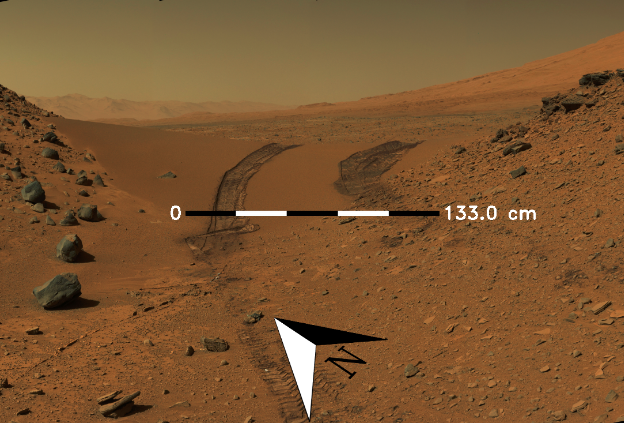
Full documentation on wiki: http://wiki.ros.org/image_overlay_scale_and_compass
Quick Start
- Install:
$ sudo apt-get install ros-kinetic-image-overlay-compass-and-scale
- Launch node:
$ roslaunch image_overlay_scale_and_compass overlay.launch
- Publish heading and scale values
$ rostopic pub /heading std_msgs/Float32 45
$ rostopic pub /scale std_msgs/Float32 133
- View resulting image
$ rqt_image_view /science/overlay/compressed
Command Line Interface (CLI)
Invoke once using Command Line Interface (CLI) and save to disk instead of pulishing to ROS.
$ roscd image_overlay_scale_and_compass
$ ./src/image_overlay_scale_and_compass/image_overlay.py --input-image ~/mars.png --heading 45 --scale-text 133 --output-file output.png
CLI Options
Usage: image_overlay.py [OPTIONS]

Options:
--input-image TEXT  Path to input image file  [required]
--heading FLOAT     Current heading relative to north in degrees  [required]
--scale-text FLOAT  The value to be displayed on the right of the scale bar
                    in centemeters  [required]
--output-file TEXT  Output filename to save result to
                    [default='output.png']
--help              Show this message and exit.
Full documentation on wiki: http://wiki.ros.org/image_overlay_scale_and_compass
CONTRIBUTING
Repository Summary
| Description | Add an indication of scale and compass to images (with ROS support) |
| Checkout URI | https://github.com/danielsnider/image_overlay_scale_and_compass.git |
| VCS Type | git |
| VCS Version | master |
| Last Updated | 2017-08-05 |
| Dev Status | MAINTAINED |
| Released | RELEASED |
| Contributing |
Help Wanted (-)
Good First Issues (-) Pull Requests to Review (-) |
Packages
| Name | Version |
|---|---|
| image_overlay_scale_and_compass | 0.2.1 |
README
image_overlay_scale_and_compass
Add an indication of scale and compass to images.
Full documentation on wiki: http://wiki.ros.org/image_overlay_scale_and_compass
Quick Start
- Install:
$ sudo apt-get install ros-kinetic-image-overlay-compass-and-scale
- Launch node:
$ roslaunch image_overlay_scale_and_compass overlay.launch
- Publish heading and scale values
$ rostopic pub /heading std_msgs/Float32 45
$ rostopic pub /scale std_msgs/Float32 133
- View resulting image
$ rqt_image_view /science/overlay/compressed
Command Line Interface (CLI)
Invoke once using Command Line Interface (CLI) and save to disk instead of pulishing to ROS.
$ roscd image_overlay_scale_and_compass
$ ./src/image_overlay_scale_and_compass/image_overlay.py --input-image ~/mars.png --heading 45 --scale-text 133 --output-file output.png
CLI Options
Usage: image_overlay.py [OPTIONS]

Options:
--input-image TEXT  Path to input image file  [required]
--heading FLOAT     Current heading relative to north in degrees  [required]
--scale-text FLOAT  The value to be displayed on the right of the scale bar
                    in centemeters  [required]
--output-file TEXT  Output filename to save result to
                    [default='output.png']
--help              Show this message and exit.
Full documentation on wiki: http://wiki.ros.org/image_overlay_scale_and_compass
CONTRIBUTING
Repository Summary
| Description | Add an indication of scale and compass to images (with ROS support) |
| Checkout URI | https://github.com/danielsnider/image_overlay_scale_and_compass.git |
| VCS Type | git |
| VCS Version | master |
| Last Updated | 2017-08-05 |
| Dev Status | MAINTAINED |
| Released | RELEASED |
| Contributing |
Help Wanted (-)
Good First Issues (-) Pull Requests to Review (-) |
Packages
| Name | Version |
|---|---|
| image_overlay_scale_and_compass | 0.2.1 |
README
image_overlay_scale_and_compass
Add an indication of scale and compass to images.
Full documentation on wiki: http://wiki.ros.org/image_overlay_scale_and_compass
Quick Start
- Install:
$ sudo apt-get install ros-kinetic-image-overlay-compass-and-scale
- Launch node:
$ roslaunch image_overlay_scale_and_compass overlay.launch
- Publish heading and scale values
$ rostopic pub /heading std_msgs/Float32 45
$ rostopic pub /scale std_msgs/Float32 133
- View resulting image
$ rqt_image_view /science/overlay/compressed
Command Line Interface (CLI)
Invoke once using Command Line Interface (CLI) and save to disk instead of pulishing to ROS.
$ roscd image_overlay_scale_and_compass
$ ./src/image_overlay_scale_and_compass/image_overlay.py --input-image ~/mars.png --heading 45 --scale-text 133 --output-file output.png
CLI Options
Usage: image_overlay.py [OPTIONS]

Options:
--input-image TEXT  Path to input image file  [required]
--heading FLOAT     Current heading relative to north in degrees  [required]
--scale-text FLOAT  The value to be displayed on the right of the scale bar
                    in centemeters  [required]
--output-file TEXT  Output filename to save result to
                    [default='output.png']
--help              Show this message and exit.
Full documentation on wiki: http://wiki.ros.org/image_overlay_scale_and_compass
CONTRIBUTING
Repository Summary
| Description | Add an indication of scale and compass to images (with ROS support) |
| Checkout URI | https://github.com/danielsnider/image_overlay_scale_and_compass.git |
| VCS Type | git |
| VCS Version | master |
| Last Updated | 2017-08-05 |
| Dev Status | MAINTAINED |
| Released | RELEASED |
| Contributing |
Help Wanted (-)
Good First Issues (-) Pull Requests to Review (-) |
Packages
| Name | Version |
|---|---|
| image_overlay_scale_and_compass | 0.2.1 |
README
image_overlay_scale_and_compass
Add an indication of scale and compass to images.
Full documentation on wiki: http://wiki.ros.org/image_overlay_scale_and_compass
Quick Start
- Install:
$ sudo apt-get install ros-kinetic-image-overlay-compass-and-scale
- Launch node:
$ roslaunch image_overlay_scale_and_compass overlay.launch
- Publish heading and scale values
$ rostopic pub /heading std_msgs/Float32 45
$ rostopic pub /scale std_msgs/Float32 133
- View resulting image
$ rqt_image_view /science/overlay/compressed
Command Line Interface (CLI)
Invoke once using Command Line Interface (CLI) and save to disk instead of pulishing to ROS.
$ roscd image_overlay_scale_and_compass
$ ./src/image_overlay_scale_and_compass/image_overlay.py --input-image ~/mars.png --heading 45 --scale-text 133 --output-file output.png
CLI Options
Usage: image_overlay.py [OPTIONS]

Options:
--input-image TEXT  Path to input image file  [required]
--heading FLOAT     Current heading relative to north in degrees  [required]
--scale-text FLOAT  The value to be displayed on the right of the scale bar
                    in centemeters  [required]
--output-file TEXT  Output filename to save result to
                    [default='output.png']
--help              Show this message and exit.
Full documentation on wiki: http://wiki.ros.org/image_overlay_scale_and_compass
CONTRIBUTING
Repository Summary
| Description | Add an indication of scale and compass to images (with ROS support) |
| Checkout URI | https://github.com/danielsnider/image_overlay_scale_and_compass.git |
| VCS Type | git |
| VCS Version | master |
| Last Updated | 2017-08-05 |
| Dev Status | MAINTAINED |
| Released | RELEASED |
| Contributing |
Help Wanted (-)
Good First Issues (-) Pull Requests to Review (-) |
Packages
| Name | Version |
|---|---|
| image_overlay_scale_and_compass | 0.2.1 |
README
image_overlay_scale_and_compass
Add an indication of scale and compass to images.
Full documentation on wiki: http://wiki.ros.org/image_overlay_scale_and_compass
Quick Start
- Install:
$ sudo apt-get install ros-kinetic-image-overlay-compass-and-scale
- Launch node:
$ roslaunch image_overlay_scale_and_compass overlay.launch
- Publish heading and scale values
$ rostopic pub /heading std_msgs/Float32 45
$ rostopic pub /scale std_msgs/Float32 133
- View resulting image
$ rqt_image_view /science/overlay/compressed
Command Line Interface (CLI)
Invoke once using Command Line Interface (CLI) and save to disk instead of pulishing to ROS.
$ roscd image_overlay_scale_and_compass
$ ./src/image_overlay_scale_and_compass/image_overlay.py --input-image ~/mars.png --heading 45 --scale-text 133 --output-file output.png
CLI Options
Usage: image_overlay.py [OPTIONS]

Options:
--input-image TEXT  Path to input image file  [required]
--heading FLOAT     Current heading relative to north in degrees  [required]
--scale-text FLOAT  The value to be displayed on the right of the scale bar
                    in centemeters  [required]
--output-file TEXT  Output filename to save result to
                    [default='output.png']
--help              Show this message and exit.
Full documentation on wiki: http://wiki.ros.org/image_overlay_scale_and_compass
CONTRIBUTING
Repository Summary
| Description | Add an indication of scale and compass to images (with ROS support) |
| Checkout URI | https://github.com/danielsnider/image_overlay_scale_and_compass.git |
| VCS Type | git |
| VCS Version | master |
| Last Updated | 2017-08-05 |
| Dev Status | MAINTAINED |
| Released | RELEASED |
| Contributing |
Help Wanted (-)
Good First Issues (-) Pull Requests to Review (-) |
Packages
| Name | Version |
|---|---|
| image_overlay_scale_and_compass | 0.2.1 |
README
image_overlay_scale_and_compass
Add an indication of scale and compass to images.
Full documentation on wiki: http://wiki.ros.org/image_overlay_scale_and_compass
Quick Start
- Install:
$ sudo apt-get install ros-kinetic-image-overlay-compass-and-scale
- Launch node:
$ roslaunch image_overlay_scale_and_compass overlay.launch
- Publish heading and scale values
$ rostopic pub /heading std_msgs/Float32 45
$ rostopic pub /scale std_msgs/Float32 133
- View resulting image
$ rqt_image_view /science/overlay/compressed
Command Line Interface (CLI)
Invoke once using Command Line Interface (CLI) and save to disk instead of pulishing to ROS.
$ roscd image_overlay_scale_and_compass
$ ./src/image_overlay_scale_and_compass/image_overlay.py --input-image ~/mars.png --heading 45 --scale-text 133 --output-file output.png
CLI Options
Usage: image_overlay.py [OPTIONS]

Options:
--input-image TEXT  Path to input image file  [required]
--heading FLOAT     Current heading relative to north in degrees  [required]
--scale-text FLOAT  The value to be displayed on the right of the scale bar
                    in centemeters  [required]
--output-file TEXT  Output filename to save result to
                    [default='output.png']
--help              Show this message and exit.
Full documentation on wiki: http://wiki.ros.org/image_overlay_scale_and_compass
CONTRIBUTING
Repository Summary
| Description | Add an indication of scale and compass to images (with ROS support) |
| Checkout URI | https://github.com/danielsnider/image_overlay_scale_and_compass.git |
| VCS Type | git |
| VCS Version | master |
| Last Updated | 2017-08-05 |
| Dev Status | MAINTAINED |
| Released | RELEASED |
| Contributing |
Help Wanted (-)
Good First Issues (-) Pull Requests to Review (-) |
Packages
| Name | Version |
|---|---|
| image_overlay_scale_and_compass | 0.2.1 |
README
image_overlay_scale_and_compass
Add an indication of scale and compass to images.
Full documentation on wiki: http://wiki.ros.org/image_overlay_scale_and_compass
Quick Start
- Install:
$ sudo apt-get install ros-kinetic-image-overlay-compass-and-scale
- Launch node:
$ roslaunch image_overlay_scale_and_compass overlay.launch
- Publish heading and scale values
$ rostopic pub /heading std_msgs/Float32 45
$ rostopic pub /scale std_msgs/Float32 133
- View resulting image
$ rqt_image_view /science/overlay/compressed
Command Line Interface (CLI)
Invoke once using Command Line Interface (CLI) and save to disk instead of pulishing to ROS.
$ roscd image_overlay_scale_and_compass
$ ./src/image_overlay_scale_and_compass/image_overlay.py --input-image ~/mars.png --heading 45 --scale-text 133 --output-file output.png
CLI Options
Usage: image_overlay.py [OPTIONS]

Options:
--input-image TEXT  Path to input image file  [required]
--heading FLOAT     Current heading relative to north in degrees  [required]
--scale-text FLOAT  The value to be displayed on the right of the scale bar
                    in centemeters  [required]
--output-file TEXT  Output filename to save result to
                    [default='output.png']
--help              Show this message and exit.
Full documentation on wiki: http://wiki.ros.org/image_overlay_scale_and_compass
CONTRIBUTING
Repository Summary
| Description | Add an indication of scale and compass to images (with ROS support) |
| Checkout URI | https://github.com/danielsnider/image_overlay_scale_and_compass.git |
| VCS Type | git |
| VCS Version | master |
| Last Updated | 2017-08-05 |
| Dev Status | MAINTAINED |
| Released | RELEASED |
| Contributing |
Help Wanted (-)
Good First Issues (-) Pull Requests to Review (-) |
Packages
| Name | Version |
|---|---|
| image_overlay_scale_and_compass | 0.2.1 |
README
image_overlay_scale_and_compass
Add an indication of scale and compass to images.
Full documentation on wiki: http://wiki.ros.org/image_overlay_scale_and_compass
Quick Start
- Install:
$ sudo apt-get install ros-kinetic-image-overlay-compass-and-scale
- Launch node:
$ roslaunch image_overlay_scale_and_compass overlay.launch
- Publish heading and scale values
$ rostopic pub /heading std_msgs/Float32 45
$ rostopic pub /scale std_msgs/Float32 133
- View resulting image
$ rqt_image_view /science/overlay/compressed
Command Line Interface (CLI)
Invoke once using Command Line Interface (CLI) and save to disk instead of pulishing to ROS.
$ roscd image_overlay_scale_and_compass
$ ./src/image_overlay_scale_and_compass/image_overlay.py --input-image ~/mars.png --heading 45 --scale-text 133 --output-file output.png
CLI Options
Usage: image_overlay.py [OPTIONS]

Options:
--input-image TEXT  Path to input image file  [required]
--heading FLOAT     Current heading relative to north in degrees  [required]
--scale-text FLOAT  The value to be displayed on the right of the scale bar
                    in centemeters  [required]
--output-file TEXT  Output filename to save result to
                    [default='output.png']
--help              Show this message and exit.
Full documentation on wiki: http://wiki.ros.org/image_overlay_scale_and_compass
CONTRIBUTING
Repository Summary
| Description | Add an indication of scale and compass to images (with ROS support) |
| Checkout URI | https://github.com/danielsnider/image_overlay_scale_and_compass.git |
| VCS Type | git |
| VCS Version | master |
| Last Updated | 2017-08-05 |
| Dev Status | MAINTAINED |
| Released | RELEASED |
| Contributing |
Help Wanted (-)
Good First Issues (-) Pull Requests to Review (-) |
Packages
| Name | Version |
|---|---|
| image_overlay_scale_and_compass | 0.2.1 |
README
image_overlay_scale_and_compass
Add an indication of scale and compass to images.
Full documentation on wiki: http://wiki.ros.org/image_overlay_scale_and_compass
Quick Start
- Install:
$ sudo apt-get install ros-kinetic-image-overlay-compass-and-scale
- Launch node:
$ roslaunch image_overlay_scale_and_compass overlay.launch
- Publish heading and scale values
$ rostopic pub /heading std_msgs/Float32 45
$ rostopic pub /scale std_msgs/Float32 133
- View resulting image
$ rqt_image_view /science/overlay/compressed
Command Line Interface (CLI)
Invoke once using Command Line Interface (CLI) and save to disk instead of pulishing to ROS.
$ roscd image_overlay_scale_and_compass
$ ./src/image_overlay_scale_and_compass/image_overlay.py --input-image ~/mars.png --heading 45 --scale-text 133 --output-file output.png
CLI Options
Usage: image_overlay.py [OPTIONS]

Options:
--input-image TEXT  Path to input image file  [required]
--heading FLOAT     Current heading relative to north in degrees  [required]
--scale-text FLOAT  The value to be displayed on the right of the scale bar
                    in centemeters  [required]
--output-file TEXT  Output filename to save result to
                    [default='output.png']
--help              Show this message and exit.
Full documentation on wiki: http://wiki.ros.org/image_overlay_scale_and_compass
CONTRIBUTING
Repository Summary
| Description | Add an indication of scale and compass to images (with ROS support) |
| Checkout URI | https://github.com/danielsnider/image_overlay_scale_and_compass.git |
| VCS Type | git |
| VCS Version | master |
| Last Updated | 2017-08-05 |
| Dev Status | MAINTAINED |
| Released | RELEASED |
| Contributing |
Help Wanted (-)
Good First Issues (-) Pull Requests to Review (-) |
Packages
| Name | Version |
|---|---|
| image_overlay_scale_and_compass | 0.2.1 |
README
image_overlay_scale_and_compass
Add an indication of scale and compass to images.
Full documentation on wiki: http://wiki.ros.org/image_overlay_scale_and_compass
Quick Start
- Install:
$ sudo apt-get install ros-kinetic-image-overlay-compass-and-scale
- Launch node:
$ roslaunch image_overlay_scale_and_compass overlay.launch
- Publish heading and scale values
$ rostopic pub /heading std_msgs/Float32 45
$ rostopic pub /scale std_msgs/Float32 133
- View resulting image
$ rqt_image_view /science/overlay/compressed
Command Line Interface (CLI)
Invoke once using Command Line Interface (CLI) and save to disk instead of pulishing to ROS.
$ roscd image_overlay_scale_and_compass
$ ./src/image_overlay_scale_and_compass/image_overlay.py --input-image ~/mars.png --heading 45 --scale-text 133 --output-file output.png
CLI Options
Usage: image_overlay.py [OPTIONS]

Options:
--input-image TEXT  Path to input image file  [required]
--heading FLOAT     Current heading relative to north in degrees  [required]
--scale-text FLOAT  The value to be displayed on the right of the scale bar
                    in centemeters  [required]
--output-file TEXT  Output filename to save result to
                    [default='output.png']
--help              Show this message and exit.
Full documentation on wiki: http://wiki.ros.org/image_overlay_scale_and_compass
CONTRIBUTING
Repository Summary
| Description | Add an indication of scale and compass to images (with ROS support) |
| Checkout URI | https://github.com/danielsnider/image_overlay_scale_and_compass.git |
| VCS Type | git |
| VCS Version | master |
| Last Updated | 2017-08-05 |
| Dev Status | MAINTAINED |
| Released | RELEASED |
| Contributing |
Help Wanted (-)
Good First Issues (-) Pull Requests to Review (-) |
Packages
| Name | Version |
|---|---|
| image_overlay_scale_and_compass | 0.2.1 |
README
image_overlay_scale_and_compass
Add an indication of scale and compass to images.
Full documentation on wiki: http://wiki.ros.org/image_overlay_scale_and_compass
Quick Start
- Install:
$ sudo apt-get install ros-kinetic-image-overlay-compass-and-scale
- Launch node:
$ roslaunch image_overlay_scale_and_compass overlay.launch
- Publish heading and scale values
$ rostopic pub /heading std_msgs/Float32 45
$ rostopic pub /scale std_msgs/Float32 133
- View resulting image
$ rqt_image_view /science/overlay/compressed
Command Line Interface (CLI)
Invoke once using Command Line Interface (CLI) and save to disk instead of pulishing to ROS.
$ roscd image_overlay_scale_and_compass
$ ./src/image_overlay_scale_and_compass/image_overlay.py --input-image ~/mars.png --heading 45 --scale-text 133 --output-file output.png
CLI Options
Usage: image_overlay.py [OPTIONS]

Options:
--input-image TEXT  Path to input image file  [required]
--heading FLOAT     Current heading relative to north in degrees  [required]
--scale-text FLOAT  The value to be displayed on the right of the scale bar
                    in centemeters  [required]
--output-file TEXT  Output filename to save result to
                    [default='output.png']
--help              Show this message and exit.
Full documentation on wiki: http://wiki.ros.org/image_overlay_scale_and_compass
CONTRIBUTING
Repository Summary
| Description | Add an indication of scale and compass to images (with ROS support) |
| Checkout URI | https://github.com/danielsnider/image_overlay_scale_and_compass.git |
| VCS Type | git |
| VCS Version | master |
| Last Updated | 2017-08-05 |
| Dev Status | MAINTAINED |
| Released | RELEASED |
| Contributing |
Help Wanted (-)
Good First Issues (-) Pull Requests to Review (-) |
Packages
| Name | Version |
|---|---|
| image_overlay_scale_and_compass | 0.2.1 |
README
image_overlay_scale_and_compass
Add an indication of scale and compass to images.
Full documentation on wiki: http://wiki.ros.org/image_overlay_scale_and_compass
Quick Start
- Install:
$ sudo apt-get install ros-kinetic-image-overlay-compass-and-scale
- Launch node:
$ roslaunch image_overlay_scale_and_compass overlay.launch
- Publish heading and scale values
$ rostopic pub /heading std_msgs/Float32 45
$ rostopic pub /scale std_msgs/Float32 133
- View resulting image
$ rqt_image_view /science/overlay/compressed
Command Line Interface (CLI)
Invoke once using Command Line Interface (CLI) and save to disk instead of pulishing to ROS.
$ roscd image_overlay_scale_and_compass
$ ./src/image_overlay_scale_and_compass/image_overlay.py --input-image ~/mars.png --heading 45 --scale-text 133 --output-file output.png
CLI Options
Usage: image_overlay.py [OPTIONS]

Options:
--input-image TEXT  Path to input image file  [required]
--heading FLOAT     Current heading relative to north in degrees  [required]
--scale-text FLOAT  The value to be displayed on the right of the scale bar
                    in centemeters  [required]
--output-file TEXT  Output filename to save result to
                    [default='output.png']
--help              Show this message and exit.
Full documentation on wiki: http://wiki.ros.org/image_overlay_scale_and_compass
CONTRIBUTING
Repository Summary
| Description | Add an indication of scale and compass to images (with ROS support) |
| Checkout URI | https://github.com/danielsnider/image_overlay_scale_and_compass.git |
| VCS Type | git |
| VCS Version | master |
| Last Updated | 2017-08-05 |
| Dev Status | MAINTAINED |
| Released | RELEASED |
| Contributing |
Help Wanted (-)
Good First Issues (-) Pull Requests to Review (-) |
Packages
| Name | Version |
|---|---|
| image_overlay_scale_and_compass | 0.2.1 |
README
image_overlay_scale_and_compass
Add an indication of scale and compass to images.
Full documentation on wiki: http://wiki.ros.org/image_overlay_scale_and_compass
Quick Start
- Install:
$ sudo apt-get install ros-kinetic-image-overlay-compass-and-scale
- Launch node:
$ roslaunch image_overlay_scale_and_compass overlay.launch
- Publish heading and scale values
$ rostopic pub /heading std_msgs/Float32 45
$ rostopic pub /scale std_msgs/Float32 133
- View resulting image
$ rqt_image_view /science/overlay/compressed
Command Line Interface (CLI)
Invoke once using Command Line Interface (CLI) and save to disk instead of pulishing to ROS.
$ roscd image_overlay_scale_and_compass
$ ./src/image_overlay_scale_and_compass/image_overlay.py --input-image ~/mars.png --heading 45 --scale-text 133 --output-file output.png
CLI Options
Usage: image_overlay.py [OPTIONS]

Options:
--input-image TEXT  Path to input image file  [required]
--heading FLOAT     Current heading relative to north in degrees  [required]
--scale-text FLOAT  The value to be displayed on the right of the scale bar
                    in centemeters  [required]
--output-file TEXT  Output filename to save result to
                    [default='output.png']
--help              Show this message and exit.
Full documentation on wiki: http://wiki.ros.org/image_overlay_scale_and_compass
CONTRIBUTING
Repository Summary
| Description | Add an indication of scale and compass to images (with ROS support) |
| Checkout URI | https://github.com/danielsnider/image_overlay_scale_and_compass.git |
| VCS Type | git |
| VCS Version | master |
| Last Updated | 2017-08-05 |
| Dev Status | MAINTAINED |
| Released | RELEASED |
| Contributing |
Help Wanted (-)
Good First Issues (-) Pull Requests to Review (-) |
Packages
| Name | Version |
|---|---|
| image_overlay_scale_and_compass | 0.2.1 |
README
image_overlay_scale_and_compass
Add an indication of scale and compass to images.
Full documentation on wiki: http://wiki.ros.org/image_overlay_scale_and_compass
Quick Start
- Install:
$ sudo apt-get install ros-kinetic-image-overlay-compass-and-scale
- Launch node:
$ roslaunch image_overlay_scale_and_compass overlay.launch
- Publish heading and scale values
$ rostopic pub /heading std_msgs/Float32 45
$ rostopic pub /scale std_msgs/Float32 133
- View resulting image
$ rqt_image_view /science/overlay/compressed
Command Line Interface (CLI)
Invoke once using Command Line Interface (CLI) and save to disk instead of pulishing to ROS.
$ roscd image_overlay_scale_and_compass
$ ./src/image_overlay_scale_and_compass/image_overlay.py --input-image ~/mars.png --heading 45 --scale-text 133 --output-file output.png
CLI Options
Usage: image_overlay.py [OPTIONS]

Options:
--input-image TEXT  Path to input image file  [required]
--heading FLOAT     Current heading relative to north in degrees  [required]
--scale-text FLOAT  The value to be displayed on the right of the scale bar
                    in centemeters  [required]
--output-file TEXT  Output filename to save result to
                    [default='output.png']
--help              Show this message and exit.
Full documentation on wiki: http://wiki.ros.org/image_overlay_scale_and_compass
CONTRIBUTING
Repository Summary
| Description | Add an indication of scale and compass to images (with ROS support) |
| Checkout URI | https://github.com/danielsnider/image_overlay_scale_and_compass.git |
| VCS Type | git |
| VCS Version | master |
| Last Updated | 2017-08-05 |
| Dev Status | MAINTAINED |
| Released | RELEASED |
| Contributing |
Help Wanted (-)
Good First Issues (-) Pull Requests to Review (-) |
Packages
| Name | Version |
|---|---|
| image_overlay_scale_and_compass | 0.2.1 |
README
image_overlay_scale_and_compass
Add an indication of scale and compass to images.
Full documentation on wiki: http://wiki.ros.org/image_overlay_scale_and_compass
Quick Start
- Install:
$ sudo apt-get install ros-kinetic-image-overlay-compass-and-scale
- Launch node:
$ roslaunch image_overlay_scale_and_compass overlay.launch
- Publish heading and scale values
$ rostopic pub /heading std_msgs/Float32 45
$ rostopic pub /scale std_msgs/Float32 133
- View resulting image
$ rqt_image_view /science/overlay/compressed
Command Line Interface (CLI)
Invoke once using Command Line Interface (CLI) and save to disk instead of pulishing to ROS.
$ roscd image_overlay_scale_and_compass
$ ./src/image_overlay_scale_and_compass/image_overlay.py --input-image ~/mars.png --heading 45 --scale-text 133 --output-file output.png
CLI Options
Usage: image_overlay.py [OPTIONS]

Options:
--input-image TEXT  Path to input image file  [required]
--heading FLOAT     Current heading relative to north in degrees  [required]
--scale-text FLOAT  The value to be displayed on the right of the scale bar
                    in centemeters  [required]
--output-file TEXT  Output filename to save result to
                    [default='output.png']
--help              Show this message and exit.
Full documentation on wiki: http://wiki.ros.org/image_overlay_scale_and_compass
CONTRIBUTING
Repository Summary
| Description | Add an indication of scale and compass to images (with ROS support) |
| Checkout URI | https://github.com/danielsnider/image_overlay_scale_and_compass.git |
| VCS Type | git |
| VCS Version | master |
| Last Updated | 2017-08-05 |
| Dev Status | MAINTAINED |
| Released | RELEASED |
| Contributing |
Help Wanted (-)
Good First Issues (-) Pull Requests to Review (-) |
Packages
| Name | Version |
|---|---|
| image_overlay_scale_and_compass | 0.2.1 |
README
image_overlay_scale_and_compass
Add an indication of scale and compass to images.
Full documentation on wiki: http://wiki.ros.org/image_overlay_scale_and_compass
Quick Start
- Install:
$ sudo apt-get install ros-kinetic-image-overlay-compass-and-scale
- Launch node:
$ roslaunch image_overlay_scale_and_compass overlay.launch
- Publish heading and scale values
$ rostopic pub /heading std_msgs/Float32 45
$ rostopic pub /scale std_msgs/Float32 133
- View resulting image
$ rqt_image_view /science/overlay/compressed
Command Line Interface (CLI)
Invoke once using Command Line Interface (CLI) and save to disk instead of pulishing to ROS.
$ roscd image_overlay_scale_and_compass
$ ./src/image_overlay_scale_and_compass/image_overlay.py --input-image ~/mars.png --heading 45 --scale-text 133 --output-file output.png
CLI Options
Usage: image_overlay.py [OPTIONS]

Options:
--input-image TEXT  Path to input image file  [required]
--heading FLOAT     Current heading relative to north in degrees  [required]
--scale-text FLOAT  The value to be displayed on the right of the scale bar
                    in centemeters  [required]
--output-file TEXT  Output filename to save result to
                    [default='output.png']
--help              Show this message and exit.
Full documentation on wiki: http://wiki.ros.org/image_overlay_scale_and_compass
CONTRIBUTING
Repository Summary
| Description | Add an indication of scale and compass to images (with ROS support) |
| Checkout URI | https://github.com/danielsnider/image_overlay_scale_and_compass.git |
| VCS Type | git |
| VCS Version | master |
| Last Updated | 2017-08-05 |
| Dev Status | MAINTAINED |
| Released | RELEASED |
| Contributing |
Help Wanted (-)
Good First Issues (-) Pull Requests to Review (-) |
Packages
| Name | Version |
|---|---|
| image_overlay_scale_and_compass | 0.2.1 |
README
image_overlay_scale_and_compass
Add an indication of scale and compass to images.
Full documentation on wiki: http://wiki.ros.org/image_overlay_scale_and_compass
Quick Start
- Install:
$ sudo apt-get install ros-kinetic-image-overlay-compass-and-scale
- Launch node:
$ roslaunch image_overlay_scale_and_compass overlay.launch
- Publish heading and scale values
$ rostopic pub /heading std_msgs/Float32 45
$ rostopic pub /scale std_msgs/Float32 133
- View resulting image
$ rqt_image_view /science/overlay/compressed
Command Line Interface (CLI)
Invoke once using Command Line Interface (CLI) and save to disk instead of pulishing to ROS.
$ roscd image_overlay_scale_and_compass
$ ./src/image_overlay_scale_and_compass/image_overlay.py --input-image ~/mars.png --heading 45 --scale-text 133 --output-file output.png
CLI Options
Usage: image_overlay.py [OPTIONS]

Options:
--input-image TEXT  Path to input image file  [required]
--heading FLOAT     Current heading relative to north in degrees  [required]
--scale-text FLOAT  The value to be displayed on the right of the scale bar
                    in centemeters  [required]
--output-file TEXT  Output filename to save result to
                    [default='output.png']
--help              Show this message and exit.
Full documentation on wiki: http://wiki.ros.org/image_overlay_scale_and_compass
CONTRIBUTING
Repository Summary
| Description | Add an indication of scale and compass to images (with ROS support) |
| Checkout URI | https://github.com/danielsnider/image_overlay_scale_and_compass.git |
| VCS Type | git |
| VCS Version | master |
| Last Updated | 2017-08-05 |
| Dev Status | MAINTAINED |
| Released | RELEASED |
| Contributing |
Help Wanted (-)
Good First Issues (-) Pull Requests to Review (-) |
Packages
| Name | Version |
|---|---|
| image_overlay_scale_and_compass | 0.2.1 |
README
image_overlay_scale_and_compass
Add an indication of scale and compass to images.
Full documentation on wiki: http://wiki.ros.org/image_overlay_scale_and_compass
Quick Start
- Install:
$ sudo apt-get install ros-kinetic-image-overlay-compass-and-scale
- Launch node:
$ roslaunch image_overlay_scale_and_compass overlay.launch
- Publish heading and scale values
$ rostopic pub /heading std_msgs/Float32 45
$ rostopic pub /scale std_msgs/Float32 133
- View resulting image
$ rqt_image_view /science/overlay/compressed
Command Line Interface (CLI)
Invoke once using Command Line Interface (CLI) and save to disk instead of pulishing to ROS.
$ roscd image_overlay_scale_and_compass
$ ./src/image_overlay_scale_and_compass/image_overlay.py --input-image ~/mars.png --heading 45 --scale-text 133 --output-file output.png
CLI Options
Usage: image_overlay.py [OPTIONS]

Options:
--input-image TEXT  Path to input image file  [required]
--heading FLOAT     Current heading relative to north in degrees  [required]
--scale-text FLOAT  The value to be displayed on the right of the scale bar
                    in centemeters  [required]
--output-file TEXT  Output filename to save result to
                    [default='output.png']
--help              Show this message and exit.
Full documentation on wiki: http://wiki.ros.org/image_overlay_scale_and_compass
CONTRIBUTING
Repository Summary
| Description | Add an indication of scale and compass to images (with ROS support) |
| Checkout URI | https://github.com/danielsnider/image_overlay_scale_and_compass.git |
| VCS Type | git |
| VCS Version | master |
| Last Updated | 2017-08-05 |
| Dev Status | MAINTAINED |
| Released | RELEASED |
| Contributing |
Help Wanted (-)
Good First Issues (-) Pull Requests to Review (-) |
Packages
| Name | Version |
|---|---|
| image_overlay_scale_and_compass | 0.2.1 |
README
image_overlay_scale_and_compass
Add an indication of scale and compass to images.
Full documentation on wiki: http://wiki.ros.org/image_overlay_scale_and_compass
Quick Start
- Install:
$ sudo apt-get install ros-kinetic-image-overlay-compass-and-scale
- Launch node:
$ roslaunch image_overlay_scale_and_compass overlay.launch
- Publish heading and scale values
$ rostopic pub /heading std_msgs/Float32 45
$ rostopic pub /scale std_msgs/Float32 133
- View resulting image
$ rqt_image_view /science/overlay/compressed
Command Line Interface (CLI)
Invoke once using Command Line Interface (CLI) and save to disk instead of pulishing to ROS.
$ roscd image_overlay_scale_and_compass
$ ./src/image_overlay_scale_and_compass/image_overlay.py --input-image ~/mars.png --heading 45 --scale-text 133 --output-file output.png
CLI Options
Usage: image_overlay.py [OPTIONS]

Options:
--input-image TEXT  Path to input image file  [required]
--heading FLOAT     Current heading relative to north in degrees  [required]
--scale-text FLOAT  The value to be displayed on the right of the scale bar
                    in centemeters  [required]
--output-file TEXT  Output filename to save result to
                    [default='output.png']
--help              Show this message and exit.
Full documentation on wiki: http://wiki.ros.org/image_overlay_scale_and_compass
CONTRIBUTING
Repository Summary
| Description | Add an indication of scale and compass to images (with ROS support) |
| Checkout URI | https://github.com/danielsnider/image_overlay_scale_and_compass.git |
| VCS Type | git |
| VCS Version | master |
| Last Updated | 2017-08-05 |
| Dev Status | MAINTAINED |
| Released | RELEASED |
| Contributing |
Help Wanted (-)
Good First Issues (-) Pull Requests to Review (-) |
Packages
| Name | Version |
|---|---|
| image_overlay_scale_and_compass | 0.2.1 |
README
image_overlay_scale_and_compass
Add an indication of scale and compass to images.
Full documentation on wiki: http://wiki.ros.org/image_overlay_scale_and_compass
Quick Start
- Install:
$ sudo apt-get install ros-kinetic-image-overlay-compass-and-scale
- Launch node:
$ roslaunch image_overlay_scale_and_compass overlay.launch
- Publish heading and scale values
$ rostopic pub /heading std_msgs/Float32 45
$ rostopic pub /scale std_msgs/Float32 133
- View resulting image
$ rqt_image_view /science/overlay/compressed
Command Line Interface (CLI)
Invoke once using Command Line Interface (CLI) and save to disk instead of pulishing to ROS.
$ roscd image_overlay_scale_and_compass
$ ./src/image_overlay_scale_and_compass/image_overlay.py --input-image ~/mars.png --heading 45 --scale-text 133 --output-file output.png
CLI Options
Usage: image_overlay.py [OPTIONS]

Options:
--input-image TEXT  Path to input image file  [required]
--heading FLOAT     Current heading relative to north in degrees  [required]
--scale-text FLOAT  The value to be displayed on the right of the scale bar
                    in centemeters  [required]
--output-file TEXT  Output filename to save result to
                    [default='output.png']
--help              Show this message and exit.
Full documentation on wiki: http://wiki.ros.org/image_overlay_scale_and_compass