 ROS Index
|
kuka_external_control_sdk repositorykuka_external_control_sdk_common kuka_external_control_sdk_iiqka2 |
ROS Distro
|
Repository Summary
| Description | This repository provides the SDK needed for joint position streaming of KUKA robots. It is not a ROS package but is consumed by the drivers |
| Checkout URI | https://github.com/kuka-ros/kuka_external_control_sdk.git |
| VCS Type | git |
| VCS Version | master |
| Last Updated | 2026-10-06 |
| Dev Status | DEVELOPED |
| Released | UNRELEASED |
| Contributing |
Help Wanted (-)
Good First Issues (-) Pull Requests to Review (-) |
Packages
| Name | Version |
|---|---|
| kuka_external_control_sdk_common | 2.0.0 |
| kuka_external_control_sdk_iiqka2 | 2.0.0 |
README
KUKA External Control SDK
This repository provides the SDK used for KUKA external control on iiQKA.OS2. It is consumed by the ROS 2 drivers and other tooling.
| GitHub CI | SonarCloud |
|---|---|
 |
This guide will help you understand how to use the SDK to control your robot externally. You’ll find information on the SDK’s structure and setup instructions tailored to different systems.
Select Your Setup Guide
Refer to the following document for setting up the controller:
Overview
To use the SDK effectively, it’s important to understand its structure. The core component is the Robot class and its IRobot interface, which represent the external control service running on the robot controller.
The IRobot interface abstracts OS-specific operations from the user to enhance modularity. It enables external control in a standardized and flexible manner.
IRobot Interface Methods
The methods of the IRobot class provide the general interface:
-
Setup(): Sets up the network connection with the robot controller. -
StartControlling(ControlMode control_mode): Starts the external control session on the controller. -
StartMonitoring(): Not supported on iiQKA.OS2. -
CreateMonitoringSubscription(std::function<void(BaseMotionState&)> callback): Not supported on iiQKA.OS2. -
CancelMonitoringSubscription(): Not supported on iiQKA.OS2. -
HasMonitoringSubscription(): Not supported on iiQKA.OS2. -
StopControlling(): Stops the external control session on the controller. The stop signal must be sent in response to a motion state; the function also waits for a new request if none is currently active. -
StopMonitoring(): Not supported on iiQKA.OS2. -
SendControlSignal(): Sends the control signal to the controller. -
ReceiveMotionState(std::chrono::milliseconds timeout): Attempts to receive the current motion state of the robot within the provided timeout. -
GetControlSignal(): Returns the most recent control signal, which the user can fill with the desired data. -
GetLastMotionState(): Returns the most recent motion state of the control flow. -
SwitchControlMode(ControlMode control_mode): Supported when using the EKI or mxA wrapper; not supported by the RSI-only interface. -
RegisterEventHandler(std::unique_ptr<EventHandler>&& event_handler): Supported when using the EKI or mxA wrapper; not supported by the RSI-only interface.
SDK Usage
In this section, we’ll describe a general use case for controlling, using a sequence diagram to illustrate the process.
Control Example
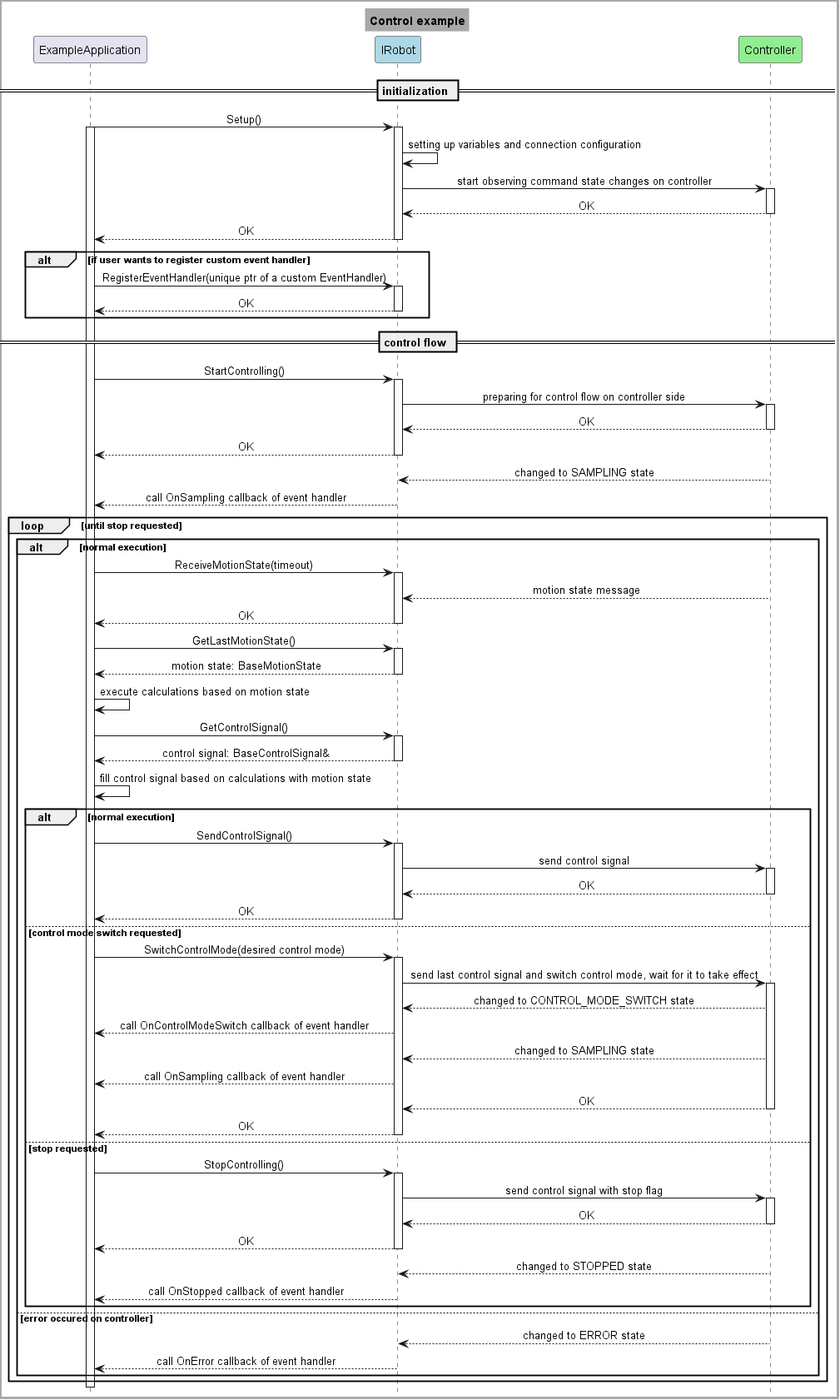
To begin, call Setup on the specific instance of the IRobot interface. This will initialize the necessary variables and communication channels. If successful, you can start external control.
After issuing a successful StartControlling call, the control cycle begins. In each iteration, the robot controller sends the current motion state of the robot, which the client receives using the ReceiveMotionState function. The client must then send the next calculated control signal using the SendControlSignal function within the defined cycle time.
Instead of manually creating the control signal objects, retrieve the stored instances using the GetLastMotionState and GetControlSignal methods.
From the user’s perspective, the MotionState is a read-only object filled when the packet containing its binary representation is received and decoded. It provides getters for the positions, torques, and velocities of individual joints.
The ControlSignal is the opposite: it’s a write-only object that the user must fill with the desired goal positions, torques, joint impedance attributes, etc., in each tick. If the ControlSignal is not modified but sent out using the SendControlSignal call, the internal control signal will contain the previous values.
Note: In the received motion states, the torque values have the opposite sign of what the client is expected to send out during torque control. To move a joint in the positive direction, a positive torque is needed, but the motion state will contain a negative measured torque due to internal conventions.
Since real-time communication follows a request-reply pattern, the StopControlling method must be sent as a reply to a received request; otherwise, an error is returned. Depending on network quality, this operation may need to be retried due to potential packet losses.
OS-Specific Implementations
To learn more about the SDK implementation for iiQKA.OS2, refer to:
CONTRIBUTING
|
|
kuka_external_control_sdk repositorykuka_external_control_sdk_common kuka_external_control_sdk_iiqka2 |
ROS Distro
|
Repository Summary
| Description | This repository provides the SDK needed for joint position streaming of KUKA robots. It is not a ROS package but is consumed by the drivers |
| Checkout URI | https://github.com/kuka-ros/kuka_external_control_sdk.git |
| VCS Type | git |
| VCS Version | master |
| Last Updated | 2026-10-06 |
| Dev Status | DEVELOPED |
| Released | UNRELEASED |
| Contributing |
Help Wanted (-)
Good First Issues (-) Pull Requests to Review (-) |
Packages
| Name | Version |
|---|---|
| kuka_external_control_sdk_common | 2.0.0 |
| kuka_external_control_sdk_iiqka2 | 2.0.0 |
README
KUKA External Control SDK
This repository provides the SDK used for KUKA external control on iiQKA.OS2. It is consumed by the ROS 2 drivers and other tooling.
| GitHub CI | SonarCloud |
|---|---|
|
This guide will help you understand how to use the SDK to control your robot externally. You’ll find information on the SDK’s structure and setup instructions tailored to different systems.
Select Your Setup Guide
Refer to the following document for setting up the controller:
Overview
To use the SDK effectively, it’s important to understand its structure. The core component is the Robot class and its IRobot interface, which represent the external control service running on the robot controller.
The IRobot interface abstracts OS-specific operations from the user to enhance modularity. It enables external control in a standardized and flexible manner.
IRobot Interface Methods
The methods of the IRobot class provide the general interface:
-
Setup(): Sets up the network connection with the robot controller. -
StartControlling(ControlMode control_mode): Starts the external control session on the controller. -
StartMonitoring(): Not supported on iiQKA.OS2. -
CreateMonitoringSubscription(std::function<void(BaseMotionState&)> callback): Not supported on iiQKA.OS2. -
CancelMonitoringSubscription(): Not supported on iiQKA.OS2. -
HasMonitoringSubscription(): Not supported on iiQKA.OS2. -
StopControlling(): Stops the external control session on the controller. The stop signal must be sent in response to a motion state; the function also waits for a new request if none is currently active. -
StopMonitoring(): Not supported on iiQKA.OS2. -
SendControlSignal(): Sends the control signal to the controller. -
ReceiveMotionState(std::chrono::milliseconds timeout): Attempts to receive the current motion state of the robot within the provided timeout. -
GetControlSignal(): Returns the most recent control signal, which the user can fill with the desired data. -
GetLastMotionState(): Returns the most recent motion state of the control flow. -
SwitchControlMode(ControlMode control_mode): Supported when using the EKI or mxA wrapper; not supported by the RSI-only interface. -
RegisterEventHandler(std::unique_ptr<EventHandler>&& event_handler): Supported when using the EKI or mxA wrapper; not supported by the RSI-only interface.
SDK Usage
In this section, we’ll describe a general use case for controlling, using a sequence diagram to illustrate the process.
Control Example
To begin, call Setup on the specific instance of the IRobot interface. This will initialize the necessary variables and communication channels. If successful, you can start external control.
After issuing a successful StartControlling call, the control cycle begins. In each iteration, the robot controller sends the current motion state of the robot, which the client receives using the ReceiveMotionState function. The client must then send the next calculated control signal using the SendControlSignal function within the defined cycle time.
Instead of manually creating the control signal objects, retrieve the stored instances using the GetLastMotionState and GetControlSignal methods.
From the user’s perspective, the MotionState is a read-only object filled when the packet containing its binary representation is received and decoded. It provides getters for the positions, torques, and velocities of individual joints.
The ControlSignal is the opposite: it’s a write-only object that the user must fill with the desired goal positions, torques, joint impedance attributes, etc., in each tick. If the ControlSignal is not modified but sent out using the SendControlSignal call, the internal control signal will contain the previous values.
Note: In the received motion states, the torque values have the opposite sign of what the client is expected to send out during torque control. To move a joint in the positive direction, a positive torque is needed, but the motion state will contain a negative measured torque due to internal conventions.
Since real-time communication follows a request-reply pattern, the StopControlling method must be sent as a reply to a received request; otherwise, an error is returned. Depending on network quality, this operation may need to be retried due to potential packet losses.
OS-Specific Implementations
To learn more about the SDK implementation for iiQKA.OS2, refer to:
CONTRIBUTING
|
|
kuka_external_control_sdk repositorykuka_external_control_sdk_common kuka_external_control_sdk_iiqka2 |
ROS Distro
|
Repository Summary
| Description | This repository provides the SDK needed for joint position streaming of KUKA robots. It is not a ROS package but is consumed by the drivers |
| Checkout URI | https://github.com/kuka-ros/kuka_external_control_sdk.git |
| VCS Type | git |
| VCS Version | master |
| Last Updated | 2026-10-06 |
| Dev Status | DEVELOPED |
| Released | UNRELEASED |
| Contributing |
Help Wanted (-)
Good First Issues (-) Pull Requests to Review (-) |
Packages
| Name | Version |
|---|---|
| kuka_external_control_sdk_common | 2.0.0 |
| kuka_external_control_sdk_iiqka2 | 2.0.0 |
README
KUKA External Control SDK
This repository provides the SDK used for KUKA external control on iiQKA.OS2. It is consumed by the ROS 2 drivers and other tooling.
| GitHub CI | SonarCloud |
|---|---|
|
This guide will help you understand how to use the SDK to control your robot externally. You’ll find information on the SDK’s structure and setup instructions tailored to different systems.
Select Your Setup Guide
Refer to the following document for setting up the controller:
Overview
To use the SDK effectively, it’s important to understand its structure. The core component is the Robot class and its IRobot interface, which represent the external control service running on the robot controller.
The IRobot interface abstracts OS-specific operations from the user to enhance modularity. It enables external control in a standardized and flexible manner.
IRobot Interface Methods
The methods of the IRobot class provide the general interface:
-
Setup(): Sets up the network connection with the robot controller. -
StartControlling(ControlMode control_mode): Starts the external control session on the controller. -
StartMonitoring(): Not supported on iiQKA.OS2. -
CreateMonitoringSubscription(std::function<void(BaseMotionState&)> callback): Not supported on iiQKA.OS2. -
CancelMonitoringSubscription(): Not supported on iiQKA.OS2. -
HasMonitoringSubscription(): Not supported on iiQKA.OS2. -
StopControlling(): Stops the external control session on the controller. The stop signal must be sent in response to a motion state; the function also waits for a new request if none is currently active. -
StopMonitoring(): Not supported on iiQKA.OS2. -
SendControlSignal(): Sends the control signal to the controller. -
ReceiveMotionState(std::chrono::milliseconds timeout): Attempts to receive the current motion state of the robot within the provided timeout. -
GetControlSignal(): Returns the most recent control signal, which the user can fill with the desired data. -
GetLastMotionState(): Returns the most recent motion state of the control flow. -
SwitchControlMode(ControlMode control_mode): Supported when using the EKI or mxA wrapper; not supported by the RSI-only interface. -
RegisterEventHandler(std::unique_ptr<EventHandler>&& event_handler): Supported when using the EKI or mxA wrapper; not supported by the RSI-only interface.
SDK Usage
In this section, we’ll describe a general use case for controlling, using a sequence diagram to illustrate the process.
Control Example
To begin, call Setup on the specific instance of the IRobot interface. This will initialize the necessary variables and communication channels. If successful, you can start external control.
After issuing a successful StartControlling call, the control cycle begins. In each iteration, the robot controller sends the current motion state of the robot, which the client receives using the ReceiveMotionState function. The client must then send the next calculated control signal using the SendControlSignal function within the defined cycle time.
Instead of manually creating the control signal objects, retrieve the stored instances using the GetLastMotionState and GetControlSignal methods.
From the user’s perspective, the MotionState is a read-only object filled when the packet containing its binary representation is received and decoded. It provides getters for the positions, torques, and velocities of individual joints.
The ControlSignal is the opposite: it’s a write-only object that the user must fill with the desired goal positions, torques, joint impedance attributes, etc., in each tick. If the ControlSignal is not modified but sent out using the SendControlSignal call, the internal control signal will contain the previous values.
Note: In the received motion states, the torque values have the opposite sign of what the client is expected to send out during torque control. To move a joint in the positive direction, a positive torque is needed, but the motion state will contain a negative measured torque due to internal conventions.
Since real-time communication follows a request-reply pattern, the StopControlling method must be sent as a reply to a received request; otherwise, an error is returned. Depending on network quality, this operation may need to be retried due to potential packet losses.
OS-Specific Implementations
To learn more about the SDK implementation for iiQKA.OS2, refer to:
CONTRIBUTING
|
|
kuka_external_control_sdk repositorykuka_external_control_sdk_common kuka_external_control_sdk_iiqka2 |
ROS Distro
|
Repository Summary
| Description | This repository provides the SDK needed for joint position streaming of KUKA robots. It is not a ROS package but is consumed by the drivers |
| Checkout URI | https://github.com/kuka-ros/kuka_external_control_sdk.git |
| VCS Type | git |
| VCS Version | master |
| Last Updated | 2026-10-06 |
| Dev Status | DEVELOPED |
| Released | UNRELEASED |
| Contributing |
Help Wanted (-)
Good First Issues (-) Pull Requests to Review (-) |
Packages
| Name | Version |
|---|---|
| kuka_external_control_sdk_common | 2.0.0 |
| kuka_external_control_sdk_iiqka2 | 2.0.0 |
README
KUKA External Control SDK
This repository provides the SDK used for KUKA external control on iiQKA.OS2. It is consumed by the ROS 2 drivers and other tooling.
| GitHub CI | SonarCloud |
|---|---|
|
This guide will help you understand how to use the SDK to control your robot externally. You’ll find information on the SDK’s structure and setup instructions tailored to different systems.
Select Your Setup Guide
Refer to the following document for setting up the controller:
Overview
To use the SDK effectively, it’s important to understand its structure. The core component is the Robot class and its IRobot interface, which represent the external control service running on the robot controller.
The IRobot interface abstracts OS-specific operations from the user to enhance modularity. It enables external control in a standardized and flexible manner.
IRobot Interface Methods
The methods of the IRobot class provide the general interface:
-
Setup(): Sets up the network connection with the robot controller. -
StartControlling(ControlMode control_mode): Starts the external control session on the controller. -
StartMonitoring(): Not supported on iiQKA.OS2. -
CreateMonitoringSubscription(std::function<void(BaseMotionState&)> callback): Not supported on iiQKA.OS2. -
CancelMonitoringSubscription(): Not supported on iiQKA.OS2. -
HasMonitoringSubscription(): Not supported on iiQKA.OS2. -
StopControlling(): Stops the external control session on the controller. The stop signal must be sent in response to a motion state; the function also waits for a new request if none is currently active. -
StopMonitoring(): Not supported on iiQKA.OS2. -
SendControlSignal(): Sends the control signal to the controller. -
ReceiveMotionState(std::chrono::milliseconds timeout): Attempts to receive the current motion state of the robot within the provided timeout. -
GetControlSignal(): Returns the most recent control signal, which the user can fill with the desired data. -
GetLastMotionState(): Returns the most recent motion state of the control flow. -
SwitchControlMode(ControlMode control_mode): Supported when using the EKI or mxA wrapper; not supported by the RSI-only interface. -
RegisterEventHandler(std::unique_ptr<EventHandler>&& event_handler): Supported when using the EKI or mxA wrapper; not supported by the RSI-only interface.
SDK Usage
In this section, we’ll describe a general use case for controlling, using a sequence diagram to illustrate the process.
Control Example
To begin, call Setup on the specific instance of the IRobot interface. This will initialize the necessary variables and communication channels. If successful, you can start external control.
After issuing a successful StartControlling call, the control cycle begins. In each iteration, the robot controller sends the current motion state of the robot, which the client receives using the ReceiveMotionState function. The client must then send the next calculated control signal using the SendControlSignal function within the defined cycle time.
Instead of manually creating the control signal objects, retrieve the stored instances using the GetLastMotionState and GetControlSignal methods.
From the user’s perspective, the MotionState is a read-only object filled when the packet containing its binary representation is received and decoded. It provides getters for the positions, torques, and velocities of individual joints.
The ControlSignal is the opposite: it’s a write-only object that the user must fill with the desired goal positions, torques, joint impedance attributes, etc., in each tick. If the ControlSignal is not modified but sent out using the SendControlSignal call, the internal control signal will contain the previous values.
Note: In the received motion states, the torque values have the opposite sign of what the client is expected to send out during torque control. To move a joint in the positive direction, a positive torque is needed, but the motion state will contain a negative measured torque due to internal conventions.
Since real-time communication follows a request-reply pattern, the StopControlling method must be sent as a reply to a received request; otherwise, an error is returned. Depending on network quality, this operation may need to be retried due to potential packet losses.
OS-Specific Implementations
To learn more about the SDK implementation for iiQKA.OS2, refer to:
CONTRIBUTING
|
|
kuka_external_control_sdk repositorykuka_external_control_sdk_common kuka_external_control_sdk_iiqka2 |
ROS Distro
|
Repository Summary
| Description | This repository provides the SDK needed for joint position streaming of KUKA robots. It is not a ROS package but is consumed by the drivers |
| Checkout URI | https://github.com/kuka-ros/kuka_external_control_sdk.git |
| VCS Type | git |
| VCS Version | master |
| Last Updated | 2026-10-06 |
| Dev Status | DEVELOPED |
| Released | UNRELEASED |
| Contributing |
Help Wanted (-)
Good First Issues (-) Pull Requests to Review (-) |
Packages
| Name | Version |
|---|---|
| kuka_external_control_sdk_common | 2.0.0 |
| kuka_external_control_sdk_iiqka2 | 2.0.0 |
README
KUKA External Control SDK
This repository provides the SDK used for KUKA external control on iiQKA.OS2. It is consumed by the ROS 2 drivers and other tooling.
| GitHub CI | SonarCloud |
|---|---|
|
This guide will help you understand how to use the SDK to control your robot externally. You’ll find information on the SDK’s structure and setup instructions tailored to different systems.
Select Your Setup Guide
Refer to the following document for setting up the controller:
Overview
To use the SDK effectively, it’s important to understand its structure. The core component is the Robot class and its IRobot interface, which represent the external control service running on the robot controller.
The IRobot interface abstracts OS-specific operations from the user to enhance modularity. It enables external control in a standardized and flexible manner.
IRobot Interface Methods
The methods of the IRobot class provide the general interface:
-
Setup(): Sets up the network connection with the robot controller. -
StartControlling(ControlMode control_mode): Starts the external control session on the controller. -
StartMonitoring(): Not supported on iiQKA.OS2. -
CreateMonitoringSubscription(std::function<void(BaseMotionState&)> callback): Not supported on iiQKA.OS2. -
CancelMonitoringSubscription(): Not supported on iiQKA.OS2. -
HasMonitoringSubscription(): Not supported on iiQKA.OS2. -
StopControlling(): Stops the external control session on the controller. The stop signal must be sent in response to a motion state; the function also waits for a new request if none is currently active. -
StopMonitoring(): Not supported on iiQKA.OS2. -
SendControlSignal(): Sends the control signal to the controller. -
ReceiveMotionState(std::chrono::milliseconds timeout): Attempts to receive the current motion state of the robot within the provided timeout. -
GetControlSignal(): Returns the most recent control signal, which the user can fill with the desired data. -
GetLastMotionState(): Returns the most recent motion state of the control flow. -
SwitchControlMode(ControlMode control_mode): Supported when using the EKI or mxA wrapper; not supported by the RSI-only interface. -
RegisterEventHandler(std::unique_ptr<EventHandler>&& event_handler): Supported when using the EKI or mxA wrapper; not supported by the RSI-only interface.
SDK Usage
In this section, we’ll describe a general use case for controlling, using a sequence diagram to illustrate the process.
Control Example
To begin, call Setup on the specific instance of the IRobot interface. This will initialize the necessary variables and communication channels. If successful, you can start external control.
After issuing a successful StartControlling call, the control cycle begins. In each iteration, the robot controller sends the current motion state of the robot, which the client receives using the ReceiveMotionState function. The client must then send the next calculated control signal using the SendControlSignal function within the defined cycle time.
Instead of manually creating the control signal objects, retrieve the stored instances using the GetLastMotionState and GetControlSignal methods.
From the user’s perspective, the MotionState is a read-only object filled when the packet containing its binary representation is received and decoded. It provides getters for the positions, torques, and velocities of individual joints.
The ControlSignal is the opposite: it’s a write-only object that the user must fill with the desired goal positions, torques, joint impedance attributes, etc., in each tick. If the ControlSignal is not modified but sent out using the SendControlSignal call, the internal control signal will contain the previous values.
Note: In the received motion states, the torque values have the opposite sign of what the client is expected to send out during torque control. To move a joint in the positive direction, a positive torque is needed, but the motion state will contain a negative measured torque due to internal conventions.
Since real-time communication follows a request-reply pattern, the StopControlling method must be sent as a reply to a received request; otherwise, an error is returned. Depending on network quality, this operation may need to be retried due to potential packet losses.
OS-Specific Implementations
To learn more about the SDK implementation for iiQKA.OS2, refer to:
CONTRIBUTING
|
|
kuka_external_control_sdk repositorykuka_external_control_sdk_common kuka_external_control_sdk_iiqka2 |
ROS Distro
|
Repository Summary
| Description | This repository provides the SDK needed for joint position streaming of KUKA robots. It is not a ROS package but is consumed by the drivers |
| Checkout URI | https://github.com/kuka-ros/kuka_external_control_sdk.git |
| VCS Type | git |
| VCS Version | master |
| Last Updated | 2026-10-06 |
| Dev Status | DEVELOPED |
| Released | UNRELEASED |
| Contributing |
Help Wanted (-)
Good First Issues (-) Pull Requests to Review (-) |
Packages
| Name | Version |
|---|---|
| kuka_external_control_sdk_common | 2.0.0 |
| kuka_external_control_sdk_iiqka2 | 2.0.0 |
README
KUKA External Control SDK
This repository provides the SDK used for KUKA external control on iiQKA.OS2. It is consumed by the ROS 2 drivers and other tooling.
| GitHub CI | SonarCloud |
|---|---|
|
This guide will help you understand how to use the SDK to control your robot externally. You’ll find information on the SDK’s structure and setup instructions tailored to different systems.
Select Your Setup Guide
Refer to the following document for setting up the controller:
Overview
To use the SDK effectively, it’s important to understand its structure. The core component is the Robot class and its IRobot interface, which represent the external control service running on the robot controller.
The IRobot interface abstracts OS-specific operations from the user to enhance modularity. It enables external control in a standardized and flexible manner.
IRobot Interface Methods
The methods of the IRobot class provide the general interface:
-
Setup(): Sets up the network connection with the robot controller. -
StartControlling(ControlMode control_mode): Starts the external control session on the controller. -
StartMonitoring(): Not supported on iiQKA.OS2. -
CreateMonitoringSubscription(std::function<void(BaseMotionState&)> callback): Not supported on iiQKA.OS2. -
CancelMonitoringSubscription(): Not supported on iiQKA.OS2. -
HasMonitoringSubscription(): Not supported on iiQKA.OS2. -
StopControlling(): Stops the external control session on the controller. The stop signal must be sent in response to a motion state; the function also waits for a new request if none is currently active. -
StopMonitoring(): Not supported on iiQKA.OS2. -
SendControlSignal(): Sends the control signal to the controller. -
ReceiveMotionState(std::chrono::milliseconds timeout): Attempts to receive the current motion state of the robot within the provided timeout. -
GetControlSignal(): Returns the most recent control signal, which the user can fill with the desired data. -
GetLastMotionState(): Returns the most recent motion state of the control flow. -
SwitchControlMode(ControlMode control_mode): Supported when using the EKI or mxA wrapper; not supported by the RSI-only interface. -
RegisterEventHandler(std::unique_ptr<EventHandler>&& event_handler): Supported when using the EKI or mxA wrapper; not supported by the RSI-only interface.
SDK Usage
In this section, we’ll describe a general use case for controlling, using a sequence diagram to illustrate the process.
Control Example
To begin, call Setup on the specific instance of the IRobot interface. This will initialize the necessary variables and communication channels. If successful, you can start external control.
After issuing a successful StartControlling call, the control cycle begins. In each iteration, the robot controller sends the current motion state of the robot, which the client receives using the ReceiveMotionState function. The client must then send the next calculated control signal using the SendControlSignal function within the defined cycle time.
Instead of manually creating the control signal objects, retrieve the stored instances using the GetLastMotionState and GetControlSignal methods.
From the user’s perspective, the MotionState is a read-only object filled when the packet containing its binary representation is received and decoded. It provides getters for the positions, torques, and velocities of individual joints.
The ControlSignal is the opposite: it’s a write-only object that the user must fill with the desired goal positions, torques, joint impedance attributes, etc., in each tick. If the ControlSignal is not modified but sent out using the SendControlSignal call, the internal control signal will contain the previous values.
Note: In the received motion states, the torque values have the opposite sign of what the client is expected to send out during torque control. To move a joint in the positive direction, a positive torque is needed, but the motion state will contain a negative measured torque due to internal conventions.
Since real-time communication follows a request-reply pattern, the StopControlling method must be sent as a reply to a received request; otherwise, an error is returned. Depending on network quality, this operation may need to be retried due to potential packet losses.
OS-Specific Implementations
To learn more about the SDK implementation for iiQKA.OS2, refer to:
CONTRIBUTING
|
|
kuka_external_control_sdk repositorykuka_external_control_sdk_common kuka_external_control_sdk_iiqka2 |
ROS Distro
|
Repository Summary
| Description | This repository provides the SDK needed for joint position streaming of KUKA robots. It is not a ROS package but is consumed by the drivers |
| Checkout URI | https://github.com/kuka-ros/kuka_external_control_sdk.git |
| VCS Type | git |
| VCS Version | master |
| Last Updated | 2026-10-06 |
| Dev Status | DEVELOPED |
| Released | UNRELEASED |
| Contributing |
Help Wanted (-)
Good First Issues (-) Pull Requests to Review (-) |
Packages
| Name | Version |
|---|---|
| kuka_external_control_sdk_common | 2.0.0 |
| kuka_external_control_sdk_iiqka2 | 2.0.0 |
README
KUKA External Control SDK
This repository provides the SDK used for KUKA external control on iiQKA.OS2. It is consumed by the ROS 2 drivers and other tooling.
| GitHub CI | SonarCloud |
|---|---|
|
This guide will help you understand how to use the SDK to control your robot externally. You’ll find information on the SDK’s structure and setup instructions tailored to different systems.
Select Your Setup Guide
Refer to the following document for setting up the controller:
Overview
To use the SDK effectively, it’s important to understand its structure. The core component is the Robot class and its IRobot interface, which represent the external control service running on the robot controller.
The IRobot interface abstracts OS-specific operations from the user to enhance modularity. It enables external control in a standardized and flexible manner.
IRobot Interface Methods
The methods of the IRobot class provide the general interface:
-
Setup(): Sets up the network connection with the robot controller. -
StartControlling(ControlMode control_mode): Starts the external control session on the controller. -
StartMonitoring(): Not supported on iiQKA.OS2. -
CreateMonitoringSubscription(std::function<void(BaseMotionState&)> callback): Not supported on iiQKA.OS2. -
CancelMonitoringSubscription(): Not supported on iiQKA.OS2. -
HasMonitoringSubscription(): Not supported on iiQKA.OS2. -
StopControlling(): Stops the external control session on the controller. The stop signal must be sent in response to a motion state; the function also waits for a new request if none is currently active. -
StopMonitoring(): Not supported on iiQKA.OS2. -
SendControlSignal(): Sends the control signal to the controller. -
ReceiveMotionState(std::chrono::milliseconds timeout): Attempts to receive the current motion state of the robot within the provided timeout. -
GetControlSignal(): Returns the most recent control signal, which the user can fill with the desired data. -
GetLastMotionState(): Returns the most recent motion state of the control flow. -
SwitchControlMode(ControlMode control_mode): Supported when using the EKI or mxA wrapper; not supported by the RSI-only interface. -
RegisterEventHandler(std::unique_ptr<EventHandler>&& event_handler): Supported when using the EKI or mxA wrapper; not supported by the RSI-only interface.
SDK Usage
In this section, we’ll describe a general use case for controlling, using a sequence diagram to illustrate the process.
Control Example
To begin, call Setup on the specific instance of the IRobot interface. This will initialize the necessary variables and communication channels. If successful, you can start external control.
After issuing a successful StartControlling call, the control cycle begins. In each iteration, the robot controller sends the current motion state of the robot, which the client receives using the ReceiveMotionState function. The client must then send the next calculated control signal using the SendControlSignal function within the defined cycle time.
Instead of manually creating the control signal objects, retrieve the stored instances using the GetLastMotionState and GetControlSignal methods.
From the user’s perspective, the MotionState is a read-only object filled when the packet containing its binary representation is received and decoded. It provides getters for the positions, torques, and velocities of individual joints.
The ControlSignal is the opposite: it’s a write-only object that the user must fill with the desired goal positions, torques, joint impedance attributes, etc., in each tick. If the ControlSignal is not modified but sent out using the SendControlSignal call, the internal control signal will contain the previous values.
Note: In the received motion states, the torque values have the opposite sign of what the client is expected to send out during torque control. To move a joint in the positive direction, a positive torque is needed, but the motion state will contain a negative measured torque due to internal conventions.
Since real-time communication follows a request-reply pattern, the StopControlling method must be sent as a reply to a received request; otherwise, an error is returned. Depending on network quality, this operation may need to be retried due to potential packet losses.
OS-Specific Implementations
To learn more about the SDK implementation for iiQKA.OS2, refer to:
CONTRIBUTING
|
|
kuka_external_control_sdk repositorykuka_external_control_sdk_common kuka_external_control_sdk_iiqka2 |
ROS Distro
|
Repository Summary
| Description | This repository provides the SDK needed for joint position streaming of KUKA robots. It is not a ROS package but is consumed by the drivers |
| Checkout URI | https://github.com/kuka-ros/kuka_external_control_sdk.git |
| VCS Type | git |
| VCS Version | master |
| Last Updated | 2026-10-06 |
| Dev Status | DEVELOPED |
| Released | UNRELEASED |
| Contributing |
Help Wanted (-)
Good First Issues (-) Pull Requests to Review (-) |
Packages
| Name | Version |
|---|---|
| kuka_external_control_sdk_common | 2.0.0 |
| kuka_external_control_sdk_iiqka2 | 2.0.0 |
README
KUKA External Control SDK
This repository provides the SDK used for KUKA external control on iiQKA.OS2. It is consumed by the ROS 2 drivers and other tooling.
| GitHub CI | SonarCloud |
|---|---|
|
This guide will help you understand how to use the SDK to control your robot externally. You’ll find information on the SDK’s structure and setup instructions tailored to different systems.
Select Your Setup Guide
Refer to the following document for setting up the controller:
Overview
To use the SDK effectively, it’s important to understand its structure. The core component is the Robot class and its IRobot interface, which represent the external control service running on the robot controller.
The IRobot interface abstracts OS-specific operations from the user to enhance modularity. It enables external control in a standardized and flexible manner.
IRobot Interface Methods
The methods of the IRobot class provide the general interface:
-
Setup(): Sets up the network connection with the robot controller. -
StartControlling(ControlMode control_mode): Starts the external control session on the controller. -
StartMonitoring(): Not supported on iiQKA.OS2. -
CreateMonitoringSubscription(std::function<void(BaseMotionState&)> callback): Not supported on iiQKA.OS2. -
CancelMonitoringSubscription(): Not supported on iiQKA.OS2. -
HasMonitoringSubscription(): Not supported on iiQKA.OS2. -
StopControlling(): Stops the external control session on the controller. The stop signal must be sent in response to a motion state; the function also waits for a new request if none is currently active. -
StopMonitoring(): Not supported on iiQKA.OS2. -
SendControlSignal(): Sends the control signal to the controller. -
ReceiveMotionState(std::chrono::milliseconds timeout): Attempts to receive the current motion state of the robot within the provided timeout. -
GetControlSignal(): Returns the most recent control signal, which the user can fill with the desired data. -
GetLastMotionState(): Returns the most recent motion state of the control flow. -
SwitchControlMode(ControlMode control_mode): Supported when using the EKI or mxA wrapper; not supported by the RSI-only interface. -
RegisterEventHandler(std::unique_ptr<EventHandler>&& event_handler): Supported when using the EKI or mxA wrapper; not supported by the RSI-only interface.
SDK Usage
In this section, we’ll describe a general use case for controlling, using a sequence diagram to illustrate the process.
Control Example
To begin, call Setup on the specific instance of the IRobot interface. This will initialize the necessary variables and communication channels. If successful, you can start external control.
After issuing a successful StartControlling call, the control cycle begins. In each iteration, the robot controller sends the current motion state of the robot, which the client receives using the ReceiveMotionState function. The client must then send the next calculated control signal using the SendControlSignal function within the defined cycle time.
Instead of manually creating the control signal objects, retrieve the stored instances using the GetLastMotionState and GetControlSignal methods.
From the user’s perspective, the MotionState is a read-only object filled when the packet containing its binary representation is received and decoded. It provides getters for the positions, torques, and velocities of individual joints.
The ControlSignal is the opposite: it’s a write-only object that the user must fill with the desired goal positions, torques, joint impedance attributes, etc., in each tick. If the ControlSignal is not modified but sent out using the SendControlSignal call, the internal control signal will contain the previous values.
Note: In the received motion states, the torque values have the opposite sign of what the client is expected to send out during torque control. To move a joint in the positive direction, a positive torque is needed, but the motion state will contain a negative measured torque due to internal conventions.
Since real-time communication follows a request-reply pattern, the StopControlling method must be sent as a reply to a received request; otherwise, an error is returned. Depending on network quality, this operation may need to be retried due to potential packet losses.
OS-Specific Implementations
To learn more about the SDK implementation for iiQKA.OS2, refer to:
CONTRIBUTING
|
|
kuka_external_control_sdk repositorykuka_external_control_sdk_common kuka_external_control_sdk_iiqka2 |
ROS Distro
|
Repository Summary
| Description | This repository provides the SDK needed for joint position streaming of KUKA robots. It is not a ROS package but is consumed by the drivers |
| Checkout URI | https://github.com/kuka-ros/kuka_external_control_sdk.git |
| VCS Type | git |
| VCS Version | master |
| Last Updated | 2026-10-06 |
| Dev Status | DEVELOPED |
| Released | UNRELEASED |
| Contributing |
Help Wanted (-)
Good First Issues (-) Pull Requests to Review (-) |
Packages
| Name | Version |
|---|---|
| kuka_external_control_sdk_common | 2.0.0 |
| kuka_external_control_sdk_iiqka2 | 2.0.0 |
README
KUKA External Control SDK
This repository provides the SDK used for KUKA external control on iiQKA.OS2. It is consumed by the ROS 2 drivers and other tooling.
| GitHub CI | SonarCloud |
|---|---|
|
This guide will help you understand how to use the SDK to control your robot externally. You’ll find information on the SDK’s structure and setup instructions tailored to different systems.
Select Your Setup Guide
Refer to the following document for setting up the controller:
Overview
To use the SDK effectively, it’s important to understand its structure. The core component is the Robot class and its IRobot interface, which represent the external control service running on the robot controller.
The IRobot interface abstracts OS-specific operations from the user to enhance modularity. It enables external control in a standardized and flexible manner.
IRobot Interface Methods
The methods of the IRobot class provide the general interface:
-
Setup(): Sets up the network connection with the robot controller. -
StartControlling(ControlMode control_mode): Starts the external control session on the controller. -
StartMonitoring(): Not supported on iiQKA.OS2. -
CreateMonitoringSubscription(std::function<void(BaseMotionState&)> callback): Not supported on iiQKA.OS2. -
CancelMonitoringSubscription(): Not supported on iiQKA.OS2. -
HasMonitoringSubscription(): Not supported on iiQKA.OS2. -
StopControlling(): Stops the external control session on the controller. The stop signal must be sent in response to a motion state; the function also waits for a new request if none is currently active. -
StopMonitoring(): Not supported on iiQKA.OS2. -
SendControlSignal(): Sends the control signal to the controller. -
ReceiveMotionState(std::chrono::milliseconds timeout): Attempts to receive the current motion state of the robot within the provided timeout. -
GetControlSignal(): Returns the most recent control signal, which the user can fill with the desired data. -
GetLastMotionState(): Returns the most recent motion state of the control flow. -
SwitchControlMode(ControlMode control_mode): Supported when using the EKI or mxA wrapper; not supported by the RSI-only interface. -
RegisterEventHandler(std::unique_ptr<EventHandler>&& event_handler): Supported when using the EKI or mxA wrapper; not supported by the RSI-only interface.
SDK Usage
In this section, we’ll describe a general use case for controlling, using a sequence diagram to illustrate the process.
Control Example
To begin, call Setup on the specific instance of the IRobot interface. This will initialize the necessary variables and communication channels. If successful, you can start external control.
After issuing a successful StartControlling call, the control cycle begins. In each iteration, the robot controller sends the current motion state of the robot, which the client receives using the ReceiveMotionState function. The client must then send the next calculated control signal using the SendControlSignal function within the defined cycle time.
Instead of manually creating the control signal objects, retrieve the stored instances using the GetLastMotionState and GetControlSignal methods.
From the user’s perspective, the MotionState is a read-only object filled when the packet containing its binary representation is received and decoded. It provides getters for the positions, torques, and velocities of individual joints.
The ControlSignal is the opposite: it’s a write-only object that the user must fill with the desired goal positions, torques, joint impedance attributes, etc., in each tick. If the ControlSignal is not modified but sent out using the SendControlSignal call, the internal control signal will contain the previous values.
Note: In the received motion states, the torque values have the opposite sign of what the client is expected to send out during torque control. To move a joint in the positive direction, a positive torque is needed, but the motion state will contain a negative measured torque due to internal conventions.
Since real-time communication follows a request-reply pattern, the StopControlling method must be sent as a reply to a received request; otherwise, an error is returned. Depending on network quality, this operation may need to be retried due to potential packet losses.
OS-Specific Implementations
To learn more about the SDK implementation for iiQKA.OS2, refer to:
CONTRIBUTING
|
|
kuka_external_control_sdk repositorykuka_external_control_sdk_common kuka_external_control_sdk_iiqka2 |
ROS Distro
|
Repository Summary
| Description | This repository provides the SDK needed for joint position streaming of KUKA robots. It is not a ROS package but is consumed by the drivers |
| Checkout URI | https://github.com/kuka-ros/kuka_external_control_sdk.git |
| VCS Type | git |
| VCS Version | master |
| Last Updated | 2026-10-06 |
| Dev Status | DEVELOPED |
| Released | UNRELEASED |
| Contributing |
Help Wanted (-)
Good First Issues (-) Pull Requests to Review (-) |
Packages
| Name | Version |
|---|---|
| kuka_external_control_sdk_common | 2.0.0 |
| kuka_external_control_sdk_iiqka2 | 2.0.0 |
README
KUKA External Control SDK
This repository provides the SDK used for KUKA external control on iiQKA.OS2. It is consumed by the ROS 2 drivers and other tooling.
| GitHub CI | SonarCloud |
|---|---|
|
This guide will help you understand how to use the SDK to control your robot externally. You’ll find information on the SDK’s structure and setup instructions tailored to different systems.
Select Your Setup Guide
Refer to the following document for setting up the controller:
Overview
To use the SDK effectively, it’s important to understand its structure. The core component is the Robot class and its IRobot interface, which represent the external control service running on the robot controller.
The IRobot interface abstracts OS-specific operations from the user to enhance modularity. It enables external control in a standardized and flexible manner.
IRobot Interface Methods
The methods of the IRobot class provide the general interface:
-
Setup(): Sets up the network connection with the robot controller. -
StartControlling(ControlMode control_mode): Starts the external control session on the controller. -
StartMonitoring(): Not supported on iiQKA.OS2. -
CreateMonitoringSubscription(std::function<void(BaseMotionState&)> callback): Not supported on iiQKA.OS2. -
CancelMonitoringSubscription(): Not supported on iiQKA.OS2. -
HasMonitoringSubscription(): Not supported on iiQKA.OS2. -
StopControlling(): Stops the external control session on the controller. The stop signal must be sent in response to a motion state; the function also waits for a new request if none is currently active. -
StopMonitoring(): Not supported on iiQKA.OS2. -
SendControlSignal(): Sends the control signal to the controller. -
ReceiveMotionState(std::chrono::milliseconds timeout): Attempts to receive the current motion state of the robot within the provided timeout. -
GetControlSignal(): Returns the most recent control signal, which the user can fill with the desired data. -
GetLastMotionState(): Returns the most recent motion state of the control flow. -
SwitchControlMode(ControlMode control_mode): Supported when using the EKI or mxA wrapper; not supported by the RSI-only interface. -
RegisterEventHandler(std::unique_ptr<EventHandler>&& event_handler): Supported when using the EKI or mxA wrapper; not supported by the RSI-only interface.
SDK Usage
In this section, we’ll describe a general use case for controlling, using a sequence diagram to illustrate the process.
Control Example
To begin, call Setup on the specific instance of the IRobot interface. This will initialize the necessary variables and communication channels. If successful, you can start external control.
After issuing a successful StartControlling call, the control cycle begins. In each iteration, the robot controller sends the current motion state of the robot, which the client receives using the ReceiveMotionState function. The client must then send the next calculated control signal using the SendControlSignal function within the defined cycle time.
Instead of manually creating the control signal objects, retrieve the stored instances using the GetLastMotionState and GetControlSignal methods.
From the user’s perspective, the MotionState is a read-only object filled when the packet containing its binary representation is received and decoded. It provides getters for the positions, torques, and velocities of individual joints.
The ControlSignal is the opposite: it’s a write-only object that the user must fill with the desired goal positions, torques, joint impedance attributes, etc., in each tick. If the ControlSignal is not modified but sent out using the SendControlSignal call, the internal control signal will contain the previous values.
Note: In the received motion states, the torque values have the opposite sign of what the client is expected to send out during torque control. To move a joint in the positive direction, a positive torque is needed, but the motion state will contain a negative measured torque due to internal conventions.
Since real-time communication follows a request-reply pattern, the StopControlling method must be sent as a reply to a received request; otherwise, an error is returned. Depending on network quality, this operation may need to be retried due to potential packet losses.
OS-Specific Implementations
To learn more about the SDK implementation for iiQKA.OS2, refer to:
CONTRIBUTING
|
|
kuka_external_control_sdk repositorykuka_external_control_sdk_common kuka_external_control_sdk_iiqka2 |
ROS Distro
|
Repository Summary
| Description | This repository provides the SDK needed for joint position streaming of KUKA robots. It is not a ROS package but is consumed by the drivers |
| Checkout URI | https://github.com/kuka-ros/kuka_external_control_sdk.git |
| VCS Type | git |
| VCS Version | master |
| Last Updated | 2026-10-06 |
| Dev Status | DEVELOPED |
| Released | UNRELEASED |
| Contributing |
Help Wanted (-)
Good First Issues (-) Pull Requests to Review (-) |
Packages
| Name | Version |
|---|---|
| kuka_external_control_sdk_common | 2.0.0 |
| kuka_external_control_sdk_iiqka2 | 2.0.0 |
README
KUKA External Control SDK
This repository provides the SDK used for KUKA external control on iiQKA.OS2. It is consumed by the ROS 2 drivers and other tooling.
| GitHub CI | SonarCloud |
|---|---|
|
This guide will help you understand how to use the SDK to control your robot externally. You’ll find information on the SDK’s structure and setup instructions tailored to different systems.
Select Your Setup Guide
Refer to the following document for setting up the controller:
Overview
To use the SDK effectively, it’s important to understand its structure. The core component is the Robot class and its IRobot interface, which represent the external control service running on the robot controller.
The IRobot interface abstracts OS-specific operations from the user to enhance modularity. It enables external control in a standardized and flexible manner.
IRobot Interface Methods
The methods of the IRobot class provide the general interface:
-
Setup(): Sets up the network connection with the robot controller. -
StartControlling(ControlMode control_mode): Starts the external control session on the controller. -
StartMonitoring(): Not supported on iiQKA.OS2. -
CreateMonitoringSubscription(std::function<void(BaseMotionState&)> callback): Not supported on iiQKA.OS2. -
CancelMonitoringSubscription(): Not supported on iiQKA.OS2. -
HasMonitoringSubscription(): Not supported on iiQKA.OS2. -
StopControlling(): Stops the external control session on the controller. The stop signal must be sent in response to a motion state; the function also waits for a new request if none is currently active. -
StopMonitoring(): Not supported on iiQKA.OS2. -
SendControlSignal(): Sends the control signal to the controller. -
ReceiveMotionState(std::chrono::milliseconds timeout): Attempts to receive the current motion state of the robot within the provided timeout. -
GetControlSignal(): Returns the most recent control signal, which the user can fill with the desired data. -
GetLastMotionState(): Returns the most recent motion state of the control flow. -
SwitchControlMode(ControlMode control_mode): Supported when using the EKI or mxA wrapper; not supported by the RSI-only interface. -
RegisterEventHandler(std::unique_ptr<EventHandler>&& event_handler): Supported when using the EKI or mxA wrapper; not supported by the RSI-only interface.
SDK Usage
In this section, we’ll describe a general use case for controlling, using a sequence diagram to illustrate the process.
Control Example
To begin, call Setup on the specific instance of the IRobot interface. This will initialize the necessary variables and communication channels. If successful, you can start external control.
After issuing a successful StartControlling call, the control cycle begins. In each iteration, the robot controller sends the current motion state of the robot, which the client receives using the ReceiveMotionState function. The client must then send the next calculated control signal using the SendControlSignal function within the defined cycle time.
Instead of manually creating the control signal objects, retrieve the stored instances using the GetLastMotionState and GetControlSignal methods.
From the user’s perspective, the MotionState is a read-only object filled when the packet containing its binary representation is received and decoded. It provides getters for the positions, torques, and velocities of individual joints.
The ControlSignal is the opposite: it’s a write-only object that the user must fill with the desired goal positions, torques, joint impedance attributes, etc., in each tick. If the ControlSignal is not modified but sent out using the SendControlSignal call, the internal control signal will contain the previous values.
Note: In the received motion states, the torque values have the opposite sign of what the client is expected to send out during torque control. To move a joint in the positive direction, a positive torque is needed, but the motion state will contain a negative measured torque due to internal conventions.
Since real-time communication follows a request-reply pattern, the StopControlling method must be sent as a reply to a received request; otherwise, an error is returned. Depending on network quality, this operation may need to be retried due to potential packet losses.
OS-Specific Implementations
To learn more about the SDK implementation for iiQKA.OS2, refer to:
CONTRIBUTING
|
|
kuka_external_control_sdk repositorykuka_external_control_sdk_common kuka_external_control_sdk_iiqka2 |
ROS Distro
|
Repository Summary
| Description | This repository provides the SDK needed for joint position streaming of KUKA robots. It is not a ROS package but is consumed by the drivers |
| Checkout URI | https://github.com/kuka-ros/kuka_external_control_sdk.git |
| VCS Type | git |
| VCS Version | master |
| Last Updated | 2026-10-06 |
| Dev Status | DEVELOPED |
| Released | UNRELEASED |
| Contributing |
Help Wanted (-)
Good First Issues (-) Pull Requests to Review (-) |
Packages
| Name | Version |
|---|---|
| kuka_external_control_sdk_common | 2.0.0 |
| kuka_external_control_sdk_iiqka2 | 2.0.0 |
README
KUKA External Control SDK
This repository provides the SDK used for KUKA external control on iiQKA.OS2. It is consumed by the ROS 2 drivers and other tooling.
| GitHub CI | SonarCloud |
|---|---|
|
This guide will help you understand how to use the SDK to control your robot externally. You’ll find information on the SDK’s structure and setup instructions tailored to different systems.
Select Your Setup Guide
Refer to the following document for setting up the controller:
Overview
To use the SDK effectively, it’s important to understand its structure. The core component is the Robot class and its IRobot interface, which represent the external control service running on the robot controller.
The IRobot interface abstracts OS-specific operations from the user to enhance modularity. It enables external control in a standardized and flexible manner.
IRobot Interface Methods
The methods of the IRobot class provide the general interface:
-
Setup(): Sets up the network connection with the robot controller. -
StartControlling(ControlMode control_mode): Starts the external control session on the controller. -
StartMonitoring(): Not supported on iiQKA.OS2. -
CreateMonitoringSubscription(std::function<void(BaseMotionState&)> callback): Not supported on iiQKA.OS2. -
CancelMonitoringSubscription(): Not supported on iiQKA.OS2. -
HasMonitoringSubscription(): Not supported on iiQKA.OS2. -
StopControlling(): Stops the external control session on the controller. The stop signal must be sent in response to a motion state; the function also waits for a new request if none is currently active. -
StopMonitoring(): Not supported on iiQKA.OS2. -
SendControlSignal(): Sends the control signal to the controller. -
ReceiveMotionState(std::chrono::milliseconds timeout): Attempts to receive the current motion state of the robot within the provided timeout. -
GetControlSignal(): Returns the most recent control signal, which the user can fill with the desired data. -
GetLastMotionState(): Returns the most recent motion state of the control flow. -
SwitchControlMode(ControlMode control_mode): Supported when using the EKI or mxA wrapper; not supported by the RSI-only interface. -
RegisterEventHandler(std::unique_ptr<EventHandler>&& event_handler): Supported when using the EKI or mxA wrapper; not supported by the RSI-only interface.
SDK Usage
In this section, we’ll describe a general use case for controlling, using a sequence diagram to illustrate the process.
Control Example
To begin, call Setup on the specific instance of the IRobot interface. This will initialize the necessary variables and communication channels. If successful, you can start external control.
After issuing a successful StartControlling call, the control cycle begins. In each iteration, the robot controller sends the current motion state of the robot, which the client receives using the ReceiveMotionState function. The client must then send the next calculated control signal using the SendControlSignal function within the defined cycle time.
Instead of manually creating the control signal objects, retrieve the stored instances using the GetLastMotionState and GetControlSignal methods.
From the user’s perspective, the MotionState is a read-only object filled when the packet containing its binary representation is received and decoded. It provides getters for the positions, torques, and velocities of individual joints.
The ControlSignal is the opposite: it’s a write-only object that the user must fill with the desired goal positions, torques, joint impedance attributes, etc., in each tick. If the ControlSignal is not modified but sent out using the SendControlSignal call, the internal control signal will contain the previous values.
Note: In the received motion states, the torque values have the opposite sign of what the client is expected to send out during torque control. To move a joint in the positive direction, a positive torque is needed, but the motion state will contain a negative measured torque due to internal conventions.
Since real-time communication follows a request-reply pattern, the StopControlling method must be sent as a reply to a received request; otherwise, an error is returned. Depending on network quality, this operation may need to be retried due to potential packet losses.
OS-Specific Implementations
To learn more about the SDK implementation for iiQKA.OS2, refer to:
CONTRIBUTING
|
|
kuka_external_control_sdk repositorykuka_external_control_sdk_common kuka_external_control_sdk_iiqka2 |
ROS Distro
|
Repository Summary
| Description | This repository provides the SDK needed for joint position streaming of KUKA robots. It is not a ROS package but is consumed by the drivers |
| Checkout URI | https://github.com/kuka-ros/kuka_external_control_sdk.git |
| VCS Type | git |
| VCS Version | master |
| Last Updated | 2026-10-06 |
| Dev Status | DEVELOPED |
| Released | UNRELEASED |
| Contributing |
Help Wanted (-)
Good First Issues (-) Pull Requests to Review (-) |
Packages
| Name | Version |
|---|---|
| kuka_external_control_sdk_common | 2.0.0 |
| kuka_external_control_sdk_iiqka2 | 2.0.0 |
README
KUKA External Control SDK
This repository provides the SDK used for KUKA external control on iiQKA.OS2. It is consumed by the ROS 2 drivers and other tooling.
| GitHub CI | SonarCloud |
|---|---|
|
This guide will help you understand how to use the SDK to control your robot externally. You’ll find information on the SDK’s structure and setup instructions tailored to different systems.
Select Your Setup Guide
Refer to the following document for setting up the controller:
Overview
To use the SDK effectively, it’s important to understand its structure. The core component is the Robot class and its IRobot interface, which represent the external control service running on the robot controller.
The IRobot interface abstracts OS-specific operations from the user to enhance modularity. It enables external control in a standardized and flexible manner.
IRobot Interface Methods
The methods of the IRobot class provide the general interface:
-
Setup(): Sets up the network connection with the robot controller. -
StartControlling(ControlMode control_mode): Starts the external control session on the controller. -
StartMonitoring(): Not supported on iiQKA.OS2. -
CreateMonitoringSubscription(std::function<void(BaseMotionState&)> callback): Not supported on iiQKA.OS2. -
CancelMonitoringSubscription(): Not supported on iiQKA.OS2. -
HasMonitoringSubscription(): Not supported on iiQKA.OS2. -
StopControlling(): Stops the external control session on the controller. The stop signal must be sent in response to a motion state; the function also waits for a new request if none is currently active. -
StopMonitoring(): Not supported on iiQKA.OS2. -
SendControlSignal(): Sends the control signal to the controller. -
ReceiveMotionState(std::chrono::milliseconds timeout): Attempts to receive the current motion state of the robot within the provided timeout. -
GetControlSignal(): Returns the most recent control signal, which the user can fill with the desired data. -
GetLastMotionState(): Returns the most recent motion state of the control flow. -
SwitchControlMode(ControlMode control_mode): Supported when using the EKI or mxA wrapper; not supported by the RSI-only interface. -
RegisterEventHandler(std::unique_ptr<EventHandler>&& event_handler): Supported when using the EKI or mxA wrapper; not supported by the RSI-only interface.
SDK Usage
In this section, we’ll describe a general use case for controlling, using a sequence diagram to illustrate the process.
Control Example
To begin, call Setup on the specific instance of the IRobot interface. This will initialize the necessary variables and communication channels. If successful, you can start external control.
After issuing a successful StartControlling call, the control cycle begins. In each iteration, the robot controller sends the current motion state of the robot, which the client receives using the ReceiveMotionState function. The client must then send the next calculated control signal using the SendControlSignal function within the defined cycle time.
Instead of manually creating the control signal objects, retrieve the stored instances using the GetLastMotionState and GetControlSignal methods.
From the user’s perspective, the MotionState is a read-only object filled when the packet containing its binary representation is received and decoded. It provides getters for the positions, torques, and velocities of individual joints.
The ControlSignal is the opposite: it’s a write-only object that the user must fill with the desired goal positions, torques, joint impedance attributes, etc., in each tick. If the ControlSignal is not modified but sent out using the SendControlSignal call, the internal control signal will contain the previous values.
Note: In the received motion states, the torque values have the opposite sign of what the client is expected to send out during torque control. To move a joint in the positive direction, a positive torque is needed, but the motion state will contain a negative measured torque due to internal conventions.
Since real-time communication follows a request-reply pattern, the StopControlling method must be sent as a reply to a received request; otherwise, an error is returned. Depending on network quality, this operation may need to be retried due to potential packet losses.
OS-Specific Implementations
To learn more about the SDK implementation for iiQKA.OS2, refer to:
CONTRIBUTING
|
|
kuka_external_control_sdk repositorykuka_external_control_sdk_common kuka_external_control_sdk_iiqka2 |
ROS Distro
|
Repository Summary
| Description | This repository provides the SDK needed for joint position streaming of KUKA robots. It is not a ROS package but is consumed by the drivers |
| Checkout URI | https://github.com/kuka-ros/kuka_external_control_sdk.git |
| VCS Type | git |
| VCS Version | master |
| Last Updated | 2026-10-06 |
| Dev Status | DEVELOPED |
| Released | UNRELEASED |
| Contributing |
Help Wanted (-)
Good First Issues (-) Pull Requests to Review (-) |
Packages
| Name | Version |
|---|---|
| kuka_external_control_sdk_common | 2.0.0 |
| kuka_external_control_sdk_iiqka2 | 2.0.0 |
README
KUKA External Control SDK
This repository provides the SDK used for KUKA external control on iiQKA.OS2. It is consumed by the ROS 2 drivers and other tooling.
| GitHub CI | SonarCloud |
|---|---|
|
This guide will help you understand how to use the SDK to control your robot externally. You’ll find information on the SDK’s structure and setup instructions tailored to different systems.
Select Your Setup Guide
Refer to the following document for setting up the controller:
Overview
To use the SDK effectively, it’s important to understand its structure. The core component is the Robot class and its IRobot interface, which represent the external control service running on the robot controller.
The IRobot interface abstracts OS-specific operations from the user to enhance modularity. It enables external control in a standardized and flexible manner.
IRobot Interface Methods
The methods of the IRobot class provide the general interface:
-
Setup(): Sets up the network connection with the robot controller. -
StartControlling(ControlMode control_mode): Starts the external control session on the controller. -
StartMonitoring(): Not supported on iiQKA.OS2. -
CreateMonitoringSubscription(std::function<void(BaseMotionState&)> callback): Not supported on iiQKA.OS2. -
CancelMonitoringSubscription(): Not supported on iiQKA.OS2. -
HasMonitoringSubscription(): Not supported on iiQKA.OS2. -
StopControlling(): Stops the external control session on the controller. The stop signal must be sent in response to a motion state; the function also waits for a new request if none is currently active. -
StopMonitoring(): Not supported on iiQKA.OS2. -
SendControlSignal(): Sends the control signal to the controller. -
ReceiveMotionState(std::chrono::milliseconds timeout): Attempts to receive the current motion state of the robot within the provided timeout. -
GetControlSignal(): Returns the most recent control signal, which the user can fill with the desired data. -
GetLastMotionState(): Returns the most recent motion state of the control flow. -
SwitchControlMode(ControlMode control_mode): Supported when using the EKI or mxA wrapper; not supported by the RSI-only interface. -
RegisterEventHandler(std::unique_ptr<EventHandler>&& event_handler): Supported when using the EKI or mxA wrapper; not supported by the RSI-only interface.
SDK Usage
In this section, we’ll describe a general use case for controlling, using a sequence diagram to illustrate the process.
Control Example
To begin, call Setup on the specific instance of the IRobot interface. This will initialize the necessary variables and communication channels. If successful, you can start external control.
After issuing a successful StartControlling call, the control cycle begins. In each iteration, the robot controller sends the current motion state of the robot, which the client receives using the ReceiveMotionState function. The client must then send the next calculated control signal using the SendControlSignal function within the defined cycle time.
Instead of manually creating the control signal objects, retrieve the stored instances using the GetLastMotionState and GetControlSignal methods.
From the user’s perspective, the MotionState is a read-only object filled when the packet containing its binary representation is received and decoded. It provides getters for the positions, torques, and velocities of individual joints.
The ControlSignal is the opposite: it’s a write-only object that the user must fill with the desired goal positions, torques, joint impedance attributes, etc., in each tick. If the ControlSignal is not modified but sent out using the SendControlSignal call, the internal control signal will contain the previous values.
Note: In the received motion states, the torque values have the opposite sign of what the client is expected to send out during torque control. To move a joint in the positive direction, a positive torque is needed, but the motion state will contain a negative measured torque due to internal conventions.
Since real-time communication follows a request-reply pattern, the StopControlling method must be sent as a reply to a received request; otherwise, an error is returned. Depending on network quality, this operation may need to be retried due to potential packet losses.
OS-Specific Implementations
To learn more about the SDK implementation for iiQKA.OS2, refer to:
CONTRIBUTING
|
|
kuka_external_control_sdk repositorykuka_external_control_sdk_common kuka_external_control_sdk_iiqka2 |
ROS Distro
|
Repository Summary
| Description | This repository provides the SDK needed for joint position streaming of KUKA robots. It is not a ROS package but is consumed by the drivers |
| Checkout URI | https://github.com/kuka-ros/kuka_external_control_sdk.git |
| VCS Type | git |
| VCS Version | master |
| Last Updated | 2026-10-06 |
| Dev Status | DEVELOPED |
| Released | UNRELEASED |
| Contributing |
Help Wanted (-)
Good First Issues (-) Pull Requests to Review (-) |
Packages
| Name | Version |
|---|---|
| kuka_external_control_sdk_common | 2.0.0 |
| kuka_external_control_sdk_iiqka2 | 2.0.0 |
README
KUKA External Control SDK
This repository provides the SDK used for KUKA external control on iiQKA.OS2. It is consumed by the ROS 2 drivers and other tooling.
| GitHub CI | SonarCloud |
|---|---|
|
This guide will help you understand how to use the SDK to control your robot externally. You’ll find information on the SDK’s structure and setup instructions tailored to different systems.
Select Your Setup Guide
Refer to the following document for setting up the controller:
Overview
To use the SDK effectively, it’s important to understand its structure. The core component is the Robot class and its IRobot interface, which represent the external control service running on the robot controller.
The IRobot interface abstracts OS-specific operations from the user to enhance modularity. It enables external control in a standardized and flexible manner.
IRobot Interface Methods
The methods of the IRobot class provide the general interface:
-
Setup(): Sets up the network connection with the robot controller. -
StartControlling(ControlMode control_mode): Starts the external control session on the controller. -
StartMonitoring(): Not supported on iiQKA.OS2. -
CreateMonitoringSubscription(std::function<void(BaseMotionState&)> callback): Not supported on iiQKA.OS2. -
CancelMonitoringSubscription(): Not supported on iiQKA.OS2. -
HasMonitoringSubscription(): Not supported on iiQKA.OS2. -
StopControlling(): Stops the external control session on the controller. The stop signal must be sent in response to a motion state; the function also waits for a new request if none is currently active. -
StopMonitoring(): Not supported on iiQKA.OS2. -
SendControlSignal(): Sends the control signal to the controller. -
ReceiveMotionState(std::chrono::milliseconds timeout): Attempts to receive the current motion state of the robot within the provided timeout. -
GetControlSignal(): Returns the most recent control signal, which the user can fill with the desired data. -
GetLastMotionState(): Returns the most recent motion state of the control flow. -
SwitchControlMode(ControlMode control_mode): Supported when using the EKI or mxA wrapper; not supported by the RSI-only interface. -
RegisterEventHandler(std::unique_ptr<EventHandler>&& event_handler): Supported when using the EKI or mxA wrapper; not supported by the RSI-only interface.
SDK Usage
In this section, we’ll describe a general use case for controlling, using a sequence diagram to illustrate the process.
Control Example
To begin, call Setup on the specific instance of the IRobot interface. This will initialize the necessary variables and communication channels. If successful, you can start external control.
After issuing a successful StartControlling call, the control cycle begins. In each iteration, the robot controller sends the current motion state of the robot, which the client receives using the ReceiveMotionState function. The client must then send the next calculated control signal using the SendControlSignal function within the defined cycle time.
Instead of manually creating the control signal objects, retrieve the stored instances using the GetLastMotionState and GetControlSignal methods.
From the user’s perspective, the MotionState is a read-only object filled when the packet containing its binary representation is received and decoded. It provides getters for the positions, torques, and velocities of individual joints.
The ControlSignal is the opposite: it’s a write-only object that the user must fill with the desired goal positions, torques, joint impedance attributes, etc., in each tick. If the ControlSignal is not modified but sent out using the SendControlSignal call, the internal control signal will contain the previous values.
Note: In the received motion states, the torque values have the opposite sign of what the client is expected to send out during torque control. To move a joint in the positive direction, a positive torque is needed, but the motion state will contain a negative measured torque due to internal conventions.
Since real-time communication follows a request-reply pattern, the StopControlling method must be sent as a reply to a received request; otherwise, an error is returned. Depending on network quality, this operation may need to be retried due to potential packet losses.
OS-Specific Implementations
To learn more about the SDK implementation for iiQKA.OS2, refer to:
CONTRIBUTING
|
|
kuka_external_control_sdk repositorykuka_external_control_sdk_common kuka_external_control_sdk_iiqka2 |
ROS Distro
|
Repository Summary
| Description | This repository provides the SDK needed for joint position streaming of KUKA robots. It is not a ROS package but is consumed by the drivers |
| Checkout URI | https://github.com/kuka-ros/kuka_external_control_sdk.git |
| VCS Type | git |
| VCS Version | master |
| Last Updated | 2026-10-06 |
| Dev Status | DEVELOPED |
| Released | UNRELEASED |
| Contributing |
Help Wanted (-)
Good First Issues (-) Pull Requests to Review (-) |
Packages
| Name | Version |
|---|---|
| kuka_external_control_sdk_common | 2.0.0 |
| kuka_external_control_sdk_iiqka2 | 2.0.0 |
README
KUKA External Control SDK
This repository provides the SDK used for KUKA external control on iiQKA.OS2. It is consumed by the ROS 2 drivers and other tooling.
| GitHub CI | SonarCloud |
|---|---|
|
This guide will help you understand how to use the SDK to control your robot externally. You’ll find information on the SDK’s structure and setup instructions tailored to different systems.
Select Your Setup Guide
Refer to the following document for setting up the controller:
Overview
To use the SDK effectively, it’s important to understand its structure. The core component is the Robot class and its IRobot interface, which represent the external control service running on the robot controller.
The IRobot interface abstracts OS-specific operations from the user to enhance modularity. It enables external control in a standardized and flexible manner.
IRobot Interface Methods
The methods of the IRobot class provide the general interface:
-
Setup(): Sets up the network connection with the robot controller. -
StartControlling(ControlMode control_mode): Starts the external control session on the controller. -
StartMonitoring(): Not supported on iiQKA.OS2. -
CreateMonitoringSubscription(std::function<void(BaseMotionState&)> callback): Not supported on iiQKA.OS2. -
CancelMonitoringSubscription(): Not supported on iiQKA.OS2. -
HasMonitoringSubscription(): Not supported on iiQKA.OS2. -
StopControlling(): Stops the external control session on the controller. The stop signal must be sent in response to a motion state; the function also waits for a new request if none is currently active. -
StopMonitoring(): Not supported on iiQKA.OS2. -
SendControlSignal(): Sends the control signal to the controller. -
ReceiveMotionState(std::chrono::milliseconds timeout): Attempts to receive the current motion state of the robot within the provided timeout. -
GetControlSignal(): Returns the most recent control signal, which the user can fill with the desired data. -
GetLastMotionState(): Returns the most recent motion state of the control flow. -
SwitchControlMode(ControlMode control_mode): Supported when using the EKI or mxA wrapper; not supported by the RSI-only interface. -
RegisterEventHandler(std::unique_ptr<EventHandler>&& event_handler): Supported when using the EKI or mxA wrapper; not supported by the RSI-only interface.
SDK Usage
In this section, we’ll describe a general use case for controlling, using a sequence diagram to illustrate the process.
Control Example
To begin, call Setup on the specific instance of the IRobot interface. This will initialize the necessary variables and communication channels. If successful, you can start external control.
After issuing a successful StartControlling call, the control cycle begins. In each iteration, the robot controller sends the current motion state of the robot, which the client receives using the ReceiveMotionState function. The client must then send the next calculated control signal using the SendControlSignal function within the defined cycle time.
Instead of manually creating the control signal objects, retrieve the stored instances using the GetLastMotionState and GetControlSignal methods.
From the user’s perspective, the MotionState is a read-only object filled when the packet containing its binary representation is received and decoded. It provides getters for the positions, torques, and velocities of individual joints.
The ControlSignal is the opposite: it’s a write-only object that the user must fill with the desired goal positions, torques, joint impedance attributes, etc., in each tick. If the ControlSignal is not modified but sent out using the SendControlSignal call, the internal control signal will contain the previous values.
Note: In the received motion states, the torque values have the opposite sign of what the client is expected to send out during torque control. To move a joint in the positive direction, a positive torque is needed, but the motion state will contain a negative measured torque due to internal conventions.
Since real-time communication follows a request-reply pattern, the StopControlling method must be sent as a reply to a received request; otherwise, an error is returned. Depending on network quality, this operation may need to be retried due to potential packet losses.
OS-Specific Implementations
To learn more about the SDK implementation for iiQKA.OS2, refer to:
CONTRIBUTING
|
|
kuka_external_control_sdk repositorykuka_external_control_sdk_common kuka_external_control_sdk_iiqka2 |
ROS Distro
|
Repository Summary
| Description | This repository provides the SDK needed for joint position streaming of KUKA robots. It is not a ROS package but is consumed by the drivers |
| Checkout URI | https://github.com/kuka-ros/kuka_external_control_sdk.git |
| VCS Type | git |
| VCS Version | master |
| Last Updated | 2026-10-06 |
| Dev Status | DEVELOPED |
| Released | UNRELEASED |
| Contributing |
Help Wanted (-)
Good First Issues (-) Pull Requests to Review (-) |
Packages
| Name | Version |
|---|---|
| kuka_external_control_sdk_common | 2.0.0 |
| kuka_external_control_sdk_iiqka2 | 2.0.0 |
README
KUKA External Control SDK
This repository provides the SDK used for KUKA external control on iiQKA.OS2. It is consumed by the ROS 2 drivers and other tooling.
| GitHub CI | SonarCloud |
|---|---|
|
This guide will help you understand how to use the SDK to control your robot externally. You’ll find information on the SDK’s structure and setup instructions tailored to different systems.
Select Your Setup Guide
Refer to the following document for setting up the controller:
Overview
To use the SDK effectively, it’s important to understand its structure. The core component is the Robot class and its IRobot interface, which represent the external control service running on the robot controller.
The IRobot interface abstracts OS-specific operations from the user to enhance modularity. It enables external control in a standardized and flexible manner.
IRobot Interface Methods
The methods of the IRobot class provide the general interface:
-
Setup(): Sets up the network connection with the robot controller. -
StartControlling(ControlMode control_mode): Starts the external control session on the controller. -
StartMonitoring(): Not supported on iiQKA.OS2. -
CreateMonitoringSubscription(std::function<void(BaseMotionState&)> callback): Not supported on iiQKA.OS2. -
CancelMonitoringSubscription(): Not supported on iiQKA.OS2. -
HasMonitoringSubscription(): Not supported on iiQKA.OS2. -
StopControlling(): Stops the external control session on the controller. The stop signal must be sent in response to a motion state; the function also waits for a new request if none is currently active. -
StopMonitoring(): Not supported on iiQKA.OS2. -
SendControlSignal(): Sends the control signal to the controller. -
ReceiveMotionState(std::chrono::milliseconds timeout): Attempts to receive the current motion state of the robot within the provided timeout. -
GetControlSignal(): Returns the most recent control signal, which the user can fill with the desired data. -
GetLastMotionState(): Returns the most recent motion state of the control flow. -
SwitchControlMode(ControlMode control_mode): Supported when using the EKI or mxA wrapper; not supported by the RSI-only interface. -
RegisterEventHandler(std::unique_ptr<EventHandler>&& event_handler): Supported when using the EKI or mxA wrapper; not supported by the RSI-only interface.
SDK Usage
In this section, we’ll describe a general use case for controlling, using a sequence diagram to illustrate the process.
Control Example
To begin, call Setup on the specific instance of the IRobot interface. This will initialize the necessary variables and communication channels. If successful, you can start external control.
After issuing a successful StartControlling call, the control cycle begins. In each iteration, the robot controller sends the current motion state of the robot, which the client receives using the ReceiveMotionState function. The client must then send the next calculated control signal using the SendControlSignal function within the defined cycle time.
Instead of manually creating the control signal objects, retrieve the stored instances using the GetLastMotionState and GetControlSignal methods.
From the user’s perspective, the MotionState is a read-only object filled when the packet containing its binary representation is received and decoded. It provides getters for the positions, torques, and velocities of individual joints.
The ControlSignal is the opposite: it’s a write-only object that the user must fill with the desired goal positions, torques, joint impedance attributes, etc., in each tick. If the ControlSignal is not modified but sent out using the SendControlSignal call, the internal control signal will contain the previous values.
Note: In the received motion states, the torque values have the opposite sign of what the client is expected to send out during torque control. To move a joint in the positive direction, a positive torque is needed, but the motion state will contain a negative measured torque due to internal conventions.
Since real-time communication follows a request-reply pattern, the StopControlling method must be sent as a reply to a received request; otherwise, an error is returned. Depending on network quality, this operation may need to be retried due to potential packet losses.
OS-Specific Implementations
To learn more about the SDK implementation for iiQKA.OS2, refer to:
CONTRIBUTING
|
|
kuka_external_control_sdk repositorykuka_external_control_sdk_common kuka_external_control_sdk_iiqka2 |
ROS Distro
|
Repository Summary
| Description | This repository provides the SDK needed for joint position streaming of KUKA robots. It is not a ROS package but is consumed by the drivers |
| Checkout URI | https://github.com/kuka-ros/kuka_external_control_sdk.git |
| VCS Type | git |
| VCS Version | master |
| Last Updated | 2026-10-06 |
| Dev Status | DEVELOPED |
| Released | UNRELEASED |
| Contributing |
Help Wanted (-)
Good First Issues (-) Pull Requests to Review (-) |
Packages
| Name | Version |
|---|---|
| kuka_external_control_sdk_common | 2.0.0 |
| kuka_external_control_sdk_iiqka2 | 2.0.0 |
README
KUKA External Control SDK
This repository provides the SDK used for KUKA external control on iiQKA.OS2. It is consumed by the ROS 2 drivers and other tooling.
| GitHub CI | SonarCloud |
|---|---|
|
This guide will help you understand how to use the SDK to control your robot externally. You’ll find information on the SDK’s structure and setup instructions tailored to different systems.
Select Your Setup Guide
Refer to the following document for setting up the controller:
Overview
To use the SDK effectively, it’s important to understand its structure. The core component is the Robot class and its IRobot interface, which represent the external control service running on the robot controller.
The IRobot interface abstracts OS-specific operations from the user to enhance modularity. It enables external control in a standardized and flexible manner.
IRobot Interface Methods
The methods of the IRobot class provide the general interface:
-
Setup(): Sets up the network connection with the robot controller. -
StartControlling(ControlMode control_mode): Starts the external control session on the controller. -
StartMonitoring(): Not supported on iiQKA.OS2. -
CreateMonitoringSubscription(std::function<void(BaseMotionState&)> callback): Not supported on iiQKA.OS2. -
CancelMonitoringSubscription(): Not supported on iiQKA.OS2. -
HasMonitoringSubscription(): Not supported on iiQKA.OS2. -
StopControlling(): Stops the external control session on the controller. The stop signal must be sent in response to a motion state; the function also waits for a new request if none is currently active. -
StopMonitoring(): Not supported on iiQKA.OS2. -
SendControlSignal(): Sends the control signal to the controller. -
ReceiveMotionState(std::chrono::milliseconds timeout): Attempts to receive the current motion state of the robot within the provided timeout. -
GetControlSignal(): Returns the most recent control signal, which the user can fill with the desired data. -
GetLastMotionState(): Returns the most recent motion state of the control flow. -
SwitchControlMode(ControlMode control_mode): Supported when using the EKI or mxA wrapper; not supported by the RSI-only interface. -
RegisterEventHandler(std::unique_ptr<EventHandler>&& event_handler): Supported when using the EKI or mxA wrapper; not supported by the RSI-only interface.
SDK Usage
In this section, we’ll describe a general use case for controlling, using a sequence diagram to illustrate the process.
Control Example
To begin, call Setup on the specific instance of the IRobot interface. This will initialize the necessary variables and communication channels. If successful, you can start external control.
After issuing a successful StartControlling call, the control cycle begins. In each iteration, the robot controller sends the current motion state of the robot, which the client receives using the ReceiveMotionState function. The client must then send the next calculated control signal using the SendControlSignal function within the defined cycle time.
Instead of manually creating the control signal objects, retrieve the stored instances using the GetLastMotionState and GetControlSignal methods.
From the user’s perspective, the MotionState is a read-only object filled when the packet containing its binary representation is received and decoded. It provides getters for the positions, torques, and velocities of individual joints.
The ControlSignal is the opposite: it’s a write-only object that the user must fill with the desired goal positions, torques, joint impedance attributes, etc., in each tick. If the ControlSignal is not modified but sent out using the SendControlSignal call, the internal control signal will contain the previous values.
Note: In the received motion states, the torque values have the opposite sign of what the client is expected to send out during torque control. To move a joint in the positive direction, a positive torque is needed, but the motion state will contain a negative measured torque due to internal conventions.
Since real-time communication follows a request-reply pattern, the StopControlling method must be sent as a reply to a received request; otherwise, an error is returned. Depending on network quality, this operation may need to be retried due to potential packet losses.
OS-Specific Implementations
To learn more about the SDK implementation for iiQKA.OS2, refer to:
CONTRIBUTING
|
|
kuka_external_control_sdk repositorykuka_external_control_sdk_common kuka_external_control_sdk_iiqka2 |
ROS Distro
|
Repository Summary
| Description | This repository provides the SDK needed for joint position streaming of KUKA robots. It is not a ROS package but is consumed by the drivers |
| Checkout URI | https://github.com/kuka-ros/kuka_external_control_sdk.git |
| VCS Type | git |
| VCS Version | master |
| Last Updated | 2026-10-06 |
| Dev Status | DEVELOPED |
| Released | UNRELEASED |
| Contributing |
Help Wanted (-)
Good First Issues (-) Pull Requests to Review (-) |
Packages
| Name | Version |
|---|---|
| kuka_external_control_sdk_common | 2.0.0 |
| kuka_external_control_sdk_iiqka2 | 2.0.0 |
README
KUKA External Control SDK
This repository provides the SDK used for KUKA external control on iiQKA.OS2. It is consumed by the ROS 2 drivers and other tooling.
| GitHub CI | SonarCloud |
|---|---|
|
This guide will help you understand how to use the SDK to control your robot externally. You’ll find information on the SDK’s structure and setup instructions tailored to different systems.
Select Your Setup Guide
Refer to the following document for setting up the controller:
Overview
To use the SDK effectively, it’s important to understand its structure. The core component is the Robot class and its IRobot interface, which represent the external control service running on the robot controller.
The IRobot interface abstracts OS-specific operations from the user to enhance modularity. It enables external control in a standardized and flexible manner.
IRobot Interface Methods
The methods of the IRobot class provide the general interface:
-
Setup(): Sets up the network connection with the robot controller. -
StartControlling(ControlMode control_mode): Starts the external control session on the controller. -
StartMonitoring(): Not supported on iiQKA.OS2. -
CreateMonitoringSubscription(std::function<void(BaseMotionState&)> callback): Not supported on iiQKA.OS2. -
CancelMonitoringSubscription(): Not supported on iiQKA.OS2. -
HasMonitoringSubscription(): Not supported on iiQKA.OS2. -
StopControlling(): Stops the external control session on the controller. The stop signal must be sent in response to a motion state; the function also waits for a new request if none is currently active. -
StopMonitoring(): Not supported on iiQKA.OS2. -
SendControlSignal(): Sends the control signal to the controller. -
ReceiveMotionState(std::chrono::milliseconds timeout): Attempts to receive the current motion state of the robot within the provided timeout. -
GetControlSignal(): Returns the most recent control signal, which the user can fill with the desired data. -
GetLastMotionState(): Returns the most recent motion state of the control flow. -
SwitchControlMode(ControlMode control_mode): Supported when using the EKI or mxA wrapper; not supported by the RSI-only interface. -
RegisterEventHandler(std::unique_ptr<EventHandler>&& event_handler): Supported when using the EKI or mxA wrapper; not supported by the RSI-only interface.
SDK Usage
In this section, we’ll describe a general use case for controlling, using a sequence diagram to illustrate the process.
Control Example
To begin, call Setup on the specific instance of the IRobot interface. This will initialize the necessary variables and communication channels. If successful, you can start external control.
After issuing a successful StartControlling call, the control cycle begins. In each iteration, the robot controller sends the current motion state of the robot, which the client receives using the ReceiveMotionState function. The client must then send the next calculated control signal using the SendControlSignal function within the defined cycle time.
Instead of manually creating the control signal objects, retrieve the stored instances using the GetLastMotionState and GetControlSignal methods.
From the user’s perspective, the MotionState is a read-only object filled when the packet containing its binary representation is received and decoded. It provides getters for the positions, torques, and velocities of individual joints.
The ControlSignal is the opposite: it’s a write-only object that the user must fill with the desired goal positions, torques, joint impedance attributes, etc., in each tick. If the ControlSignal is not modified but sent out using the SendControlSignal call, the internal control signal will contain the previous values.
Note: In the received motion states, the torque values have the opposite sign of what the client is expected to send out during torque control. To move a joint in the positive direction, a positive torque is needed, but the motion state will contain a negative measured torque due to internal conventions.
Since real-time communication follows a request-reply pattern, the StopControlling method must be sent as a reply to a received request; otherwise, an error is returned. Depending on network quality, this operation may need to be retried due to potential packet losses.
OS-Specific Implementations
To learn more about the SDK implementation for iiQKA.OS2, refer to:
CONTRIBUTING
|
|
kuka_external_control_sdk repositorykuka_external_control_sdk_common kuka_external_control_sdk_iiqka2 |
ROS Distro
|
Repository Summary
| Description | This repository provides the SDK needed for joint position streaming of KUKA robots. It is not a ROS package but is consumed by the drivers |
| Checkout URI | https://github.com/kuka-ros/kuka_external_control_sdk.git |
| VCS Type | git |
| VCS Version | master |
| Last Updated | 2026-10-06 |
| Dev Status | DEVELOPED |
| Released | UNRELEASED |
| Contributing |
Help Wanted (-)
Good First Issues (-) Pull Requests to Review (-) |
Packages
| Name | Version |
|---|---|
| kuka_external_control_sdk_common | 2.0.0 |
| kuka_external_control_sdk_iiqka2 | 2.0.0 |
README
KUKA External Control SDK
This repository provides the SDK used for KUKA external control on iiQKA.OS2. It is consumed by the ROS 2 drivers and other tooling.
| GitHub CI | SonarCloud |
|---|---|
|
This guide will help you understand how to use the SDK to control your robot externally. You’ll find information on the SDK’s structure and setup instructions tailored to different systems.
Select Your Setup Guide
Refer to the following document for setting up the controller:
Overview
To use the SDK effectively, it’s important to understand its structure. The core component is the Robot class and its IRobot interface, which represent the external control service running on the robot controller.
The IRobot interface abstracts OS-specific operations from the user to enhance modularity. It enables external control in a standardized and flexible manner.
IRobot Interface Methods
The methods of the IRobot class provide the general interface:
-
Setup(): Sets up the network connection with the robot controller. -
StartControlling(ControlMode control_mode): Starts the external control session on the controller. -
StartMonitoring(): Not supported on iiQKA.OS2. -
CreateMonitoringSubscription(std::function<void(BaseMotionState&)> callback): Not supported on iiQKA.OS2. -
CancelMonitoringSubscription(): Not supported on iiQKA.OS2. -
HasMonitoringSubscription(): Not supported on iiQKA.OS2. -
StopControlling(): Stops the external control session on the controller. The stop signal must be sent in response to a motion state; the function also waits for a new request if none is currently active. -
StopMonitoring(): Not supported on iiQKA.OS2. -
SendControlSignal(): Sends the control signal to the controller. -
ReceiveMotionState(std::chrono::milliseconds timeout): Attempts to receive the current motion state of the robot within the provided timeout. -
GetControlSignal(): Returns the most recent control signal, which the user can fill with the desired data. -
GetLastMotionState(): Returns the most recent motion state of the control flow. -
SwitchControlMode(ControlMode control_mode): Supported when using the EKI or mxA wrapper; not supported by the RSI-only interface. -
RegisterEventHandler(std::unique_ptr<EventHandler>&& event_handler): Supported when using the EKI or mxA wrapper; not supported by the RSI-only interface.
SDK Usage
In this section, we’ll describe a general use case for controlling, using a sequence diagram to illustrate the process.
Control Example
To begin, call Setup on the specific instance of the IRobot interface. This will initialize the necessary variables and communication channels. If successful, you can start external control.
After issuing a successful StartControlling call, the control cycle begins. In each iteration, the robot controller sends the current motion state of the robot, which the client receives using the ReceiveMotionState function. The client must then send the next calculated control signal using the SendControlSignal function within the defined cycle time.
Instead of manually creating the control signal objects, retrieve the stored instances using the GetLastMotionState and GetControlSignal methods.
From the user’s perspective, the MotionState is a read-only object filled when the packet containing its binary representation is received and decoded. It provides getters for the positions, torques, and velocities of individual joints.
The ControlSignal is the opposite: it’s a write-only object that the user must fill with the desired goal positions, torques, joint impedance attributes, etc., in each tick. If the ControlSignal is not modified but sent out using the SendControlSignal call, the internal control signal will contain the previous values.
Note: In the received motion states, the torque values have the opposite sign of what the client is expected to send out during torque control. To move a joint in the positive direction, a positive torque is needed, but the motion state will contain a negative measured torque due to internal conventions.
Since real-time communication follows a request-reply pattern, the StopControlling method must be sent as a reply to a received request; otherwise, an error is returned. Depending on network quality, this operation may need to be retried due to potential packet losses.
OS-Specific Implementations
To learn more about the SDK implementation for iiQKA.OS2, refer to: